
Quick Links
Quick Links
Project Overview
Project Overview
Project Overview
What I made
What I made
What I made
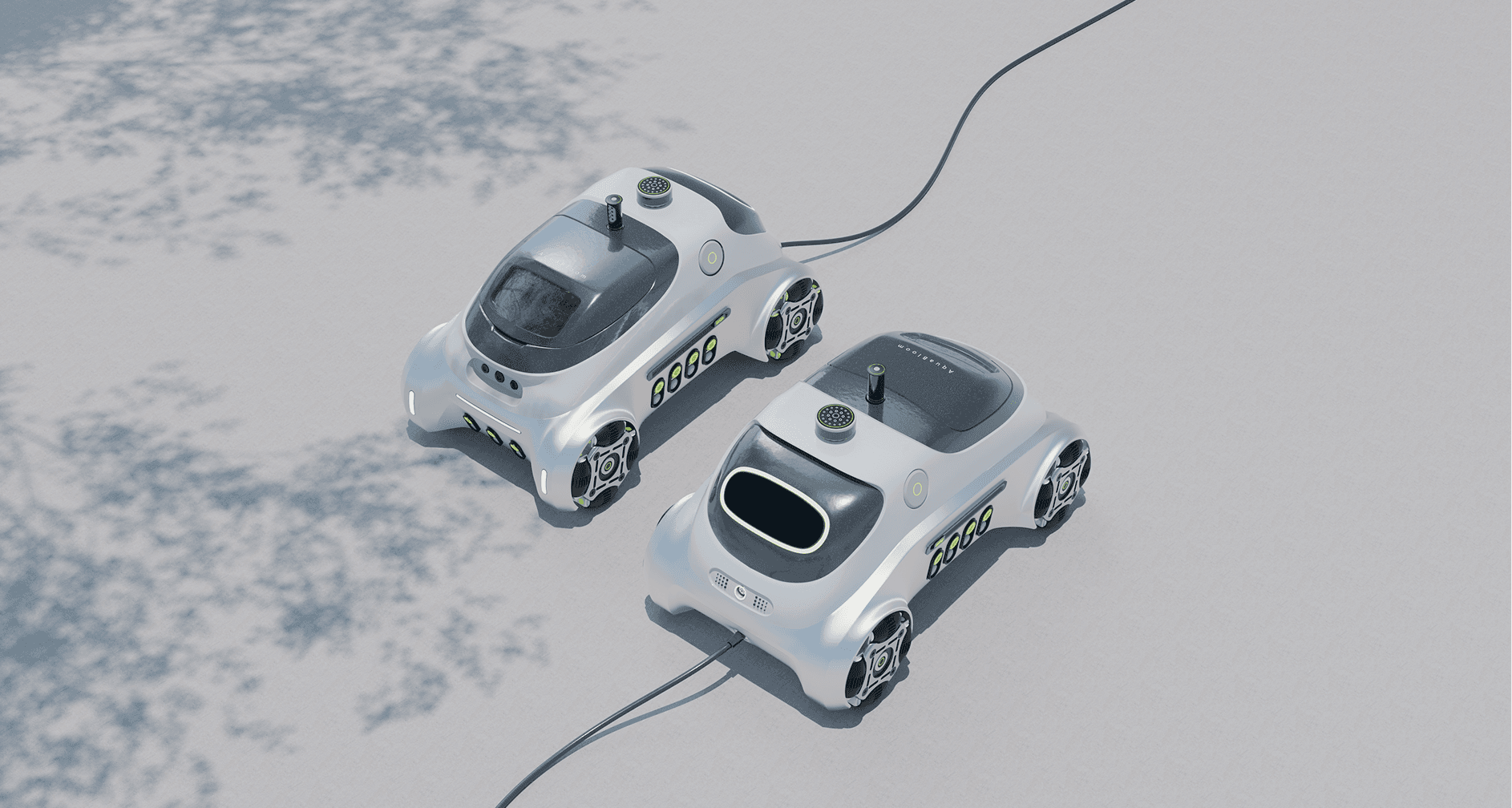
Product: a four-wheel irrigation robot with dual watering modes, lateral movement, a detachable handheld nozzle, and a removable soil probe. I developed the form, CAD, and renders.
App: pairing, user-drawn zones, task scheduling and preview, live run status, remote supervision and intervention, and manual mode.
Research: a benchmark of eight irrigation products, a questionnaire, and seven homeowner and gardener interviews.
Synthesis — research signals translated into four connected design moves: define, inspect, supervise, and take over.
Product: a four-wheel irrigation robot with dual watering modes, lateral movement, a detachable handheld nozzle, and a removable soil probe. I developed the form, CAD, and renders.
App: pairing, user-drawn zones, task scheduling and preview, live run status, remote supervision and intervention, and manual mode.
Research: a benchmark of eight irrigation products, a questionnaire, and seven homeowner and gardener interviews.
Synthesis — research signals translated into four connected design moves: define, inspect, supervise, and take over.


The thesis
The thesis
The thesis
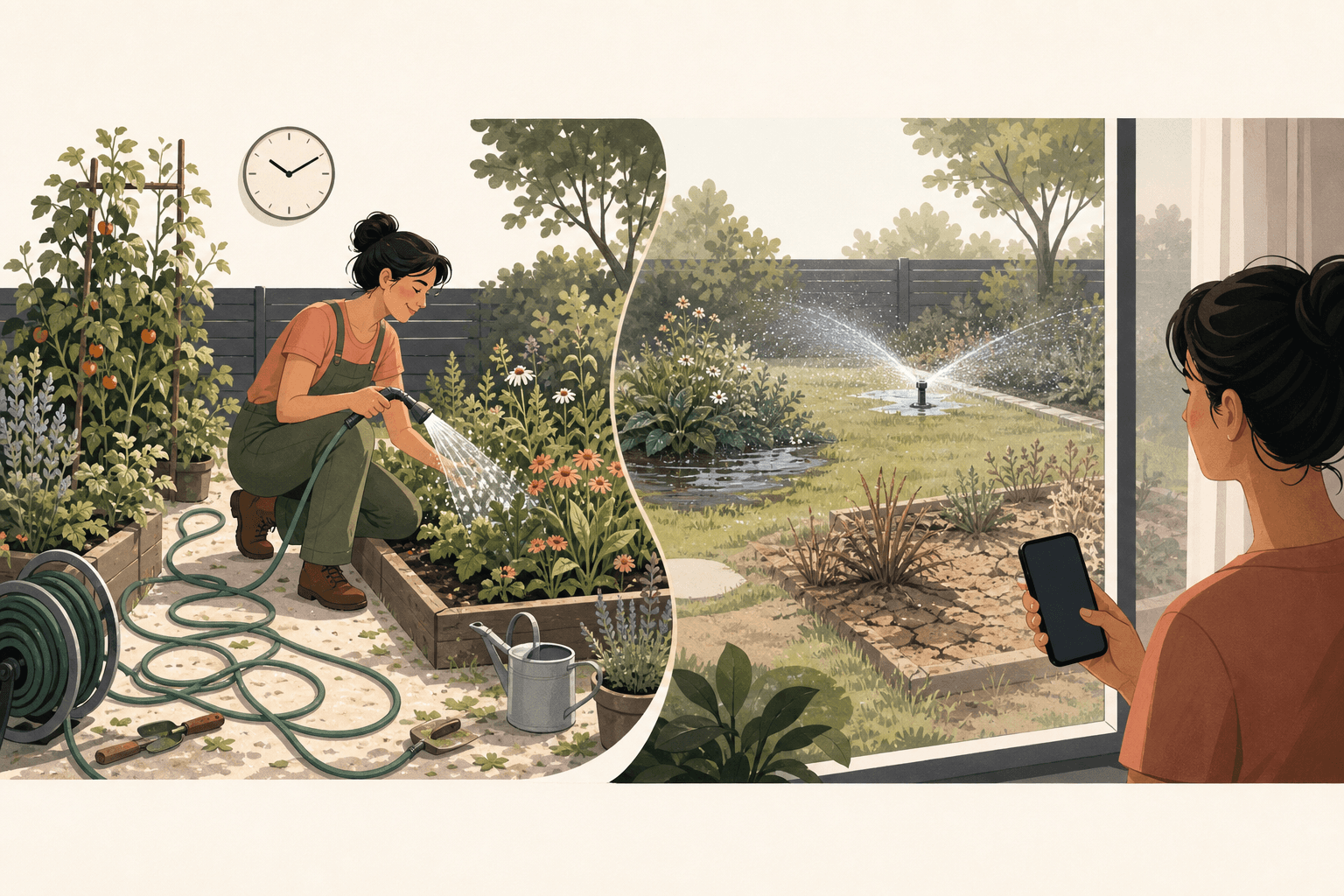
Home garden care is not only about maintaining plants. It is also a way for people to connect with nature and relax. When people are busy, away from home, or managing larger gardens, they need irrigation that is more efficient and precise.
Existing products often force a trade-off: they are either overly automated and detached, or overly manual and demanding. AquaBloom explores a balanced experience, automated routine care with the freedom to care by hand.
Home garden care is not only about maintaining plants. It is also a way for people to connect with nature and relax. When people are busy, away from home, or managing larger gardens, they need irrigation that is more efficient and precise.
Existing products often force a trade-off: they are either overly automated and detached, or overly manual and demanding. AquaBloom explores a balanced experience, automated routine care with the freedom to care by hand.
Home garden care is not only about maintaining plants. It is also a way for people to connect with nature and relax. When people are busy, away from home, or managing larger gardens, they need irrigation that is more efficient and precise.
Existing products often force a trade-off: they are either overly automated and detached, or overly manual and demanding. AquaBloom explores a balanced experience, automated routine care with the freedom to care by hand.
Why smart irrigation isn’t trusted
Why smart irrigation isn’t trusted
Why smart irrigation isn’t trusted
Three ways smart irrigation breaks trust
Three ways smart irrigation breaks trust
Three ways smart irrigation breaks trust
Complex map and zone setup
Complex map and zone setup
Complex map and zone setup
42.1% keep both a lawn and planting beds in one outdoor space, two areas with conflicting watering needs. (Survey, n=38)
46.9% found it difficult to balance water across zones. (Survey, n=32)
Map and zone setup itself remains complex. (Benchmark + usability research)
42.1% keep both a lawn and planting beds in one outdoor space, two areas with conflicting watering needs. (Survey, n=38)
46.9% found it difficult to balance water across zones. (Survey, n=32)
Map and zone setup itself remains complex. (Benchmark + usability research)
42.1% keep both a lawn and planting beds in one outdoor space, two areas with conflicting watering needs. (Survey, n=38)
46.9% found it difficult to balance water across zones. (Survey, n=32)
Map and zone setup itself remains complex. (Benchmark + usability research)
See & intervene
See & intervene
See & intervene
A schedule often does not make task progress, location, or completion inspectable.
When users are away, existing products offer limited ways to check, pause, or take over a run.
A schedule often does not make task progress, location, or completion inspectable.
When users are away, existing products offer limited ways to check, pause, or take over a run.
A schedule often does not make task progress, location, or completion inspectable.
When users are away, existing products offer limited ways to check, pause, or take over a run.
Keep it Reliable
Keep it Reliable
Keep it Reliable
Sensor ownership is where trust fails first: 45% flagged replacement cost, 35% accuracy issues, 35% frequent maintenance, 30% data misinterpretation, 25% limited connectivity, and 20% calibration difficulty. On a separate question (n=32), 46.9% reported high maintenance and 34.4% frequent clogs.
Sensor ownership is where trust fails first: 45% flagged replacement cost, 35% accuracy issues, 35% frequent maintenance, 30% data misinterpretation, 25% limited connectivity, and 20% calibration difficulty. On a separate question (n=32), 46.9% reported high maintenance and 34.4% frequent clogs.
Sensor ownership is where trust fails first: 45% flagged replacement cost, 35% accuracy issues, 35% frequent maintenance, 30% data misinterpretation, 25% limited connectivity, and 20% calibration difficulty. On a separate question (n=32), 46.9% reported high maintenance and 34.4% frequent clogs.
Source note, questionnaire bases differ by question: n=20, n=32, and n=38. Competitive and interview findings are labeled separately above.
Source note, questionnaire bases differ by question: n=20, n=32, and n=38. Competitive and interview findings are labeled separately above.
Source note, questionnaire bases differ by question: n=20, n=32, and n=38. Competitive and interview findings are labeled separately above.


What the market still leaves unresolved
What the market still leaves unresolved
What the market still leaves unresolved
Benchmark lens
Benchmark lens
Benchmark lens
8 products × four control dimensions: scheduling, live feedback, editable zones, and manual takeover.
42.1% keep both a lawn and planting beds in one outdoor space, two areas with conflicting watering needs. (Survey, n=38)
46.9% found it difficult to balance water across zones. (Survey, n=32)
Map and zone setup itself remains complex. (Benchmark + usability research)
42.1% keep both a lawn and planting beds in one outdoor space, two areas with conflicting watering needs. (Survey, n=38)
46.9% found it difficult to balance water across zones. (Survey, n=32)
Map and zone setup itself remains complex. (Benchmark + usability research)
The recurring gap
The recurring gap
The recurring gap
Most products can start a routine. Fewer let gardeners inspect it while running, reshape its scope, or take over without breaking the flow.
42.1% keep both a lawn and planting beds in one outdoor space, two areas with conflicting watering needs. (Survey, n=38)
46.9% found it difficult to balance water across zones. (Survey, n=32)
Map and zone setup itself remains complex. (Benchmark + usability research)
42.1% keep both a lawn and planting beds in one outdoor space, two areas with conflicting watering needs. (Survey, n=38)
46.9% found it difficult to balance water across zones. (Survey, n=32)
Map and zone setup itself remains complex. (Benchmark + usability research)
The opportunity
The opportunity
The opportunity
The goal is not another feature list. It is a visible, user-governed control loop: define → see → intervene → take over.
42.1% keep both a lawn and planting beds in one outdoor space, two areas with conflicting watering needs. (Survey, n=38)
46.9% found it difficult to balance water across zones. (Survey, n=32)
Map and zone setup itself remains complex. (Benchmark + usability research)
42.1% keep both a lawn and planting beds in one outdoor space, two areas with conflicting watering needs. (Survey, n=38)
46.9% found it difficult to balance water across zones. (Survey, n=32)
Map and zone setup itself remains complex. (Benchmark + usability research)
App Design
App Design
App Design
If the problem is trust rather than missing capability, the interface should not add intelligence for its own sake. It should make automation visible, governable, and reversible.
Four connected moves follow: let gardeners define the scope, inspect a scheduled run, supervise and intervene remotely, and take over by hand when they choose.
If the problem is trust rather than missing capability, the interface should not add intelligence for its own sake. It should make automation visible, governable, and reversible.
Four connected moves follow: let gardeners define the scope, inspect a scheduled run, supervise and intervene remotely, and take over by hand when they choose.
If the problem is trust rather than missing capability, the interface should not add intelligence for its own sake. It should make automation visible, governable, and reversible.
Four connected moves follow: let gardeners define the scope, inspect a scheduled run, supervise and intervene remotely, and take over by hand when they choose.
Make automation inspectable
Make automation inspectable
Make automation inspectable
A scheduled run is only useful if the gardener can tell what is happening without walking outside.
Dashboard: weather, the robot's current state, and remaining charge, surfaced before anything else.
Active run: drawn on the actual garden map rather than an abstract progress bar, with water used, time remaining, and energy use.
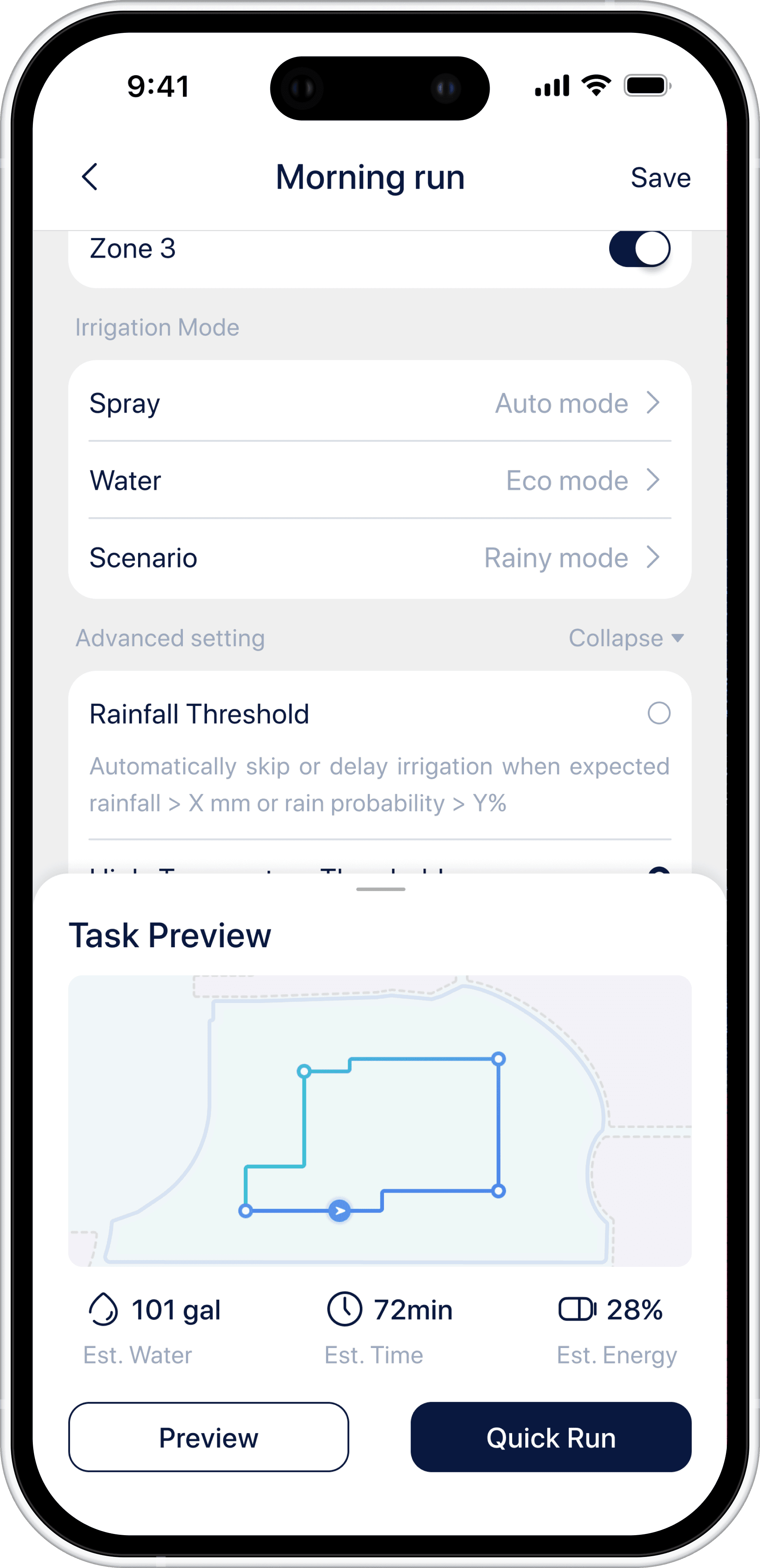
Preview, then report: the gardener sees estimated water, time, and energy before a run starts, then compares them against the reported run afterwards.
A scheduled run is only useful if the gardener can tell what is happening without walking outside.
Dashboard: weather, the robot's current state, and remaining charge, surfaced before anything else.
Active run: drawn on the actual garden map rather than an abstract progress bar, with water used, time remaining, and energy use.
Preview, then report: the gardener sees estimated water, time, and energy before a run starts, then compares them against the reported run afterwards.
A scheduled run is only useful if the gardener can tell what is happening without walking outside.
Dashboard: weather, the robot's current state, and remaining charge, surfaced before anything else.
Active run: drawn on the actual garden map rather than an abstract progress bar, with water used, time remaining, and energy use.
Preview, then report: the gardener sees estimated water, time, and energy before a run starts, then compares them against the reported run afterwards.
Pair the Robot
Pair the Robot
Pair the Robot

Check live status
Check live status
Check live status

Task Detail Page
Task Detail Page
Task Detail Page
Swiping a queued task gives three responses: run now, snooze, or cancel. Cancelling asks why, snoozing keeps the task instead of deleting it.
Swiping a queued task gives three responses: run now, snooze, or cancel. Cancelling asks why, snoozing keeps the task instead of deleting it.
Swiping a queued task gives three responses: run now, snooze, or cancel. Cancelling asks why, snoozing keeps the task instead of deleting it.
Standby
Standby
Standby

Cancelling
Cancelling
Cancelling

Snooze
Snooze
Snooze

Let gardeners define the zones
Let gardeners define the zones
Let gardeners define the zones
A zone boundary declares which plants get the same treatment, and 42.1% keep a lawn and planting beds in one outdoor space, with conflicting watering needs. (Survey, n=38)
Drawn by the gardener, not inferred, automatic zoning was simpler to build, but it would have made the boundary the system's judgment rather than the gardener's.
The map is the home screen, an aerial view with every zone in place, and the day's runs below.
Tap a zone, what grows there, when it last ran, what its sensors read.
A zone boundary declares which plants get the same treatment, and 42.1% keep a lawn and planting beds in one outdoor space, with conflicting watering needs. (Survey, n=38)
Drawn by the gardener, not inferred, automatic zoning was simpler to build, but it would have made the boundary the system's judgment rather than the gardener's.
The map is the home screen, an aerial view with every zone in place, and the day's runs below.
Tap a zone, what grows there, when it last ran, what its sensors read.
Garden map
Garden map
Garden map

Inside a zone
Inside a zone
Inside a zone

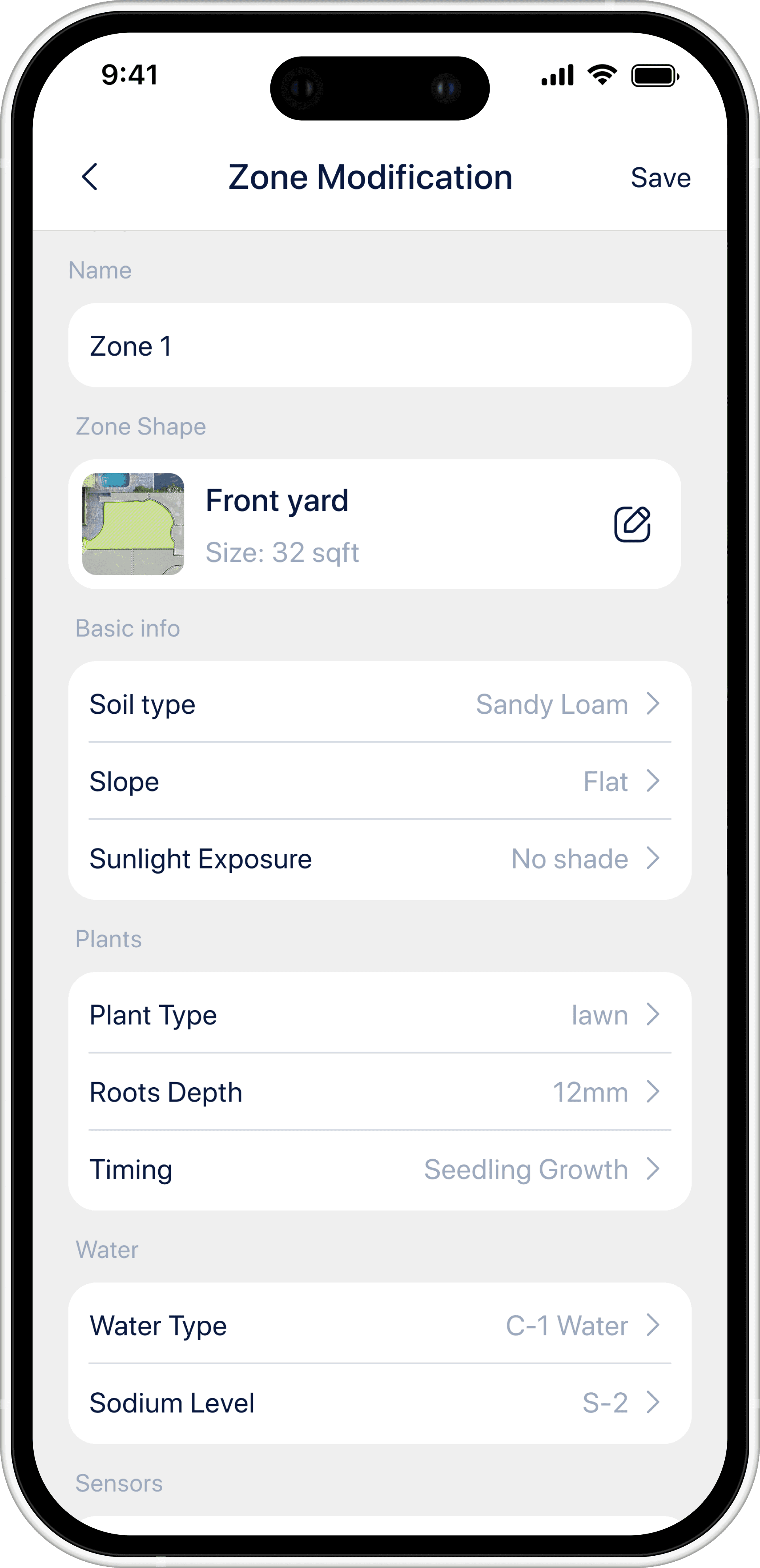
Zone Modification
Zone Modification
Zone Modification
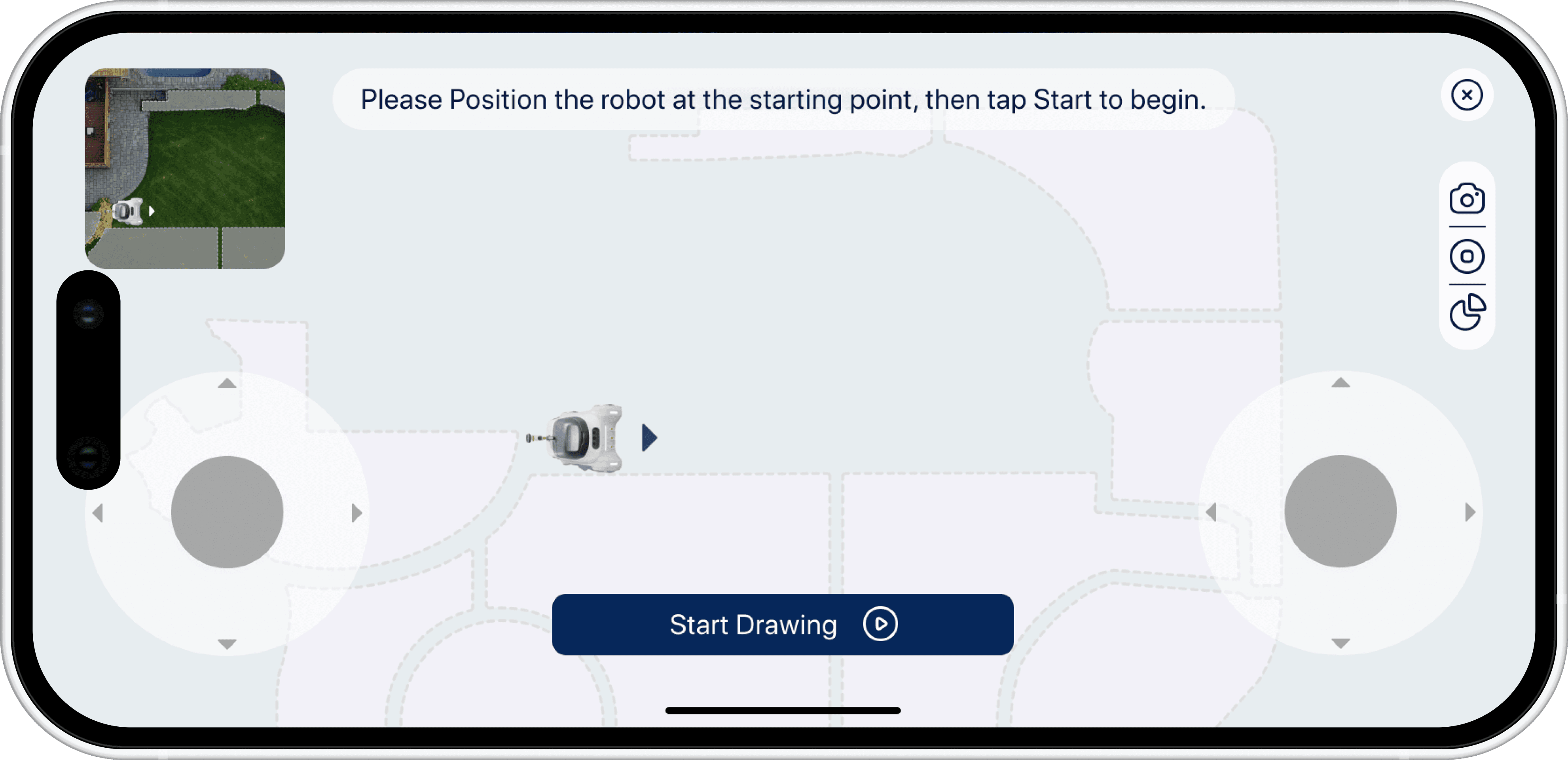
Edit the zone shape by walking the robot around it
Edit the zone shape by walking the robot around it
Edit the zone shape by walking the robot around it
Satellite imagery goes stale, and tree cover hides edges. So the boundary can also be traced physically: place the robot at a starting point, walk it slowly along the edge of the lawn, and its path becomes the zone. The guide warns to clear the path first.
Satellite imagery goes stale, and tree cover hides edges. So the boundary can also be traced physically: place the robot at a starting point, walk it slowly along the edge of the lawn, and its path becomes the zone. The guide warns to clear the path first.
Satellite imagery goes stale, and tree cover hides edges. So the boundary can also be traced physically: place the robot at a starting point, walk it slowly along the edge of the lawn, and its path becomes the zone. The guide warns to clear the path first.
Control the Robot
Control the Robot
Control the Robot

Or directly draw it on the map
Or directly draw it on the map
Or directly draw it on the map
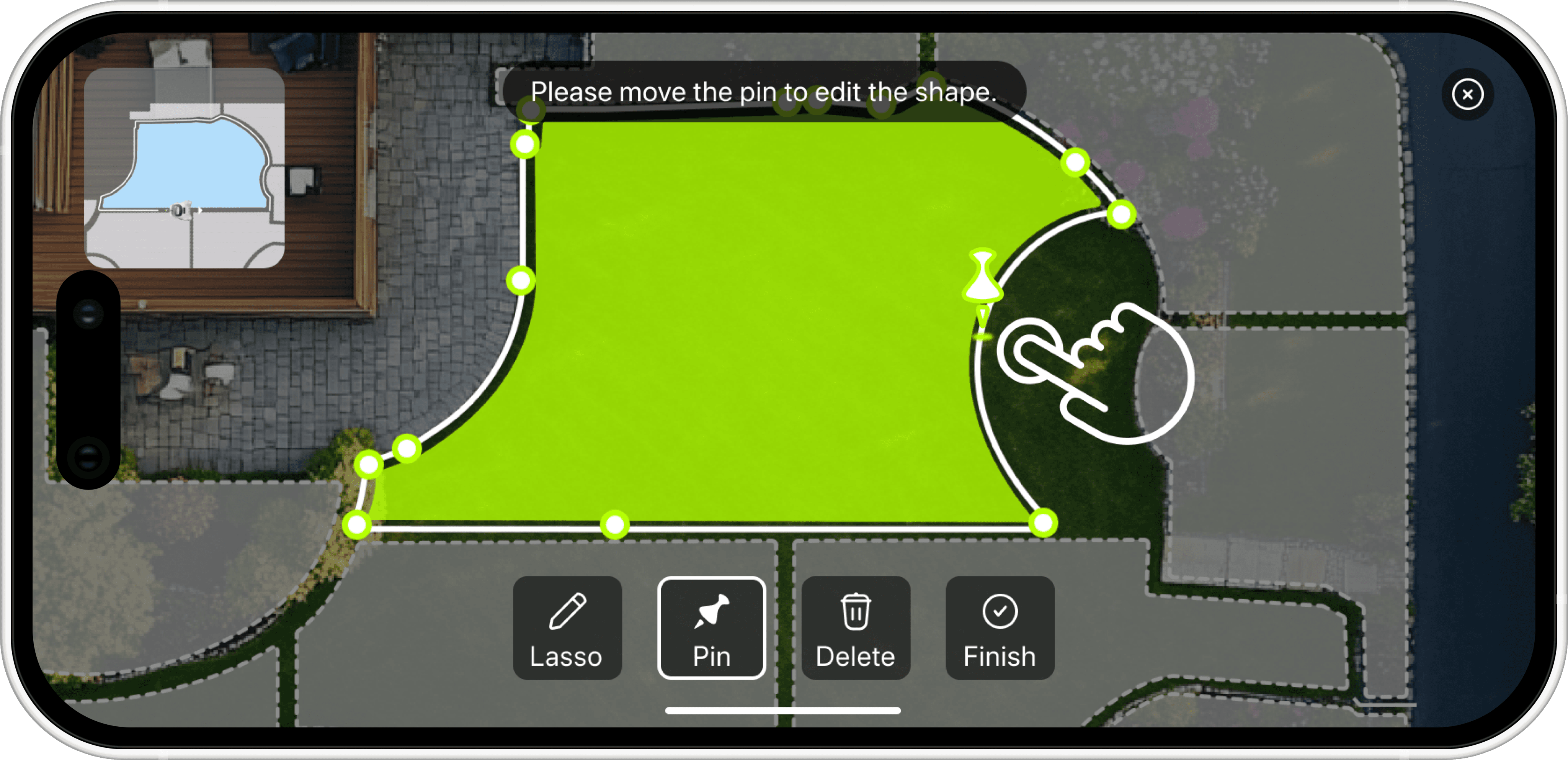
On the satellite view: drag a pin to nudge the outline, lasso to add or cut a larger area, tap along the edge to insert a new point.
On the satellite view: drag a pin to nudge the outline, lasso to add or cut a larger area, tap along the edge to insert a new point.
On the satellite view: drag a pin to nudge the outline, lasso to add or cut a larger area, tap along the edge to insert a new point.
Drag existing pins to refine the boundary
Drag existing pins to refine the boundary
Drag existing pins to refine the boundary


Use the lasso tool to add or cut areas
Use the lasso tool to add or cut areas
Use the lasso tool to add or cut areas


Insert new pins along the outline for finer control
Insert new pins along the outline for finer control
Insert new pins along the outline for finer control

Put sensors where the doubt is
Put sensors where the doubt is
Put sensors where the doubt is
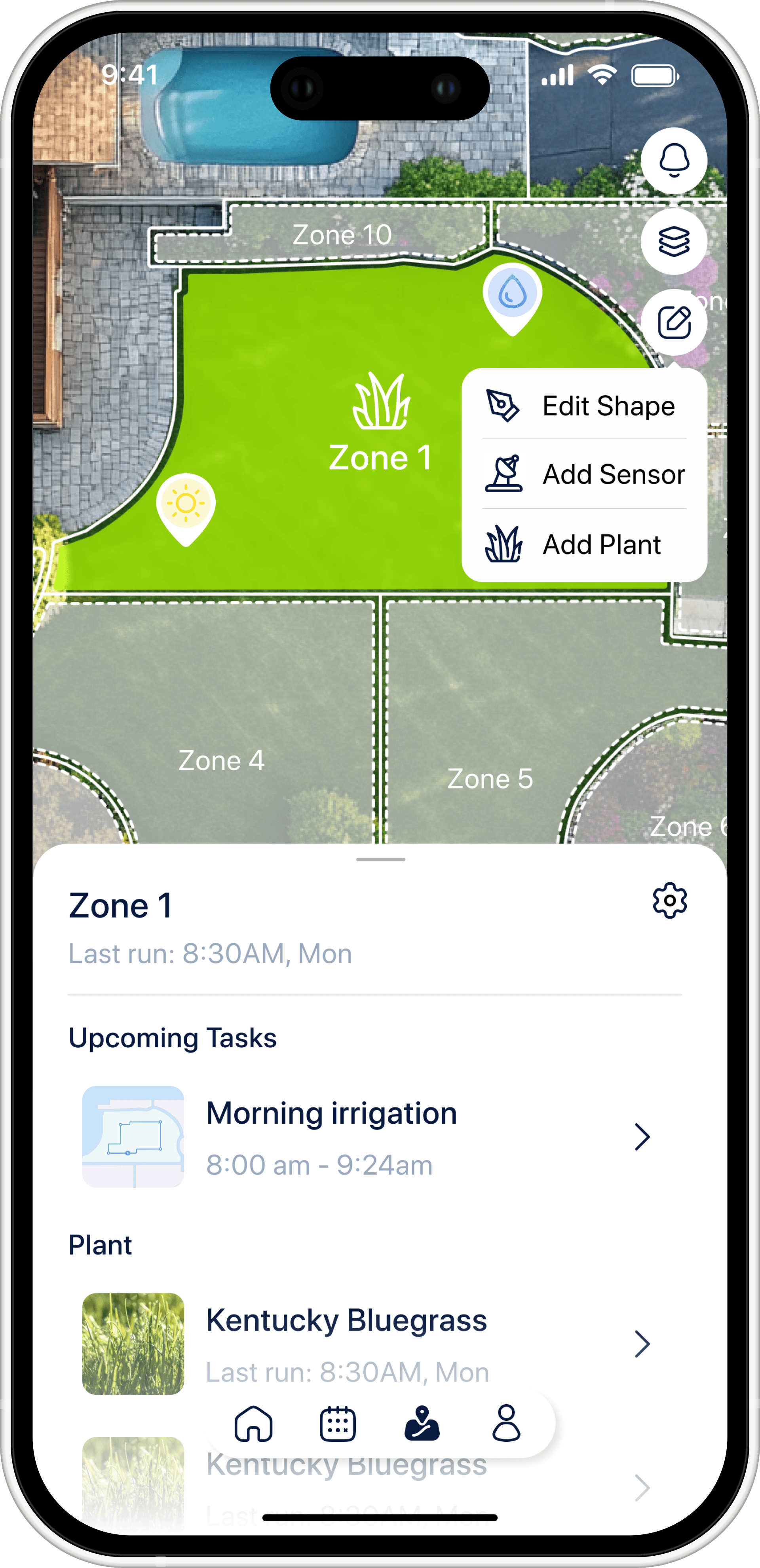
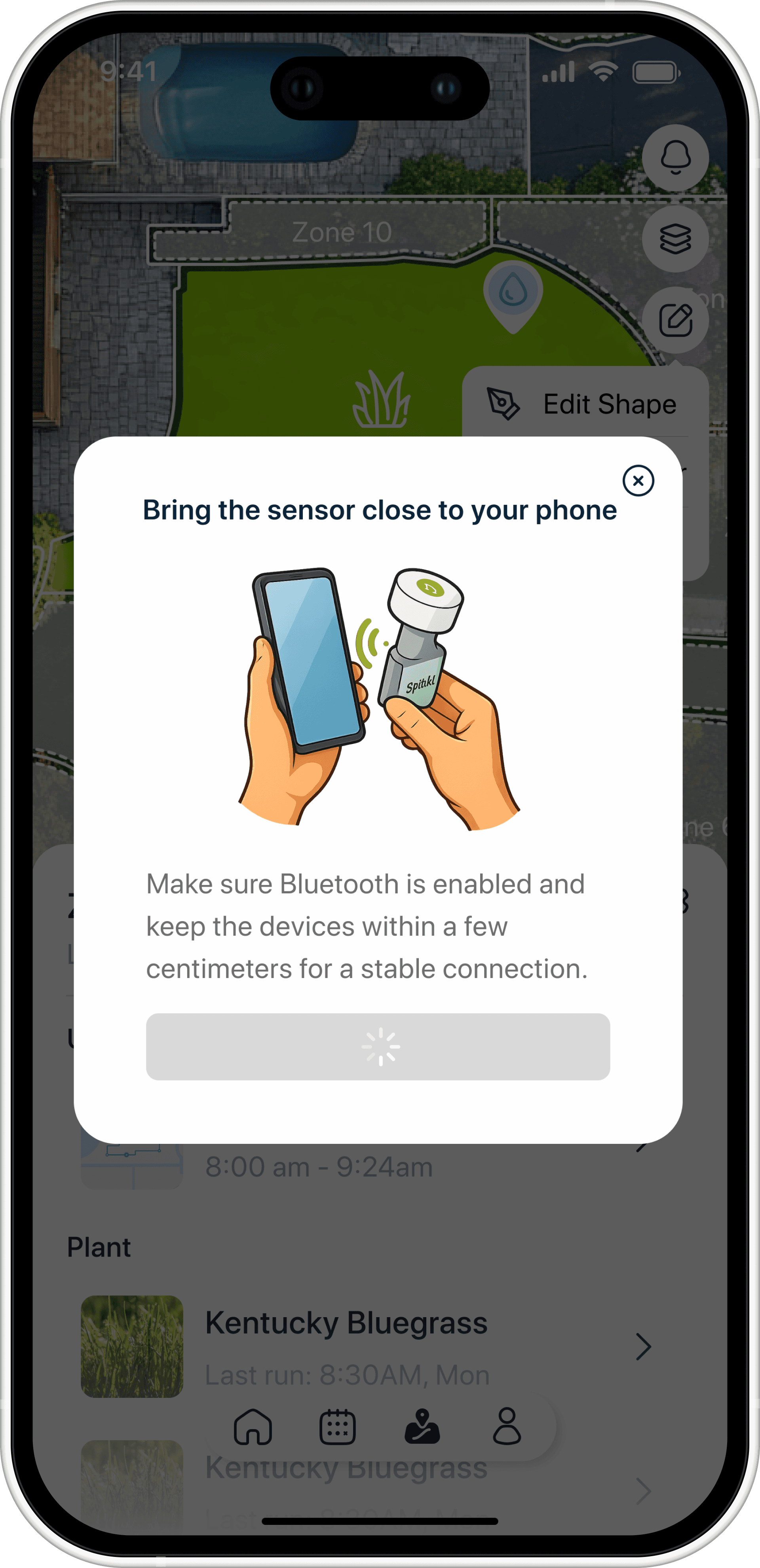
Pair by holding the sensor near the phone, then place it, its position becomes part of the zone map, so a reading is always tied to where it came from.
Pair by holding the sensor near the phone, then place it, its position becomes part of the zone map, so a reading is always tied to where it came from.
Pair by holding the sensor near the phone, then place it, its position becomes part of the zone map, so a reading is always tied to where it came from.
Add Sensor
Add Sensor
Add Sensor
Connecting
Connecting
Connecting
Sensor Detail
Sensor Detail
Sensor Detail

Supervise and intervene from anywhere
Supervise and intervene from anywhere
Supervise and intervene from anywhere
Watch the run
Watch the run
Watch the run
The robot's position and progress stay visible on the map while it works, with water used counting up live.
The robot's position and progress stay visible on the map while it works, with water used counting up live.
The robot's position and progress stay visible on the map while it works, with water used counting up live.


Aim it yourself
Aim it yourself
Aim it yourself
Two sticks: the left one sets nozzle direction, the right one controls spray pressure. Align points it at what you are looking at.
Two sticks: the left one sets nozzle direction, the right one controls spray pressure. Align points it at what you are looking at.
Two sticks: the left one sets nozzle direction, the right one controls spray pressure. Align points it at what you are looking at.


Industrial Design
Industrial Design
Industrial Design
The hardware carries the same control model as the app. Every physical decision makes the machine's behavior easier to understand, adjust, or reverse by hand.
The hardware carries the same control model as the app. Every physical decision makes the machine's behavior easier to understand, adjust, or reverse by hand.
The hardware carries the same control model as the app. Every physical decision makes the machine's behavior easier to understand, adjust, or reverse by hand.
Two watering jobs, one system
Two watering jobs, one system
Two watering jobs, one system
Lawns want coverage, beds want precision. Most products pick one and make you buy a second thing for the other.
Top nozzle telescopes up for broad area spray.
Four side outlets deliver low-arc water at root level, keeping leaves dry
Covers on the side outlets, clogging from soil and debris was the most repeated maintenance complaint in the benchmark and interviews.
Lawns want coverage, beds want precision. Most products pick one and make you buy a second thing for the other.
Top nozzle telescopes up for broad area spray.
Four side outlets deliver low-arc water at root level, keeping leaves dry
Covers on the side outlets, clogging from soil and debris was the most repeated maintenance complaint in the benchmark and interviews.
Lawns want coverage, beds want precision. Most products pick one and make you buy a second thing for the other.
Top nozzle telescopes up for broad area spray.
Four side outlets deliver low-arc water at root level, keeping leaves dry
Covers on the side outlets, clogging from soil and debris was the most repeated maintenance complaint in the benchmark and interviews.


The nozzle comes off
The nozzle comes off
The nozzle comes off
Start in the app, Manual Mode sits on the home screen beside Pause and Monitor. Taking over is one tap.
Unlock and lift, the top nozzle releases from the body.
Connect and water, it becomes a handheld sprayer on a hose.
Water keeps counting, the robot logs what you use by hand, so the record stays complete.
Start in the app, Manual Mode sits on the home screen beside Pause and Monitor. Taking over is one tap.
Unlock and lift, the top nozzle releases from the body.
Connect and water, it becomes a handheld sprayer on a hose.
Water keeps counting, the robot logs what you use by hand, so the record stays complete.
Start in the app, Manual Mode sits on the home screen beside Pause and Monitor. Taking over is one tap.
Unlock and lift, the top nozzle releases from the body.
Connect and water, it becomes a handheld sprayer on a hose.
Water keeps counting, the robot logs what you use by hand, so the record stays complete.


Move sideways, not around
Move sideways, not around
Move sideways, not around
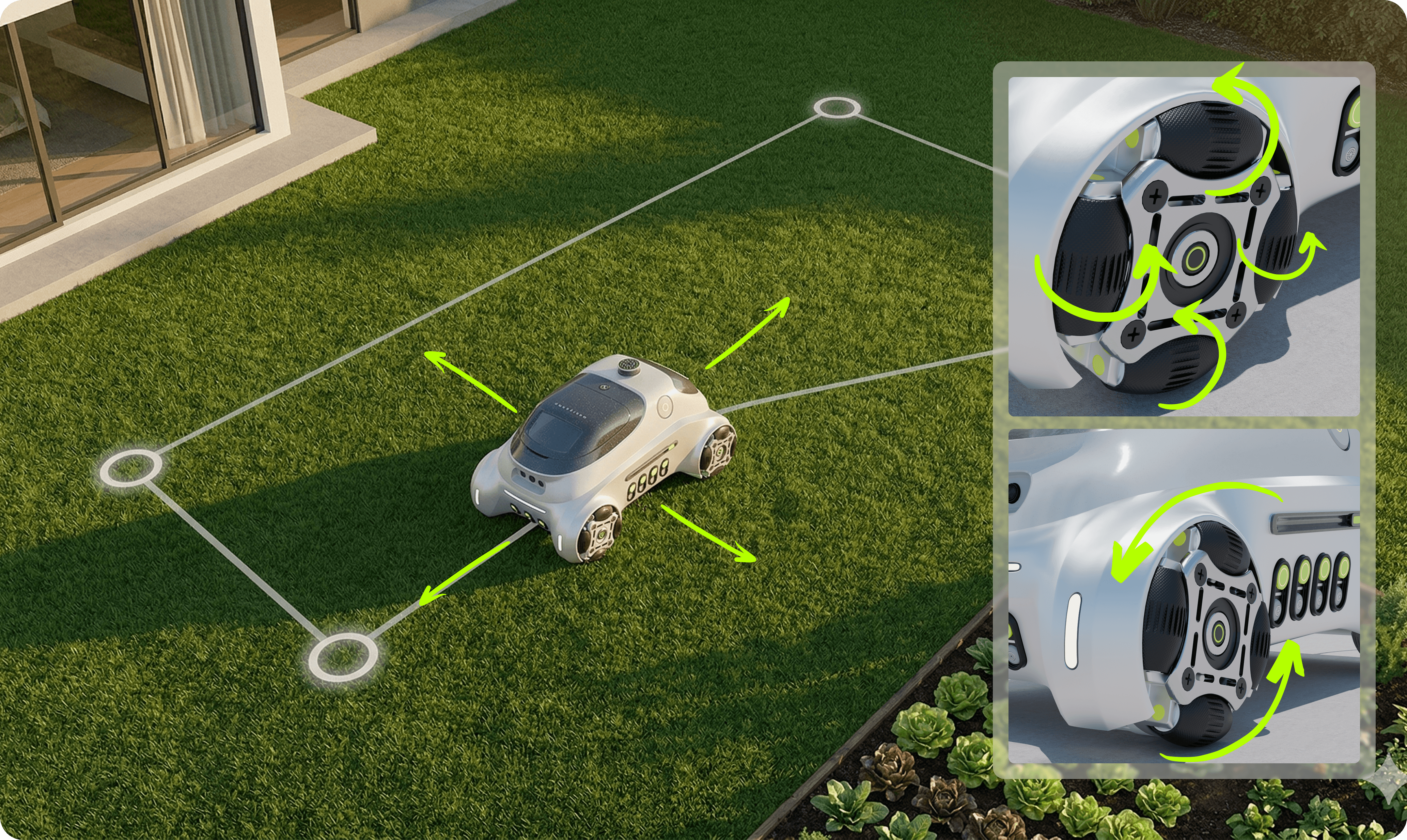
Gardens are not warehouses. Paths bend, beds interrupt, and there is often no room to turn around.
Wheels roll forward and back conventionally.
The centre hub rotates, translating the whole body laterally.
Gardens are not warehouses. Paths bend, beds interrupt, and there is often no room to turn around.
Wheels roll forward and back conventionally.
The centre hub rotates, translating the whole body laterally.
Gardens are not warehouses. Paths bend, beds interrupt, and there is often no room to turn around.
Wheels roll forward and back conventionally.
The centre hub rotates, translating the whole body laterally.
Measure where the doubt is
Measure where the doubt is
Measure where the doubt is
Interviewees described owning too few sensors and carrying them between areas.
The probe detaches from a bay in the body and goes into the soil beside the plant you are actually worried about.
Interviewees described owning too few sensors and carrying them between areas.
The probe detaches from a bay in the body and goes into the soil beside the plant you are actually worried about.
Interviewees described owning too few sensors and carrying them between areas.
The probe detaches from a bay in the body and goes into the soil beside the plant you are actually worried about.

Modelled and rendered in Blender
Modelled and rendered in Blender
Modelled and rendered in Blender
Every product image on this page is my own model, built, textured, lit, and rendered in Blender.
One scene, several setups, studio framing to read the form, garden context to show it in use.
Every product image on this page is my own model, built, textured, lit, and rendered in Blender.
One scene, several setups, studio framing to read the form, garden context to show it in use.
Every product image on this page is my own model, built, textured, lit, and rendered in Blender.
One scene, several setups, studio framing to read the form, garden context to show it in use.

Contact Me
Ready to bring your vision to life? Let's connect and explore the possibilities together. Reach out today!
2026 All rights reserved. Design by Shankun Zhou.
Contact Me
Ready to bring your vision to life? Let's connect and explore the possibilities together. Reach out today!
2026 All rights reserved. Design by Shankun Zhou.
Contact Me
Ready to bring your vision to life? Let's connect and explore the possibilities together. Reach out today!
2026 All rights reserved. Design by Shankun Zhou.