
Quick Links
Quick Links
Project Overview
Project Overview
Project Overview
GOAL
GOAL
GOAL
Build two core modules within Lilly’s Helix (eTMF ecosystem), the Helix Dashboard (an action-driven eTMF command center) and DocTrack (end-to-end document tracking), to centralize documentation performance across global clinical trials and convert dispersed risks into clear, executable next steps powered by AI and automation.
The project aims to enable Trial Capabilities Associates, Functional Owners, Study Managers, and related clinical operations roles to quickly identify at-risk documents and compliance gaps, filter and prioritize work by role / country / classification rules, and resolve issues with full traceability (versions, audit logs, timestamps). Ultimately, the solution improves regulatory inspection readiness, reduces manual tracking overhead, and scales operational oversight as trials grow more global and complex.
Build two core modules within Lilly’s Helix (eTMF ecosystem), the Helix Dashboard (an action-driven eTMF command center) and DocTrack (end-to-end document tracking), to centralize documentation performance across global clinical trials and convert dispersed risks into clear, executable next steps powered by AI and automation.
The project aims to enable Trial Capabilities Associates, Functional Owners, Study Managers, and related clinical operations roles to quickly identify at-risk documents and compliance gaps, filter and prioritize work by role / country / classification rules, and resolve issues with full traceability (versions, audit logs, timestamps). Ultimately, the solution improves regulatory inspection readiness, reduces manual tracking overhead, and scales operational oversight as trials grow more global and complex.
Build two core modules within Lilly’s Helix (eTMF ecosystem), the Helix Dashboard (an action-driven eTMF command center) and DocTrack (end-to-end document tracking), to centralize documentation performance across global clinical trials and convert dispersed risks into clear, executable next steps powered by AI and automation.
The project aims to enable Trial Capabilities Associates, Functional Owners, Study Managers, and related clinical operations roles to quickly identify at-risk documents and compliance gaps, filter and prioritize work by role / country / classification rules, and resolve issues with full traceability (versions, audit logs, timestamps). Ultimately, the solution improves regulatory inspection readiness, reduces manual tracking overhead, and scales operational oversight as trials grow more global and complex.
MY ROLE
MY ROLE
MY ROLE
As the primary UX/UI designer across both the Helix Dashboard and DocTrack workstreams, I focused on:
Core experience + key page design for the Helix Dashboard: Re-architected the experience around an action-driven model, defining key modules such as My Actions, risk insights, and manager views (Supervisor & Leadership). Translated documentation risks into executable tasks (e.g., Resolve / Snooze / Reassign / Mark N/A) and reduced decision friction through the right level of context and guidance.
End-to-end workflow modeling and scalable structure design for DocTrack: Transformed fragmented, spreadsheet/email-based coordination into a structured system with Parent/Child document hierarchy, versioning, and step-based workflows. Designed the core flow, Catalog → Confirm → auto-generate child placeholders → bulk actions, to remain usable, manageable, and auditable at global scale (multi-country, multi-language).
Design-to-dev alignment and reusable standards: Drove navigation and view strategies under RBAC, defined empty/error states and failure fallbacks, and documented component patterns and implementation constraints to accelerate delivery and support scalable iteration.
As the primary UX/UI designer across both the Helix Dashboard and DocTrack workstreams, I focused on:
Core experience + key page design for the Helix Dashboard: Re-architected the experience around an action-driven model, defining key modules such as My Actions, risk insights, and manager views (Supervisor & Leadership). Translated documentation risks into executable tasks (e.g., Resolve / Snooze / Reassign / Mark N/A) and reduced decision friction through the right level of context and guidance.
End-to-end workflow modeling and scalable structure design for DocTrack: Transformed fragmented, spreadsheet/email-based coordination into a structured system with Parent/Child document hierarchy, versioning, and step-based workflows. Designed the core flow, Catalog → Confirm → auto-generate child placeholders → bulk actions, to remain usable, manageable, and auditable at global scale (multi-country, multi-language).
Design-to-dev alignment and reusable standards: Drove navigation and view strategies under RBAC, defined empty/error states and failure fallbacks, and documented component patterns and implementation constraints to accelerate delivery and support scalable iteration.
As the primary UX/UI designer across both the Helix Dashboard and DocTrack workstreams, I focused on:
Core experience + key page design for the Helix Dashboard: Re-architected the experience around an action-driven model, defining key modules such as My Actions, risk insights, and manager views (Supervisor & Leadership). Translated documentation risks into executable tasks (e.g., Resolve / Snooze / Reassign / Mark N/A) and reduced decision friction through the right level of context and guidance.
End-to-end workflow modeling and scalable structure design for DocTrack: Transformed fragmented, spreadsheet/email-based coordination into a structured system with Parent/Child document hierarchy, versioning, and step-based workflows. Designed the core flow, Catalog → Confirm → auto-generate child placeholders → bulk actions, to remain usable, manageable, and auditable at global scale (multi-country, multi-language).
Design-to-dev alignment and reusable standards: Drove navigation and view strategies under RBAC, defined empty/error states and failure fallbacks, and documented component patterns and implementation constraints to accelerate delivery and support scalable iteration.
About Helix
About Helix
About Helix
Why Clinical Trials Need Helix
Why Clinical Trials Need Helix
Why Clinical Trials Need Helix
Clinical trials are a global, collaborative process that can span more than a decade. To meet regulatory audit and compliance requirements, organizations must continuously create, update, and retain a large volume of essential documents throughout the trial lifecycle—such as informed consent forms, ethics approvals, protocol versions, qualifications, and sign-off records—and ensure each document has a clear owner, timeline, and full traceability. In day-to-day operations, teams often need to manage and track thousands of documents; any missing items, delays, or incomplete information can introduce compliance risk or slow trial execution.
Clinical trials are a global, collaborative process that can span more than a decade. To meet regulatory audit and compliance requirements, organizations must continuously create, update, and retain a large volume of essential documents throughout the trial lifecycle—such as informed consent forms, ethics approvals, protocol versions, qualifications, and sign-off records—and ensure each document has a clear owner, timeline, and full traceability. In day-to-day operations, teams often need to manage and track thousands of documents; any missing items, delays, or incomplete information can introduce compliance risk or slow trial execution.
Clinical trials are a global, collaborative process that can span more than a decade. To meet regulatory audit and compliance requirements, organizations must continuously create, update, and retain a large volume of essential documents throughout the trial lifecycle—such as informed consent forms, ethics approvals, protocol versions, qualifications, and sign-off records—and ensure each document has a clear owner, timeline, and full traceability. In day-to-day operations, teams often need to manage and track thousands of documents; any missing items, delays, or incomplete information can introduce compliance risk or slow trial execution.
Key Business Challenges
Key Business Challenges
Key Business Challenges
At project kickoff, five major business challenges were identified. The core tension was: massive document volume + complex rules + heavy manual effort + lack of next-step guidance.
At project kickoff, five major business challenges were identified. The core tension was: massive document volume + complex rules + heavy manual effort + lack of next-step guidance.
At project kickoff, five major business challenges were identified. The core tension was: massive document volume + complex rules + heavy manual effort + lack of next-step guidance.
Low visibility into action-required documents
Low visibility into action-required documents
Low visibility into action-required documents
Hard to ensure global inspection readiness
Hard to ensure global inspection readiness
Hard to ensure global inspection readiness
Manual tracking of metadata, ICFs, and approvals
Manual tracking of metadata, ICFs, and approvals
Manual tracking of metadata, ICFs, and approvals
Few contextual alerts to guide next steps
Few contextual alerts to guide next steps
Few contextual alerts to guide next steps
Dashboards ignore complex country/classification rules
Dashboards ignore complex country/classification rules
Dashboards ignore complex country/classification rules
What Users Really Need
What Users Really Need
What Users Really Need
Helix isn’t designed to show users more data, it’s designed to help them find risks faster and take action under complex global rules.
Quickly identify high-risk documents (aging, incomplete, or beyond compliance thresholds)
Understand and act on country- and role-specific expectations (differences in country and classification rules)
Personalize views by responsibility (e.g., My Documents vs. All)
Track and resolve EDL completeness issues by trial / country / site
Manage actions directly within the dashboard (Snooze / Dismiss / Prioritize)
Helix isn’t designed to show users more data, it’s designed to help them find risks faster and take action under complex global rules.
Quickly identify high-risk documents (aging, incomplete, or beyond compliance thresholds)
Understand and act on country- and role-specific expectations (differences in country and classification rules)
Personalize views by responsibility (e.g., My Documents vs. All)
Track and resolve EDL completeness issues by trial / country / site
Manage actions directly within the dashboard (Snooze / Dismiss / Prioritize)
Helix isn’t designed to show users more data, it’s designed to help them find risks faster and take action under complex global rules.
Quickly identify high-risk documents (aging, incomplete, or beyond compliance thresholds)
Understand and act on country- and role-specific expectations (differences in country and classification rules)
Personalize views by responsibility (e.g., My Documents vs. All)
Track and resolve EDL completeness issues by trial / country / site
Manage actions directly within the dashboard (Snooze / Dismiss / Prioritize)
Research & Discovery
Research & Discovery
Research & Discovery
Trials.Lilly.com’s legacy experience was not built to support high-stakes, non-expert decision-making at scale, so Web 3.0 required a system-level redesign to unify navigation and pathways, reduce cognitive load, and standardize templates/components across the entire site.
Trials.Lilly.com’s legacy experience was not built to support high-stakes, non-expert decision-making at scale, so Web 3.0 required a system-level redesign to unify navigation and pathways, reduce cognitive load, and standardize templates/components across the entire site.
Trials.Lilly.com’s legacy experience was not built to support high-stakes, non-expert decision-making at scale, so Web 3.0 required a system-level redesign to unify navigation and pathways, reduce cognitive load, and standardize templates/components across the entire site.
Design Thinking Workshop
Design Thinking Workshop
Design Thinking Workshop
After aligning on the goals and scope of Helix (eTMF Dashboard + DocTrack) with the product and clinical operations teams, we facilitated multiple cross-functional workshops (Clinical Ops, TMF Ops, Quality/Regulatory, external partners/vendors, engineering, and data teams). Using a consistent approach, we converged current-state pain points into actionable product opportunities, then translated them into MVP scope and design requirements—ensuring the work was not about adding features, but about driving the outcomes that matter most for compliance and operations.
Aligning problem boundaries and user tasks through 5W1H + Journey Mapping.
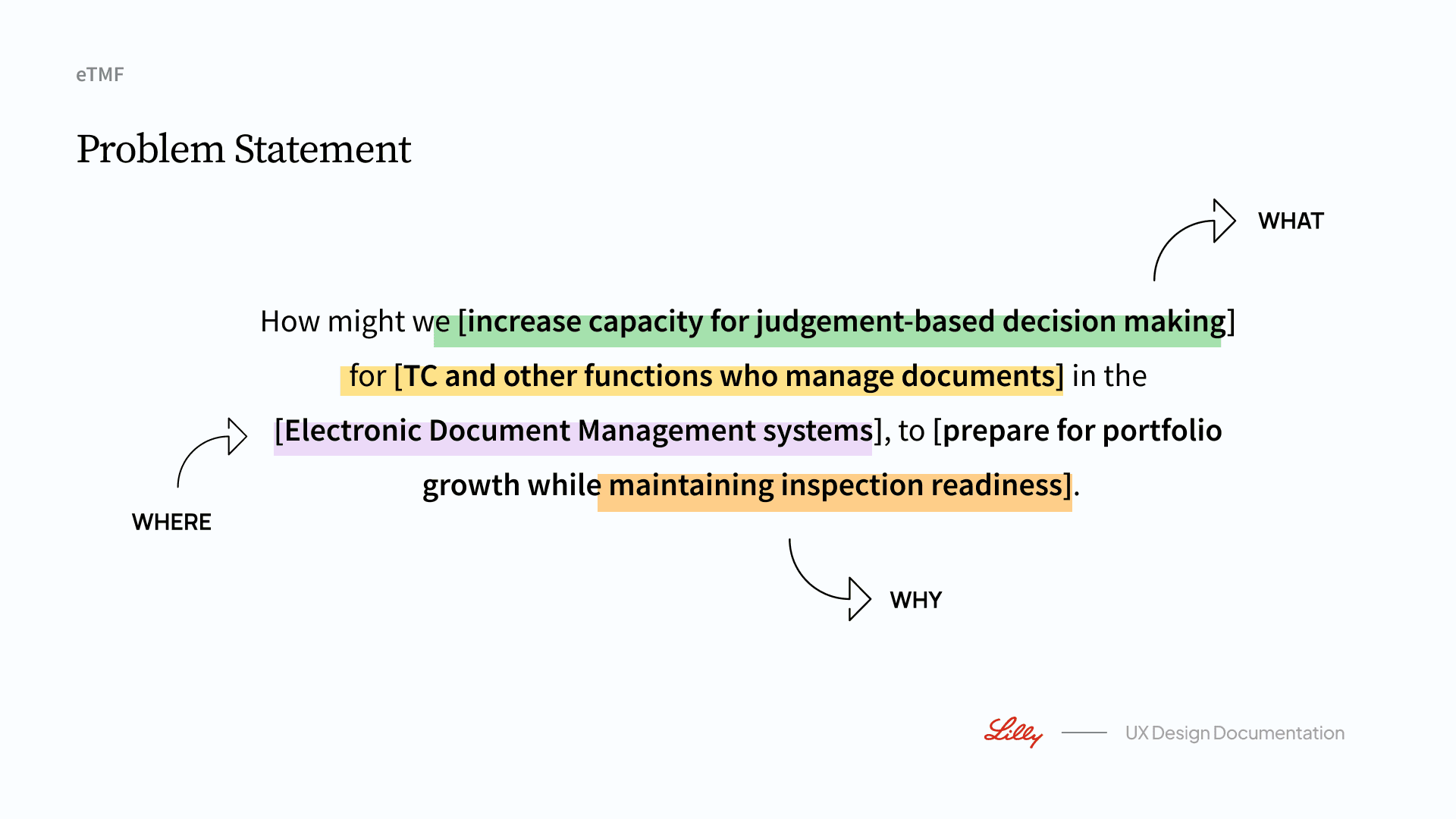
We used the Who / What / Where / When / Why / How framework to map key roles, goals, pain points, and trigger moments, and compared the Current Journey alongside the Future Journey to clarify: which steps are high-risk compliance checkpoints, which are high-frequency manual collaboration bottlenecks, and which information gaps directly lead to delays and audit risk. Outputs: a unified How Might We (HMW) problem statement and an end-to-end critical path, used to guide Helix information architecture and core task design.
Turning insights into a deliverable roadmap via Affinity Clustering + MoSCoW
We clustered workshop ideas into four actionable opportunity themes: Document Metadata & AI / AI eTMF Workflow / Automated EDL / Relevant Communication. We then prioritized initiatives through value–effort evaluation and MoSCoW, clearly defining the boundary between the MVP (Must-have) and the 6–9 month iteration scope (Should-have).
Outputs:MVP 2026 feature scope (ensuring traceability, actionability, and scalability)
A key experiences and component requirements list (e.g., action loops, role/country rule-based filtering, status sync & notifications, audit traceability)
Future iteration directions, progressively expanding automation and intelligence without compromising the compliance foundation
After aligning on the goals and scope of Helix (eTMF Dashboard + DocTrack) with the product and clinical operations teams, we facilitated multiple cross-functional workshops (Clinical Ops, TMF Ops, Quality/Regulatory, external partners/vendors, engineering, and data teams). Using a consistent approach, we converged current-state pain points into actionable product opportunities, then translated them into MVP scope and design requirements—ensuring the work was not about adding features, but about driving the outcomes that matter most for compliance and operations.
Aligning problem boundaries and user tasks through 5W1H + Journey Mapping.
We used the Who / What / Where / When / Why / How framework to map key roles, goals, pain points, and trigger moments, and compared the Current Journey alongside the Future Journey to clarify: which steps are high-risk compliance checkpoints, which are high-frequency manual collaboration bottlenecks, and which information gaps directly lead to delays and audit risk. Outputs: a unified How Might We (HMW) problem statement and an end-to-end critical path, used to guide Helix information architecture and core task design.
Turning insights into a deliverable roadmap via Affinity Clustering + MoSCoW
We clustered workshop ideas into four actionable opportunity themes: Document Metadata & AI / AI eTMF Workflow / Automated EDL / Relevant Communication. We then prioritized initiatives through value–effort evaluation and MoSCoW, clearly defining the boundary between the MVP (Must-have) and the 6–9 month iteration scope (Should-have).
Outputs:MVP 2026 feature scope (ensuring traceability, actionability, and scalability)
A key experiences and component requirements list (e.g., action loops, role/country rule-based filtering, status sync & notifications, audit traceability)
Future iteration directions, progressively expanding automation and intelligence without compromising the compliance foundation
After aligning on the goals and scope of Helix (eTMF Dashboard + DocTrack) with the product and clinical operations teams, we facilitated multiple cross-functional workshops (Clinical Ops, TMF Ops, Quality/Regulatory, external partners/vendors, engineering, and data teams). Using a consistent approach, we converged current-state pain points into actionable product opportunities, then translated them into MVP scope and design requirements—ensuring the work was not about adding features, but about driving the outcomes that matter most for compliance and operations.
Aligning problem boundaries and user tasks through 5W1H + Journey Mapping.
We used the Who / What / Where / When / Why / How framework to map key roles, goals, pain points, and trigger moments, and compared the Current Journey alongside the Future Journey to clarify: which steps are high-risk compliance checkpoints, which are high-frequency manual collaboration bottlenecks, and which information gaps directly lead to delays and audit risk. Outputs: a unified How Might We (HMW) problem statement and an end-to-end critical path, used to guide Helix information architecture and core task design.
Turning insights into a deliverable roadmap via Affinity Clustering + MoSCoW
We clustered workshop ideas into four actionable opportunity themes: Document Metadata & AI / AI eTMF Workflow / Automated EDL / Relevant Communication. We then prioritized initiatives through value–effort evaluation and MoSCoW, clearly defining the boundary between the MVP (Must-have) and the 6–9 month iteration scope (Should-have).
Outputs:MVP 2026 feature scope (ensuring traceability, actionability, and scalability)
A key experiences and component requirements list (e.g., action loops, role/country rule-based filtering, status sync & notifications, audit traceability)
Future iteration directions, progressively expanding automation and intelligence without compromising the compliance foundation


Helix Dashboard
Helix Dashboard
Helix Dashboard
Helix Dashboard is an action-driven eTMF landing hub for clinical operations and leaders: it turns documentation risk into executable work (My Actions), adds closed-loop controls like notifications, snooze, and automation fallbacks, and provides supervisor/leadership views to monitor risk distribution and trends for faster decisions.
Helix Dashboard is an action-driven eTMF landing hub for clinical operations and leaders: it turns documentation risk into executable work (My Actions), adds closed-loop controls like notifications, snooze, and automation fallbacks, and provides supervisor/leadership views to monitor risk distribution and trends for faster decisions.
Helix Dashboard is an action-driven eTMF landing hub for clinical operations and leaders: it turns documentation risk into executable work (My Actions), adds closed-loop controls like notifications, snooze, and automation fallbacks, and provides supervisor/leadership views to monitor risk distribution and trends for faster decisions.
MVP 1 — Home Dashboard
MVP 1 — Home Dashboard
MVP 1 — Home Dashboard
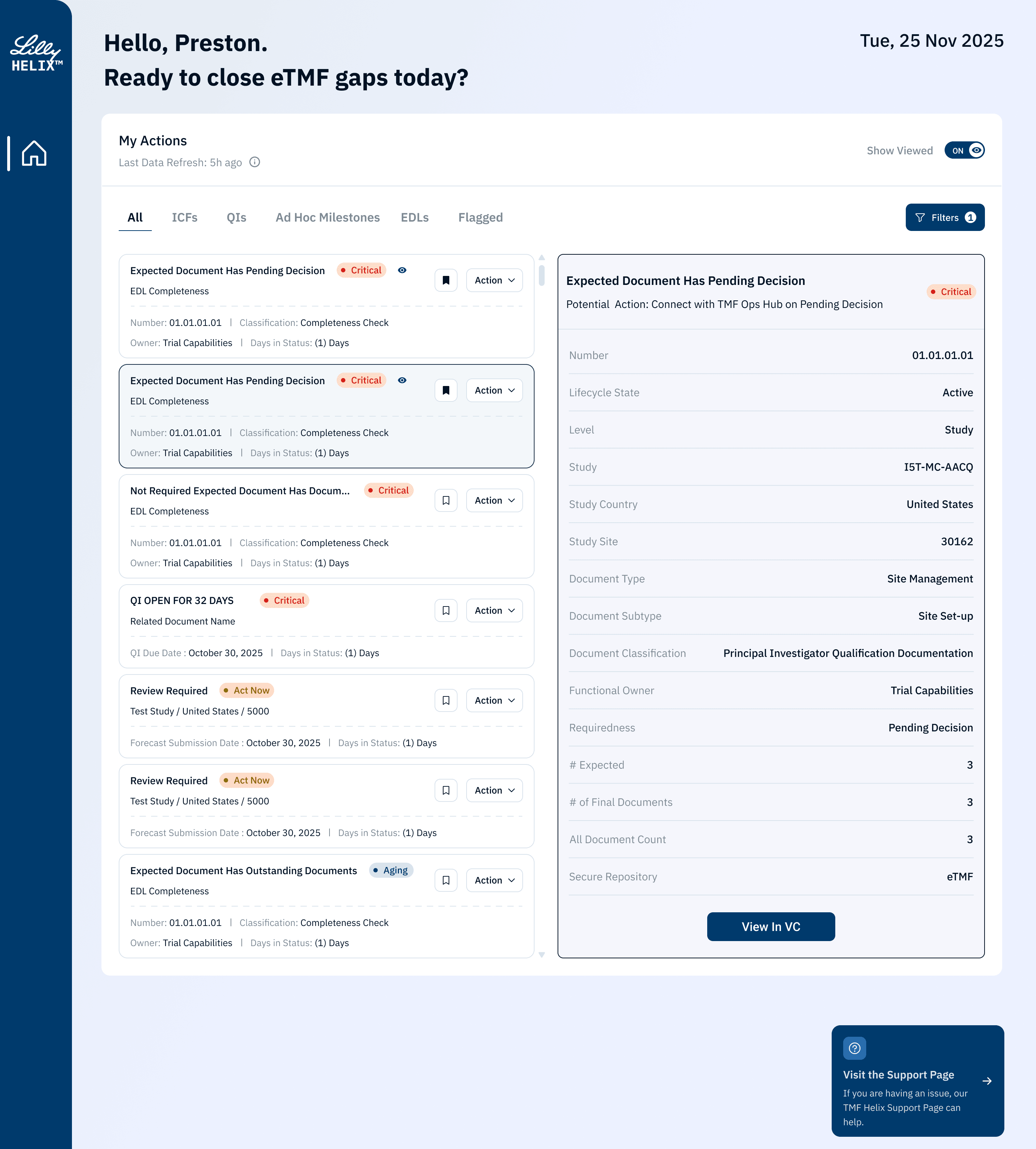
Research and workshops showed the real cost isn’t “filing documents,” but finding issues, reconciling status, clarifying ownership, and reconstructing context across fragmented systems and complex rules. MVP 1 reframes the landing page as an action-driven compliance entry point—so users immediately know what to do next and can triage and act within one screen.
Research and workshops showed the real cost isn’t “filing documents,” but finding issues, reconciling status, clarifying ownership, and reconstructing context across fragmented systems and complex rules. MVP 1 reframes the landing page as an action-driven compliance entry point—so users immediately know what to do next and can triage and act within one screen.
Research and workshops showed the real cost isn’t “filing documents,” but finding issues, reconciling status, clarifying ownership, and reconstructing context across fragmented systems and complex rules. MVP 1 reframes the landing page as an action-driven compliance entry point—so users immediately know what to do next and can triage and act within one screen.
ALL
ALL
ALL
Ad Hoc Milestones
Ad Hoc Milestones
Ad Hoc Milestones
QI’s
QI’s
QI’s
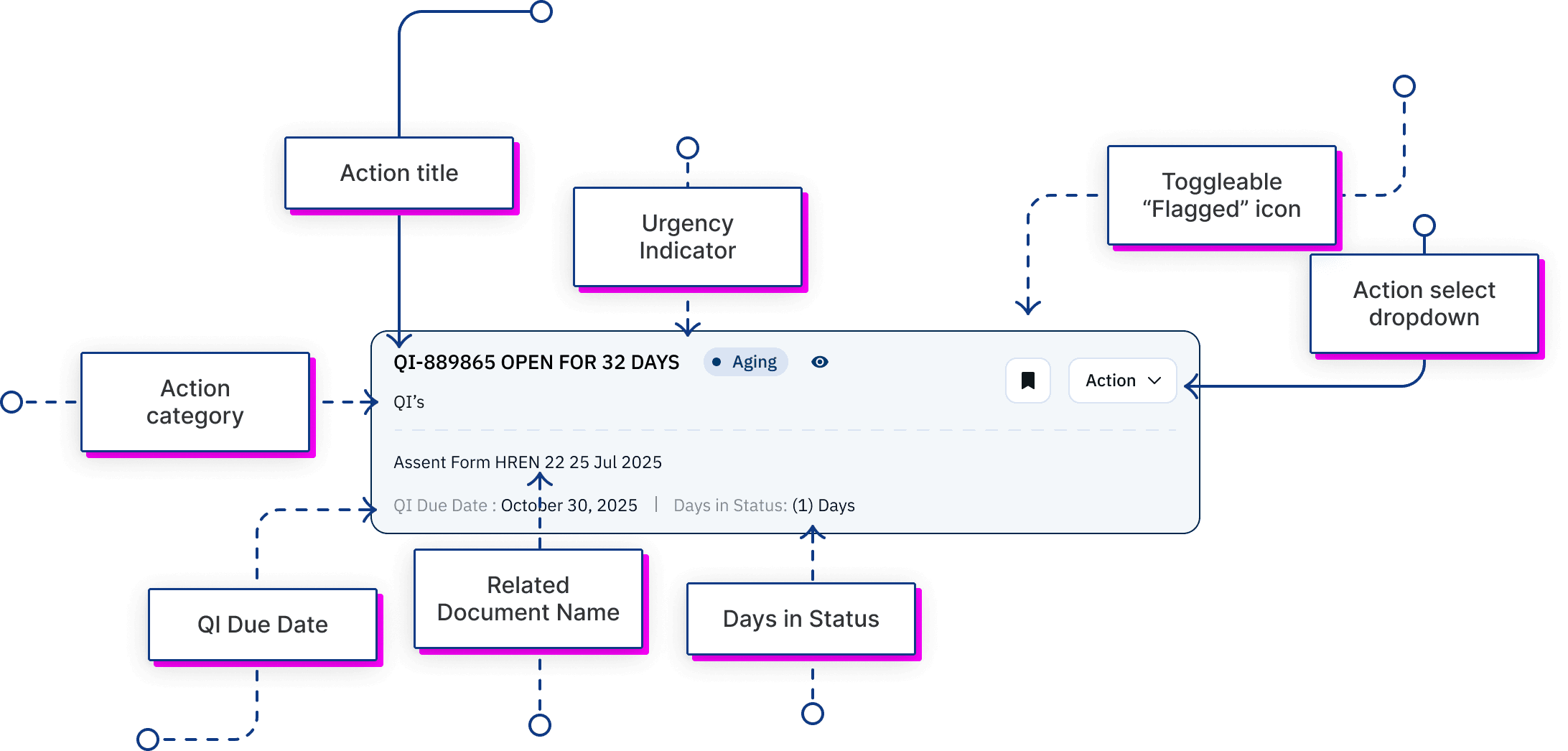
ICF’s
ICF’s
ICF’s
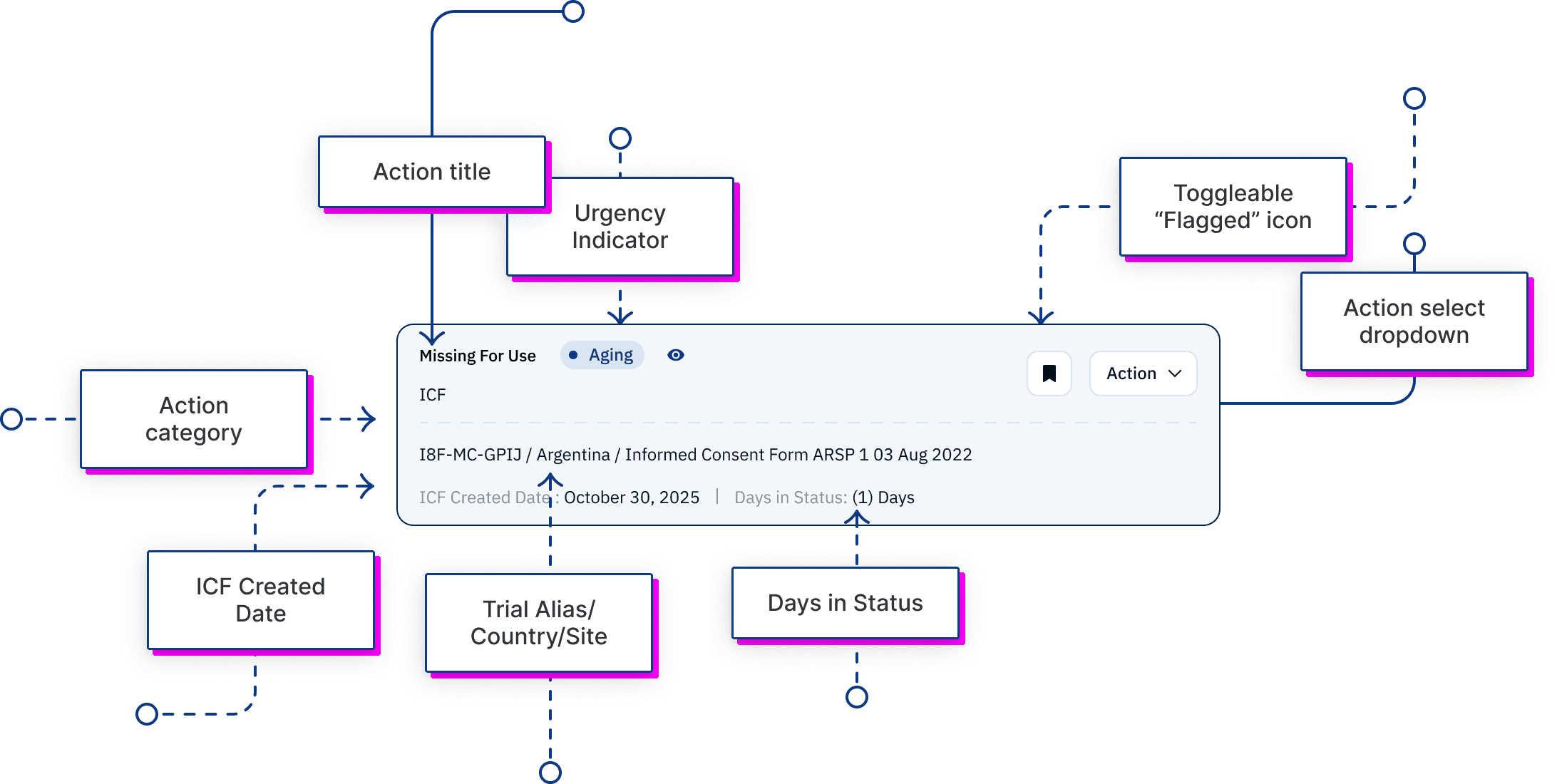
How the Design Maps to Research (From Visibility to Action)
How the Design Maps to Research (From Visibility to Action)
How the Design Maps to Research (From Visibility to Action)
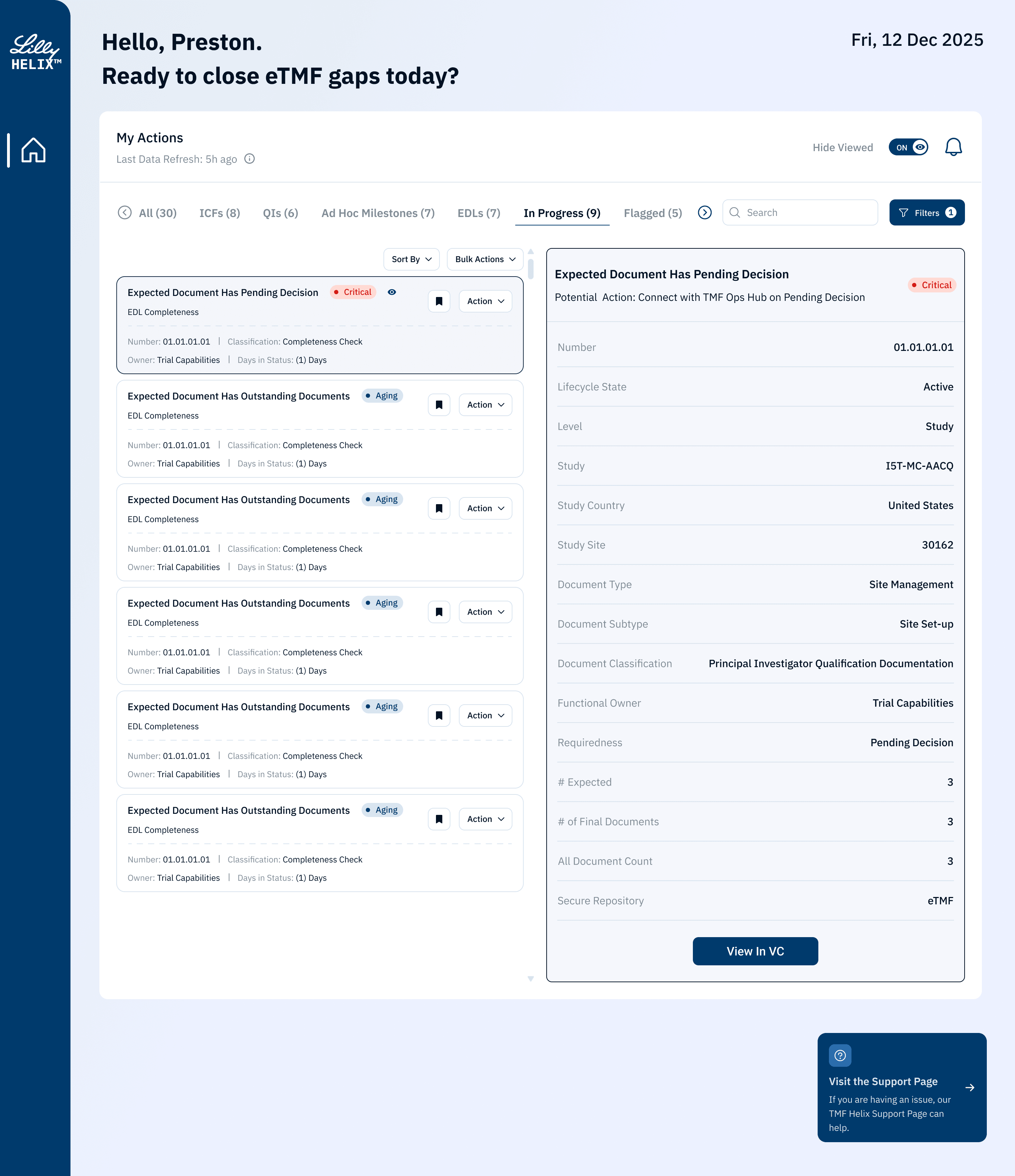
Make “Action-Required Work” the Default. My Actions is the default hub for at-risk work (ICF/QI/EDL…), reinforced by Last Data Refresh for trust and Show Viewed to reduce noise and keep focus on unresolved items.
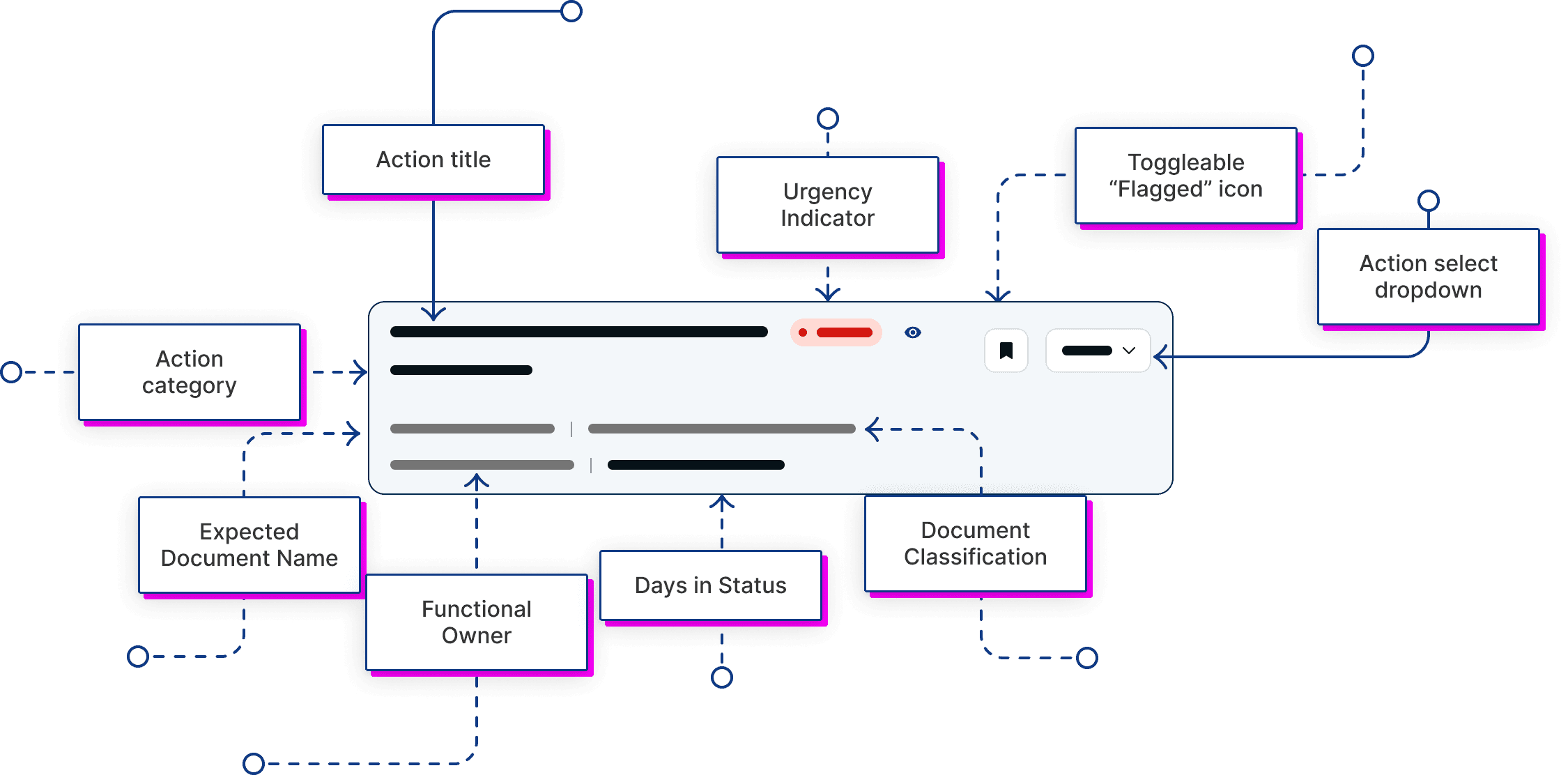
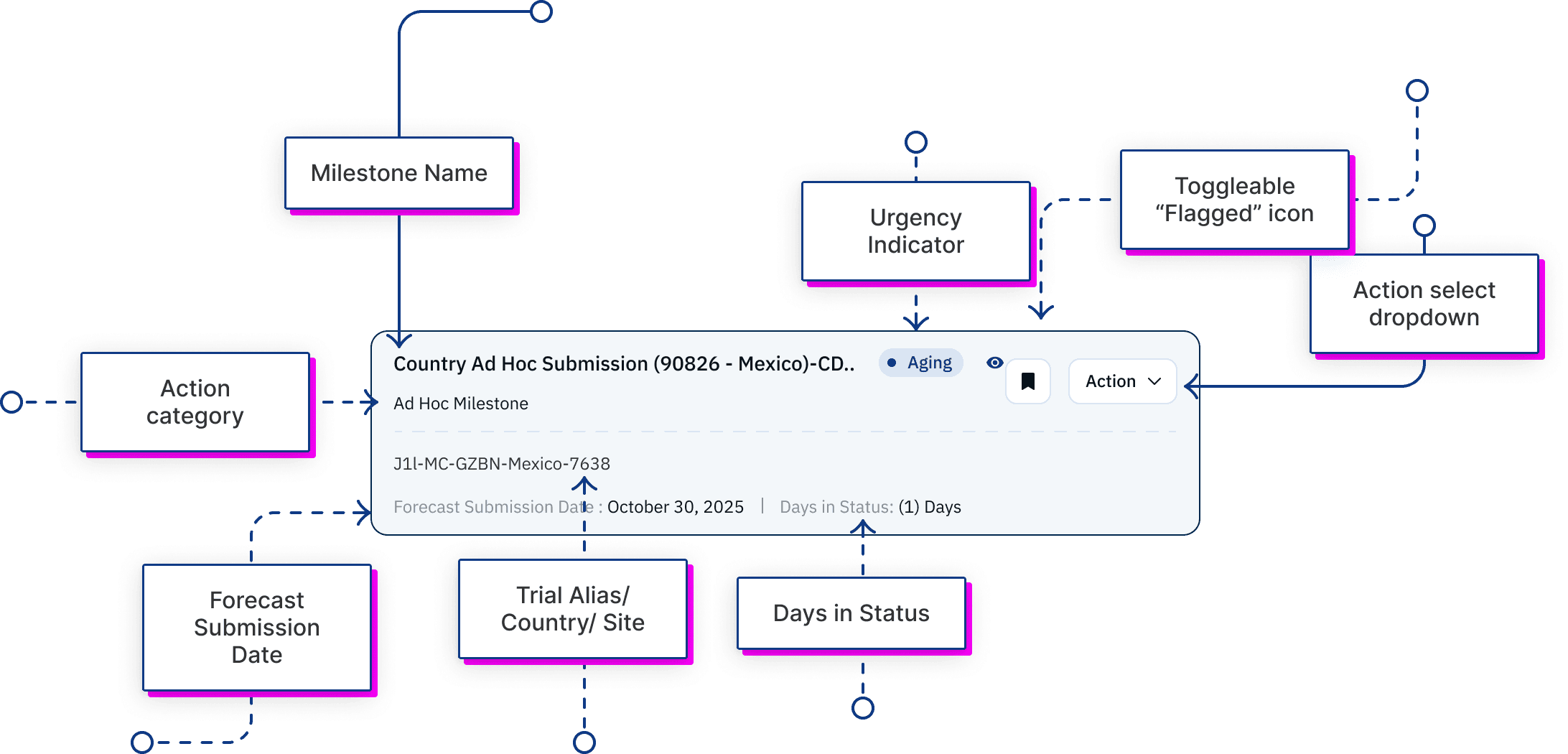
Reduce Decision Friction with a Card System + Required Fields. A scalable card system with fixed required fields and flexible metadata; Urgency + Days in Status + Trial/Country/Site + key dates enable fast triage and prioritization.
Embed “What To Do Next” as Contextual Guidance. The detail panel surfaces a Potential Action plus minimum decision context (lifecycle, classification, owner, requiredness), moving users from “seeing” to “doing.”
Preserve Traceability and Verifiability (Compliance Foundation. View in VC enables source-of-truth verification, with repository clarity (eTMF) and gap counts (Expected/Final/All); Support access prevents workflow dead-ends.
Make “Action-Required Work” the Default. My Actions is the default hub for at-risk work (ICF/QI/EDL…), reinforced by Last Data Refresh for trust and Show Viewed to reduce noise and keep focus on unresolved items.
Reduce Decision Friction with a Card System + Required Fields. A scalable card system with fixed required fields and flexible metadata; Urgency + Days in Status + Trial/Country/Site + key dates enable fast triage and prioritization.
Embed “What To Do Next” as Contextual Guidance. The detail panel surfaces a Potential Action plus minimum decision context (lifecycle, classification, owner, requiredness), moving users from “seeing” to “doing.”
Preserve Traceability and Verifiability (Compliance Foundation. View in VC enables source-of-truth verification, with repository clarity (eTMF) and gap counts (Expected/Final/All); Support access prevents workflow dead-ends.
Make “Action-Required Work” the Default. My Actions is the default hub for at-risk work (ICF/QI/EDL…), reinforced by Last Data Refresh for trust and Show Viewed to reduce noise and keep focus on unresolved items.
Reduce Decision Friction with a Card System + Required Fields. A scalable card system with fixed required fields and flexible metadata; Urgency + Days in Status + Trial/Country/Site + key dates enable fast triage and prioritization.
Embed “What To Do Next” as Contextual Guidance. The detail panel surfaces a Potential Action plus minimum decision context (lifecycle, classification, owner, requiredness), moving users from “seeing” to “doing.”
Preserve Traceability and Verifiability (Compliance Foundation. View in VC enables source-of-truth verification, with repository clarity (eTMF) and gap counts (Expected/Final/All); Support access prevents workflow dead-ends.
In-App Notifications
In-App Notifications
In-App Notifications
Research showed critical updates get buried across email and fragmented systems, so users miss new actions or urgency escalations. In MVP2, I introduced an in-app notification center (bell + badge) that surfaces these two high-signal events with a change summary, criticality/type filters, and clear all, enabling “notice → reprioritize → act” without leaving the workflow.
Research showed critical updates get buried across email and fragmented systems, so users miss new actions or urgency escalations. In MVP2, I introduced an in-app notification center (bell + badge) that surfaces these two high-signal events with a change summary, criticality/type filters, and clear all, enabling “notice → reprioritize → act” without leaving the workflow.
Research showed critical updates get buried across email and fragmented systems, so users miss new actions or urgency escalations. In MVP2, I introduced an in-app notification center (bell + badge) that surfaces these two high-signal events with a change summary, criticality/type filters, and clear all, enabling “notice → reprioritize → act” without leaving the workflow.
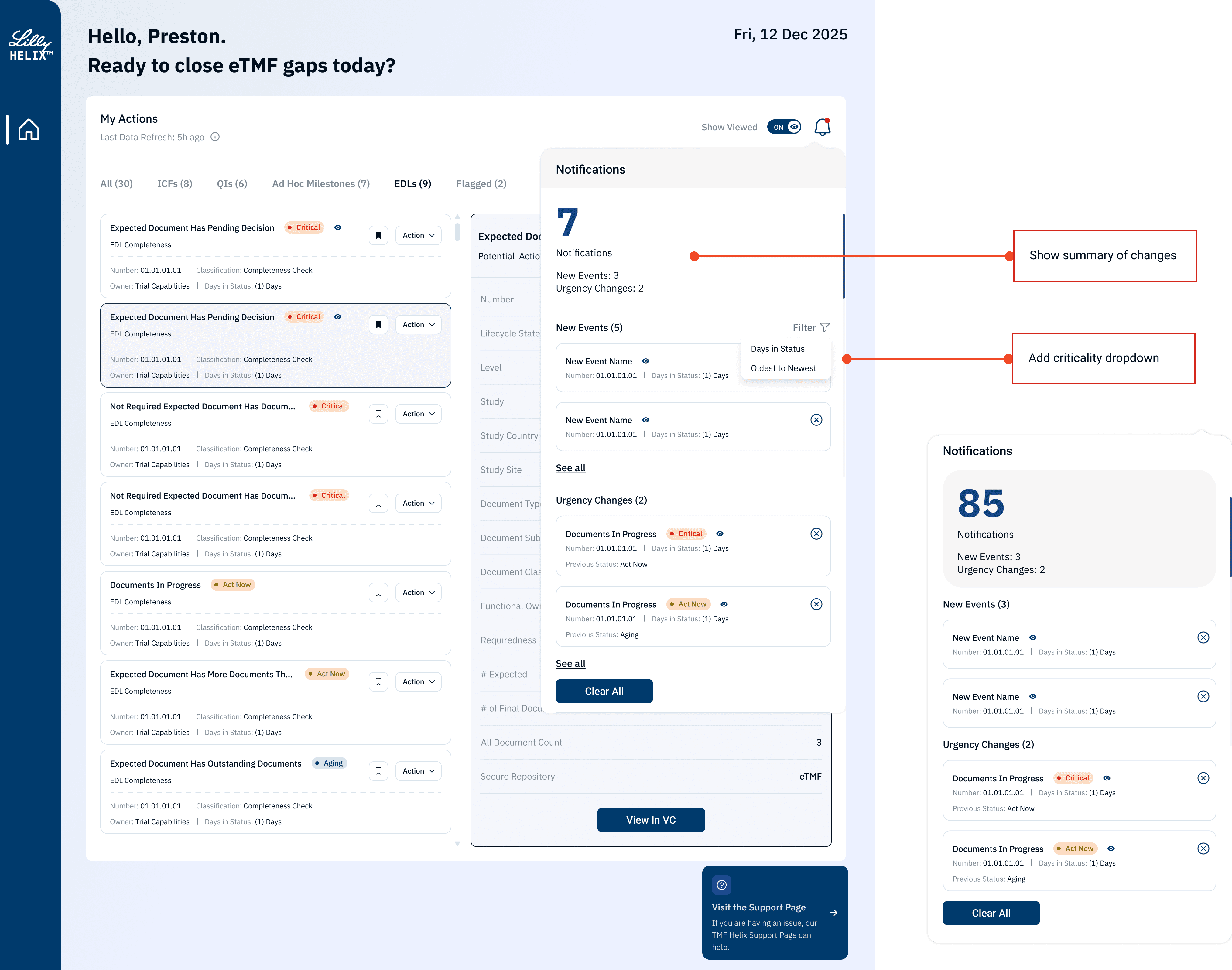
Action Item “Snooze/ Wake up”
Action Item “Snooze/ Wake up”
Action Item “Snooze/ Wake up”
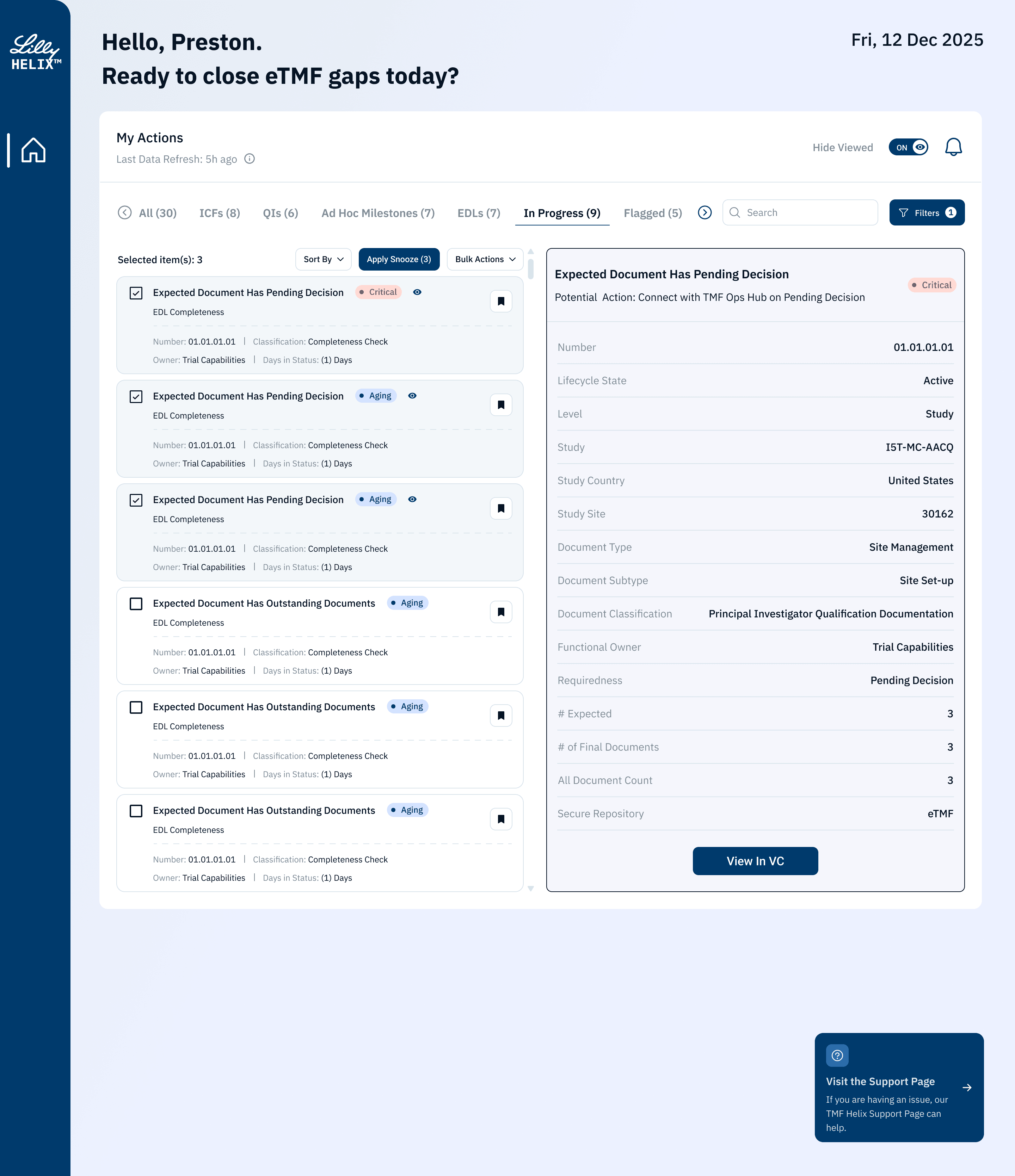
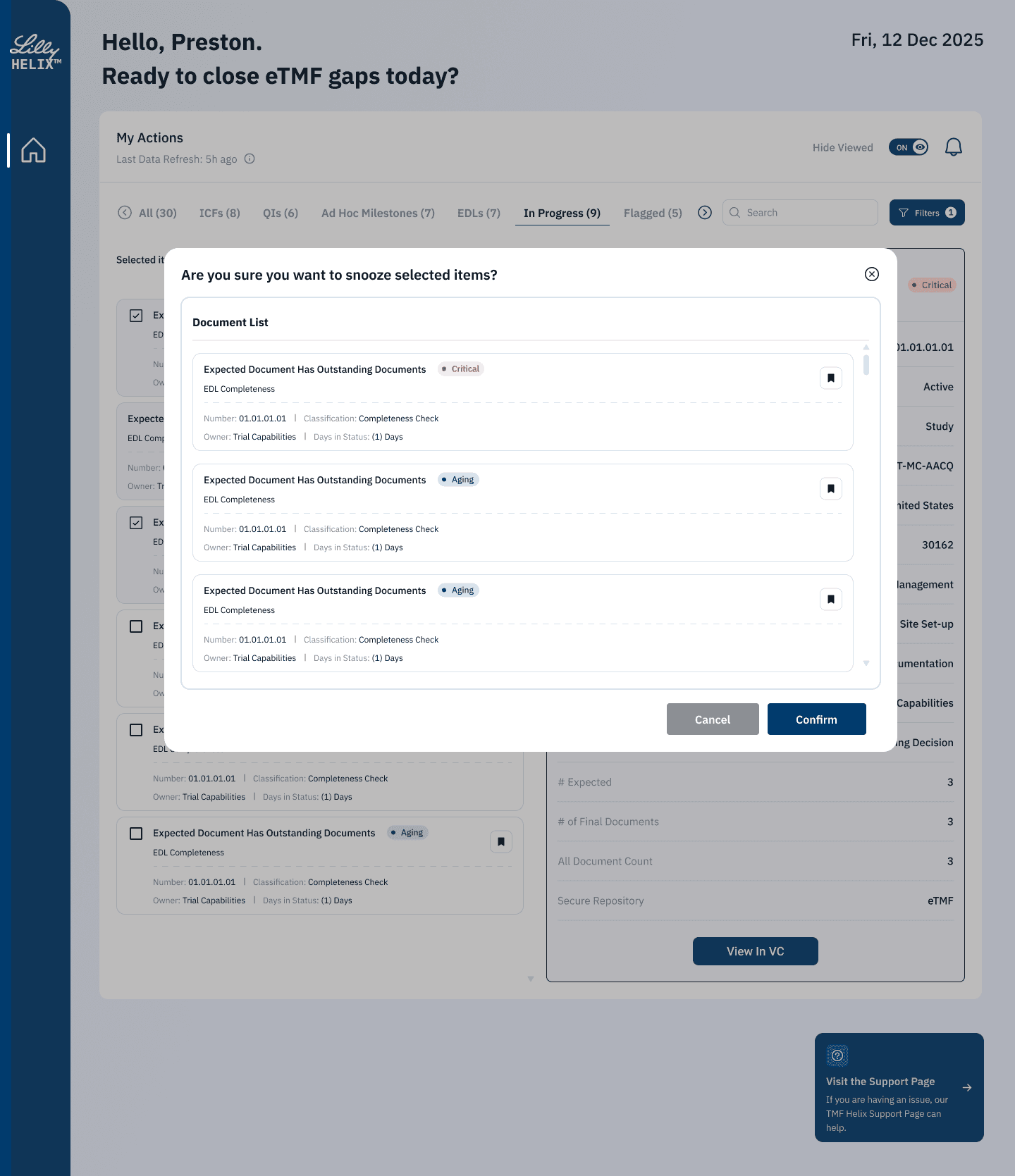
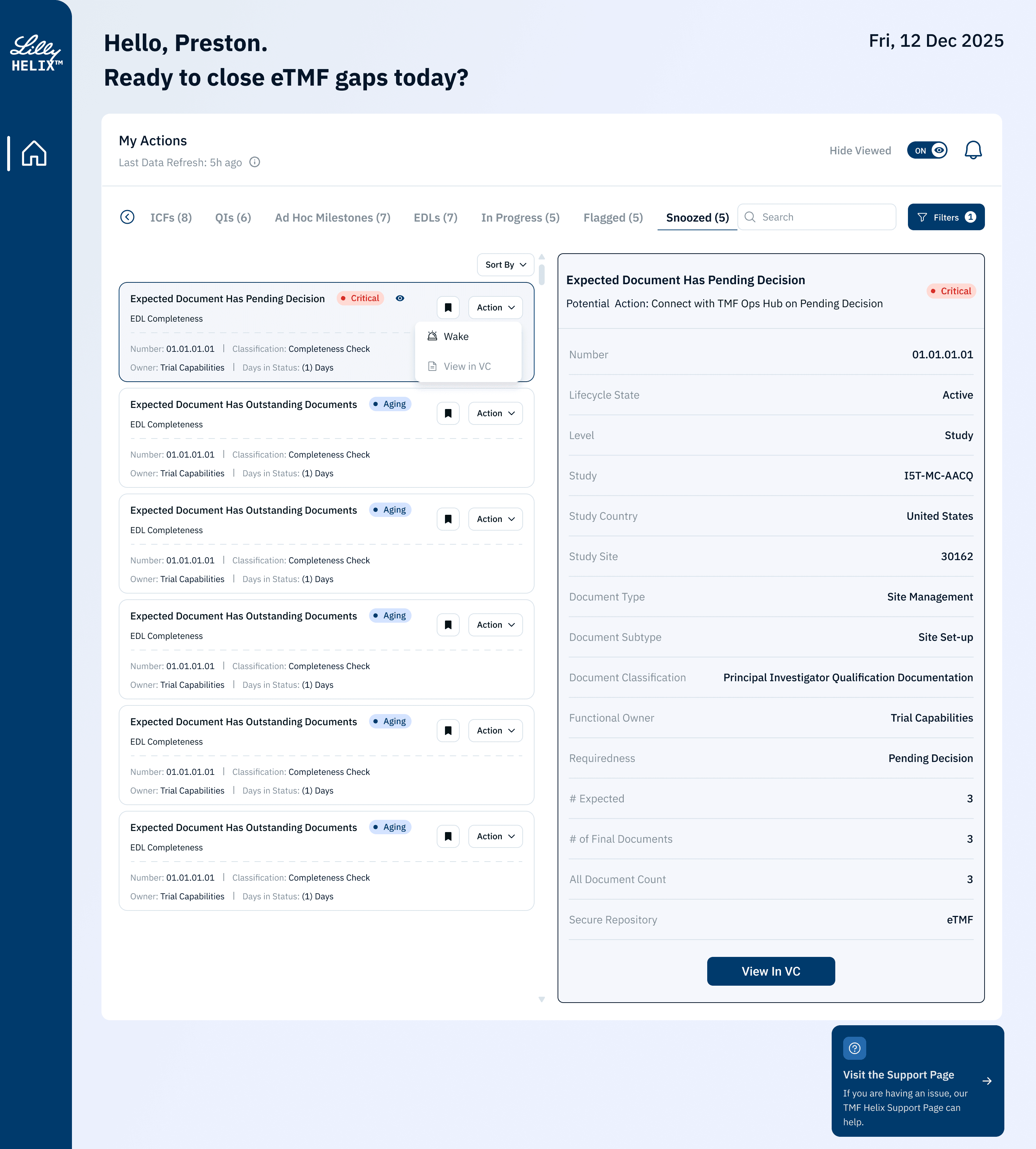
Research highlighted alert fatigue and noise: users manage many actions with constantly shifting priorities. In MVP2, I introduced Snooze / Wake up so users can defer “not-ready” items for 1–4 weeks (user-specific). Snoozed items are removed from the default view into a dedicated list and stop triggering notifications, then automatically return when the timeframe expires—or can be woken up manually. Bulk snooze/wake supports scale while preserving traceability.
Research highlighted alert fatigue and noise: users manage many actions with constantly shifting priorities. In MVP2, I introduced Snooze / Wake up so users can defer “not-ready” items for 1–4 weeks (user-specific). Snoozed items are removed from the default view into a dedicated list and stop triggering notifications, then automatically return when the timeframe expires—or can be woken up manually. Bulk snooze/wake supports scale while preserving traceability.
Research highlighted alert fatigue and noise: users manage many actions with constantly shifting priorities. In MVP2, I introduced Snooze / Wake up so users can defer “not-ready” items for 1–4 weeks (user-specific). Snoozed items are removed from the default view into a dedicated list and stop triggering notifications, then automatically return when the timeframe expires—or can be woken up manually. Bulk snooze/wake supports scale while preserving traceability.
Supervisor Report
Supervisor Report
Supervisor Report
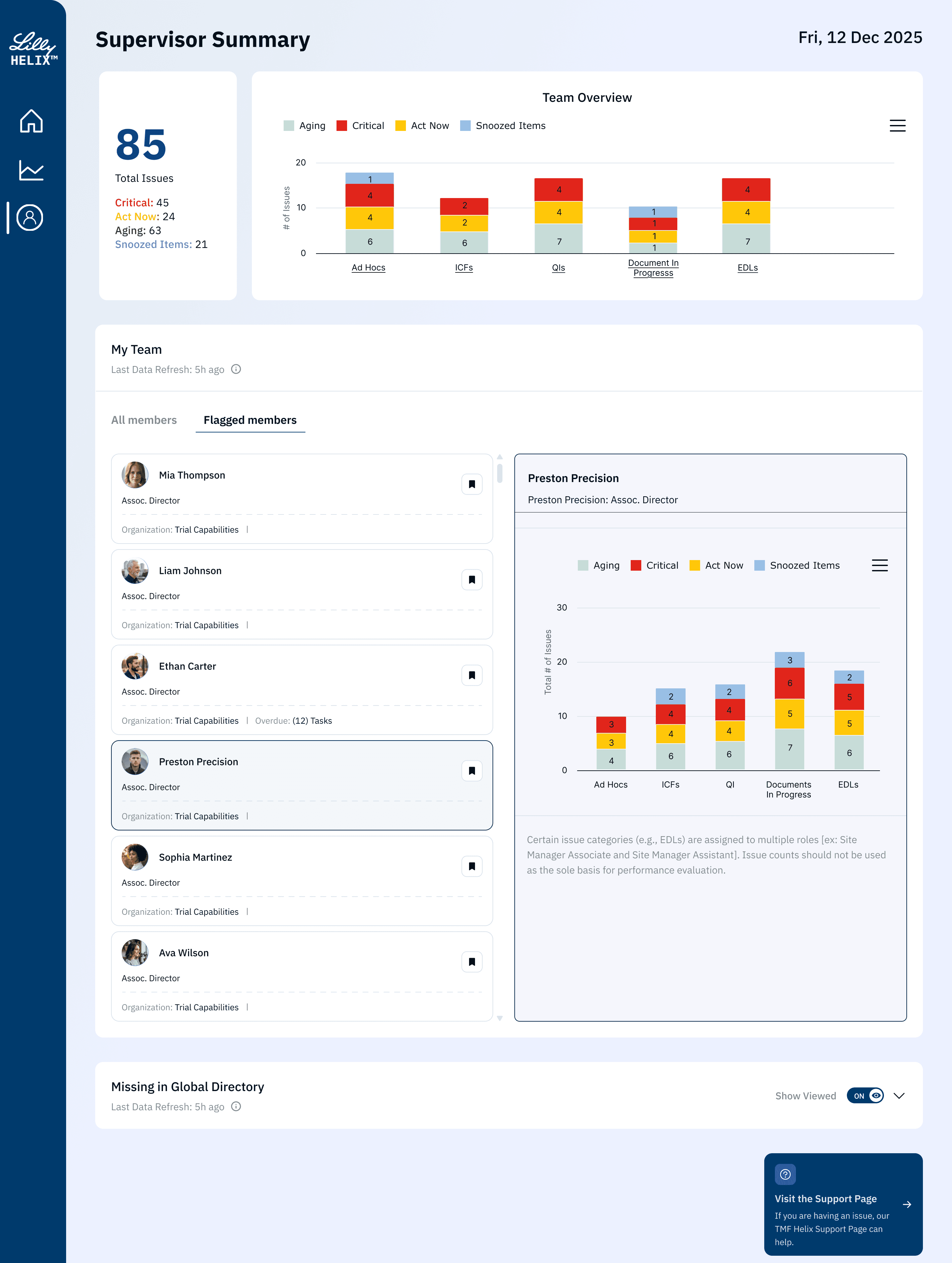
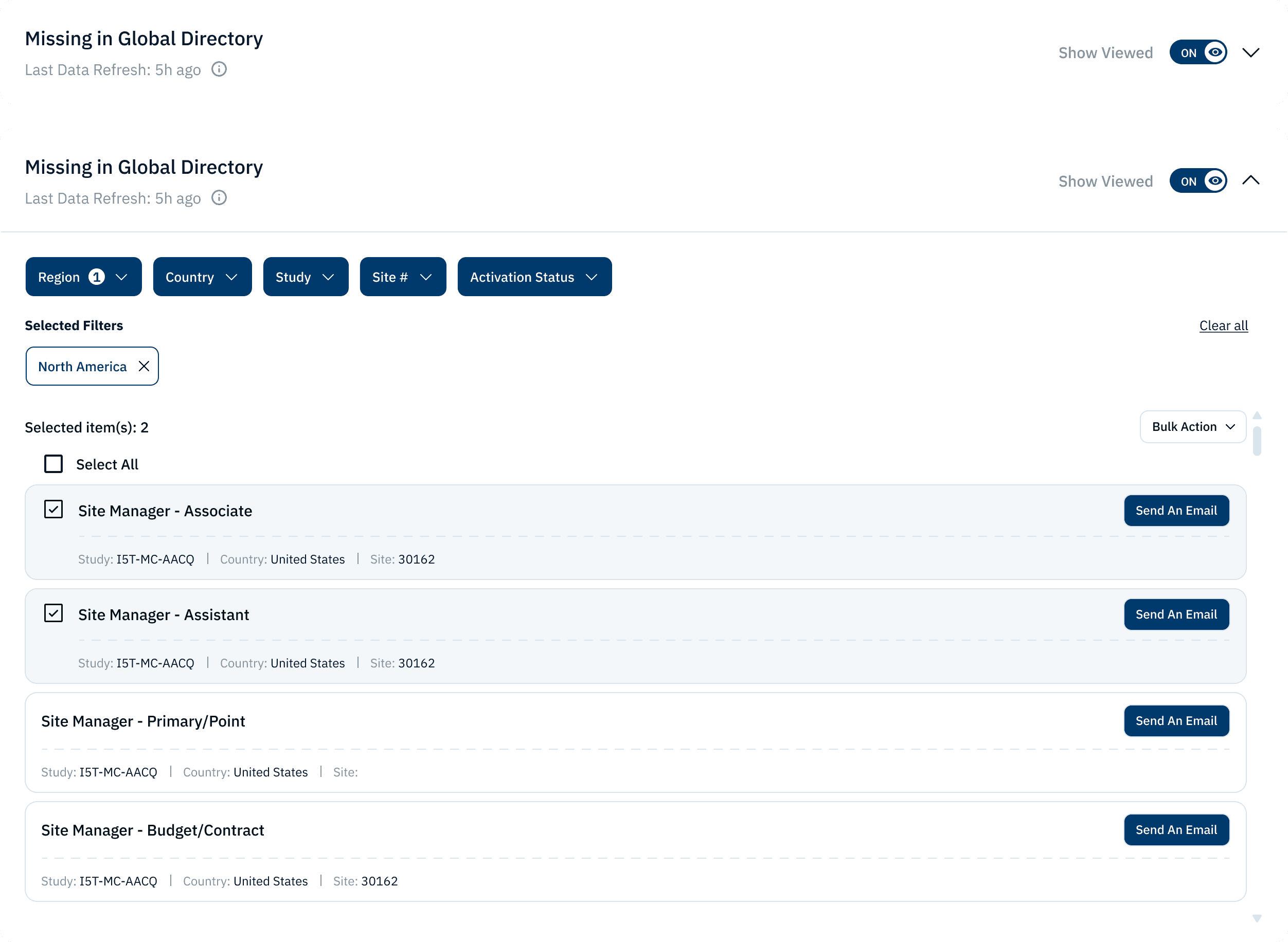
Research showed supervisors don’t need more dashboards—they need to quickly answer: how big is the team’s risk, where is it concentrated (people/types), and where should resources go. In MVP2, I designed the Supervisor Report (RBAC-gated, visible only to supervisor roles) as a management layer accessible from the Home Dashboard.
Team-level snapshot: surfaces Total issues to assess overall workload and risk.
Drill-down to individuals: click into team/person views to see issues by person, enabling workload balancing and follow-up.
Actionable breakdowns
Research showed supervisors don’t need more dashboards—they need to quickly answer: how big is the team’s risk, where is it concentrated (people/types), and where should resources go. In MVP2, I designed the Supervisor Report (RBAC-gated, visible only to supervisor roles) as a management layer accessible from the Home Dashboard.
Team-level snapshot: surfaces Total issues to assess overall workload and risk.
Drill-down to individuals: click into team/person views to see issues by person, enabling workload balancing and follow-up.
Actionable breakdowns
Research showed supervisors don’t need more dashboards—they need to quickly answer: how big is the team’s risk, where is it concentrated (people/types), and where should resources go. In MVP2, I designed the Supervisor Report (RBAC-gated, visible only to supervisor roles) as a management layer accessible from the Home Dashboard.
Team-level snapshot: surfaces Total issues to assess overall workload and risk.
Drill-down to individuals: click into team/person views to see issues by person, enabling workload balancing and follow-up.
Actionable breakdowns
Leadership Snapshot Summary
Leadership Snapshot Summary
Leadership Snapshot Summary
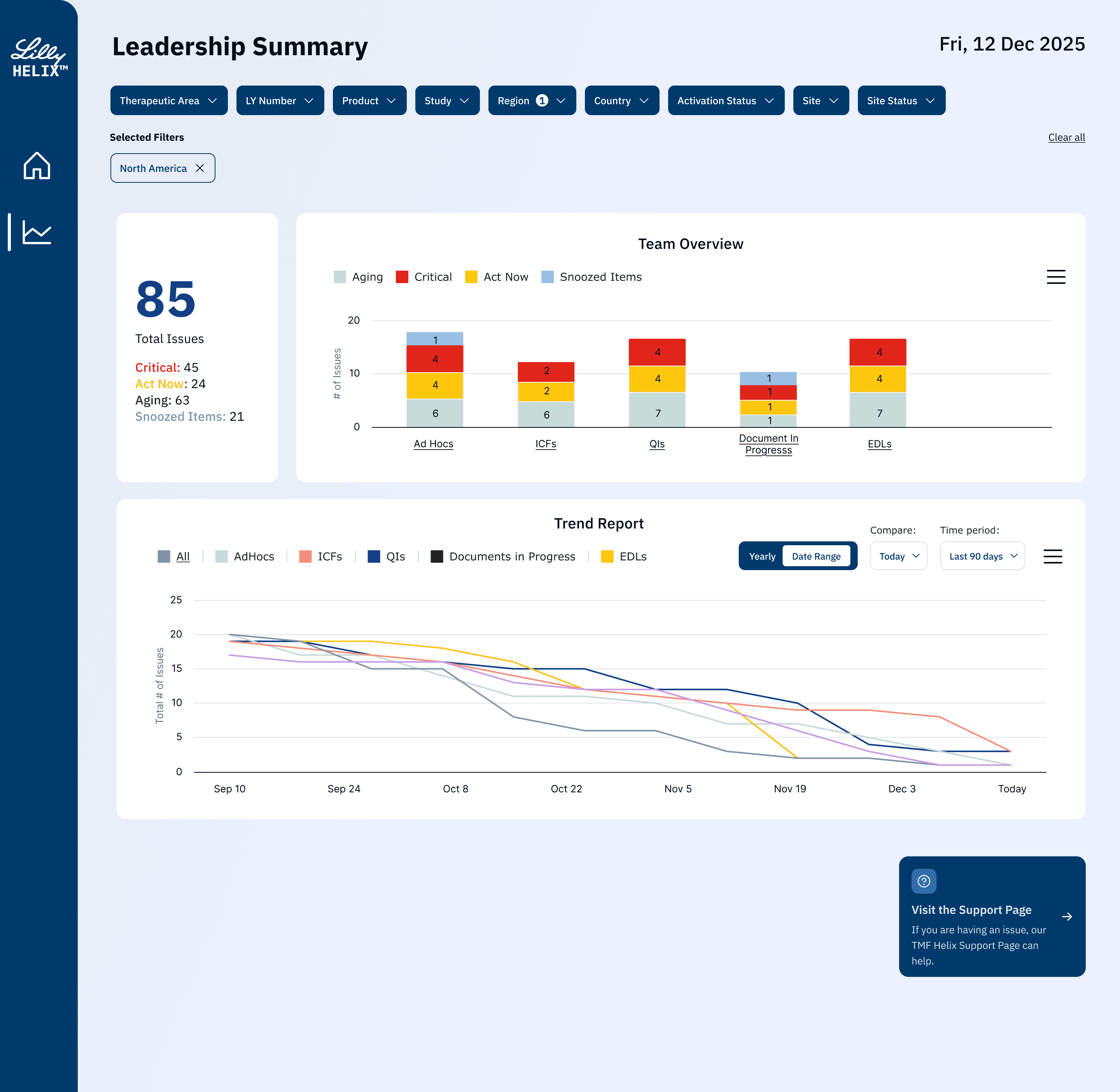
Leaders need to answer fast: how big is the risk, where it’s concentrated, and whether it’s improving or worsening. MVP2’s Leadership Summary (RBAC-gated) delivers this through:
Composable filters (TA/Product/Study/Region/Country/Site/status) for rapid slicing
Risk distribution: Total Issues + urgency rollups (Critical/Act Now/Aging/Snoozed) + stacked bars by issue type (Ad Hoc/ICF/QI/EDL/In Progress)
Trend reporting: time-based trends by issue type to inform prioritization and resourcing
Leaders need to answer fast: how big is the risk, where it’s concentrated, and whether it’s improving or worsening. MVP2’s Leadership Summary (RBAC-gated) delivers this through:
Composable filters (TA/Product/Study/Region/Country/Site/status) for rapid slicing
Risk distribution: Total Issues + urgency rollups (Critical/Act Now/Aging/Snoozed) + stacked bars by issue type (Ad Hoc/ICF/QI/EDL/In Progress)
Trend reporting: time-based trends by issue type to inform prioritization and resourcing
Leaders need to answer fast: how big is the risk, where it’s concentrated, and whether it’s improving or worsening. MVP2’s Leadership Summary (RBAC-gated) delivers this through:
Composable filters (TA/Product/Study/Region/Country/Site/status) for rapid slicing
Risk distribution: Total Issues + urgency rollups (Critical/Act Now/Aging/Snoozed) + stacked bars by issue type (Ad Hoc/ICF/QI/EDL/In Progress)
Trend reporting: time-based trends by issue type to inform prioritization and resourcing
Helix Dashboard
Helix Dashboard
Helix Dashboard
Helix Dashboard is an action-driven eTMF landing hub for clinical operations and leaders: it turns documentation risk into executable work (My Actions), adds closed-loop controls like notifications, snooze, and automation fallbacks, and provides supervisor/leadership views to monitor risk distribution and trends for faster decisions.
Helix Dashboard is an action-driven eTMF landing hub for clinical operations and leaders: it turns documentation risk into executable work (My Actions), adds closed-loop controls like notifications, snooze, and automation fallbacks, and provides supervisor/leadership views to monitor risk distribution and trends for faster decisions.
Helix Dashboard is an action-driven eTMF landing hub for clinical operations and leaders: it turns documentation risk into executable work (My Actions), adds closed-loop controls like notifications, snooze, and automation fallbacks, and provides supervisor/leadership views to monitor risk distribution and trends for faster decisions.
MVP 1 — Home Dashboard
MVP 1 — Home Dashboard
MVP 1 — Home Dashboard
Research and workshops showed the real cost isn’t “filing documents,” but finding issues, reconciling status, clarifying ownership, and reconstructing context across fragmented systems and complex rules. MVP 1 reframes the landing page as an action-driven compliance entry point—so users immediately know what to do next and can triage and act within one screen.
Research and workshops showed the real cost isn’t “filing documents,” but finding issues, reconciling status, clarifying ownership, and reconstructing context across fragmented systems and complex rules. MVP 1 reframes the landing page as an action-driven compliance entry point—so users immediately know what to do next and can triage and act within one screen.
Research and workshops showed the real cost isn’t “filing documents,” but finding issues, reconciling status, clarifying ownership, and reconstructing context across fragmented systems and complex rules. MVP 1 reframes the landing page as an action-driven compliance entry point—so users immediately know what to do next and can triage and act within one screen.
ALL
ALL
ALL
Ad Hoc Milestones
Ad Hoc Milestones
Ad Hoc Milestones
QI’s
QI’s
QI’s
ICF’s
ICF’s
ICF’s
How the Design Maps to Research (From Visibility to Action)
How the Design Maps to Research (From Visibility to Action)
How the Design Maps to Research (From Visibility to Action)
Make “Action-Required Work” the Default. My Actions is the default hub for at-risk work (ICF/QI/EDL…), reinforced by Last Data Refresh for trust and Show Viewed to reduce noise and keep focus on unresolved items.
Reduce Decision Friction with a Card System + Required Fields. A scalable card system with fixed required fields and flexible metadata; Urgency + Days in Status + Trial/Country/Site + key dates enable fast triage and prioritization.
Embed “What To Do Next” as Contextual Guidance. The detail panel surfaces a Potential Action plus minimum decision context (lifecycle, classification, owner, requiredness), moving users from “seeing” to “doing.”
Preserve Traceability and Verifiability (Compliance Foundation. View in VC enables source-of-truth verification, with repository clarity (eTMF) and gap counts (Expected/Final/All); Support access prevents workflow dead-ends.
Make “Action-Required Work” the Default. My Actions is the default hub for at-risk work (ICF/QI/EDL…), reinforced by Last Data Refresh for trust and Show Viewed to reduce noise and keep focus on unresolved items.
Reduce Decision Friction with a Card System + Required Fields. A scalable card system with fixed required fields and flexible metadata; Urgency + Days in Status + Trial/Country/Site + key dates enable fast triage and prioritization.
Embed “What To Do Next” as Contextual Guidance. The detail panel surfaces a Potential Action plus minimum decision context (lifecycle, classification, owner, requiredness), moving users from “seeing” to “doing.”
Preserve Traceability and Verifiability (Compliance Foundation. View in VC enables source-of-truth verification, with repository clarity (eTMF) and gap counts (Expected/Final/All); Support access prevents workflow dead-ends.
Make “Action-Required Work” the Default. My Actions is the default hub for at-risk work (ICF/QI/EDL…), reinforced by Last Data Refresh for trust and Show Viewed to reduce noise and keep focus on unresolved items.
Reduce Decision Friction with a Card System + Required Fields. A scalable card system with fixed required fields and flexible metadata; Urgency + Days in Status + Trial/Country/Site + key dates enable fast triage and prioritization.
Embed “What To Do Next” as Contextual Guidance. The detail panel surfaces a Potential Action plus minimum decision context (lifecycle, classification, owner, requiredness), moving users from “seeing” to “doing.”
Preserve Traceability and Verifiability (Compliance Foundation. View in VC enables source-of-truth verification, with repository clarity (eTMF) and gap counts (Expected/Final/All); Support access prevents workflow dead-ends.
In-App Notifications
In-App Notifications
In-App Notifications
Research showed critical updates get buried across email and fragmented systems, so users miss new actions or urgency escalations. In MVP2, I introduced an in-app notification center (bell + badge) that surfaces these two high-signal events with a change summary, criticality/type filters, and clear all, enabling “notice → reprioritize → act” without leaving the workflow.
Research showed critical updates get buried across email and fragmented systems, so users miss new actions or urgency escalations. In MVP2, I introduced an in-app notification center (bell + badge) that surfaces these two high-signal events with a change summary, criticality/type filters, and clear all, enabling “notice → reprioritize → act” without leaving the workflow.
Research showed critical updates get buried across email and fragmented systems, so users miss new actions or urgency escalations. In MVP2, I introduced an in-app notification center (bell + badge) that surfaces these two high-signal events with a change summary, criticality/type filters, and clear all, enabling “notice → reprioritize → act” without leaving the workflow.
Action Item “Snooze/ Wake up”
Action Item “Snooze/ Wake up”
Action Item “Snooze/ Wake up”
Research highlighted alert fatigue and noise: users manage many actions with constantly shifting priorities. In MVP2, I introduced Snooze / Wake up so users can defer “not-ready” items for 1–4 weeks (user-specific). Snoozed items are removed from the default view into a dedicated list and stop triggering notifications, then automatically return when the timeframe expires—or can be woken up manually. Bulk snooze/wake supports scale while preserving traceability.
Research highlighted alert fatigue and noise: users manage many actions with constantly shifting priorities. In MVP2, I introduced Snooze / Wake up so users can defer “not-ready” items for 1–4 weeks (user-specific). Snoozed items are removed from the default view into a dedicated list and stop triggering notifications, then automatically return when the timeframe expires—or can be woken up manually. Bulk snooze/wake supports scale while preserving traceability.
Research highlighted alert fatigue and noise: users manage many actions with constantly shifting priorities. In MVP2, I introduced Snooze / Wake up so users can defer “not-ready” items for 1–4 weeks (user-specific). Snoozed items are removed from the default view into a dedicated list and stop triggering notifications, then automatically return when the timeframe expires—or can be woken up manually. Bulk snooze/wake supports scale while preserving traceability.
Supervisor Report
Supervisor Report
Supervisor Report
Research showed supervisors don’t need more dashboards—they need to quickly answer: how big is the team’s risk, where is it concentrated (people/types), and where should resources go. In MVP2, I designed the Supervisor Report (RBAC-gated, visible only to supervisor roles) as a management layer accessible from the Home Dashboard.
Team-level snapshot: surfaces Total issues to assess overall workload and risk.
Drill-down to individuals: click into team/person views to see issues by person, enabling workload balancing and follow-up.
Actionable breakdowns
Research showed supervisors don’t need more dashboards—they need to quickly answer: how big is the team’s risk, where is it concentrated (people/types), and where should resources go. In MVP2, I designed the Supervisor Report (RBAC-gated, visible only to supervisor roles) as a management layer accessible from the Home Dashboard.
Team-level snapshot: surfaces Total issues to assess overall workload and risk.
Drill-down to individuals: click into team/person views to see issues by person, enabling workload balancing and follow-up.
Actionable breakdowns
Research showed supervisors don’t need more dashboards—they need to quickly answer: how big is the team’s risk, where is it concentrated (people/types), and where should resources go. In MVP2, I designed the Supervisor Report (RBAC-gated, visible only to supervisor roles) as a management layer accessible from the Home Dashboard.
Team-level snapshot: surfaces Total issues to assess overall workload and risk.
Drill-down to individuals: click into team/person views to see issues by person, enabling workload balancing and follow-up.
Actionable breakdowns
Leadership Snapshot Summary
Leadership Snapshot Summary
Leadership Snapshot Summary
Leaders need to answer fast: how big is the risk, where it’s concentrated, and whether it’s improving or worsening. MVP2’s Leadership Summary (RBAC-gated) delivers this through:
Composable filters (TA/Product/Study/Region/Country/Site/status) for rapid slicing
Risk distribution: Total Issues + urgency rollups (Critical/Act Now/Aging/Snoozed) + stacked bars by issue type (Ad Hoc/ICF/QI/EDL/In Progress)
Trend reporting: time-based trends by issue type to inform prioritization and resourcing
Leaders need to answer fast: how big is the risk, where it’s concentrated, and whether it’s improving or worsening. MVP2’s Leadership Summary (RBAC-gated) delivers this through:
Composable filters (TA/Product/Study/Region/Country/Site/status) for rapid slicing
Risk distribution: Total Issues + urgency rollups (Critical/Act Now/Aging/Snoozed) + stacked bars by issue type (Ad Hoc/ICF/QI/EDL/In Progress)
Trend reporting: time-based trends by issue type to inform prioritization and resourcing
Leaders need to answer fast: how big is the risk, where it’s concentrated, and whether it’s improving or worsening. MVP2’s Leadership Summary (RBAC-gated) delivers this through:
Composable filters (TA/Product/Study/Region/Country/Site/status) for rapid slicing
Risk distribution: Total Issues + urgency rollups (Critical/Act Now/Aging/Snoozed) + stacked bars by issue type (Ad Hoc/ICF/QI/EDL/In Progress)
Trend reporting: time-based trends by issue type to inform prioritization and resourcing

Contact Me
Ready to bring your vision to life? Let's connect and explore the possibilities together. Reach out today!
2026 All rights reserved. Design by Shankun Zhou.
Contact Me
Ready to bring your vision to life? Let's connect and explore the possibilities together. Reach out today!
2026 All rights reserved. Design by Shankun Zhou.
Contact Me
Ready to bring your vision to life? Let's connect and explore the possibilities together. Reach out today!
2026 All rights reserved. Design by Shankun Zhou.