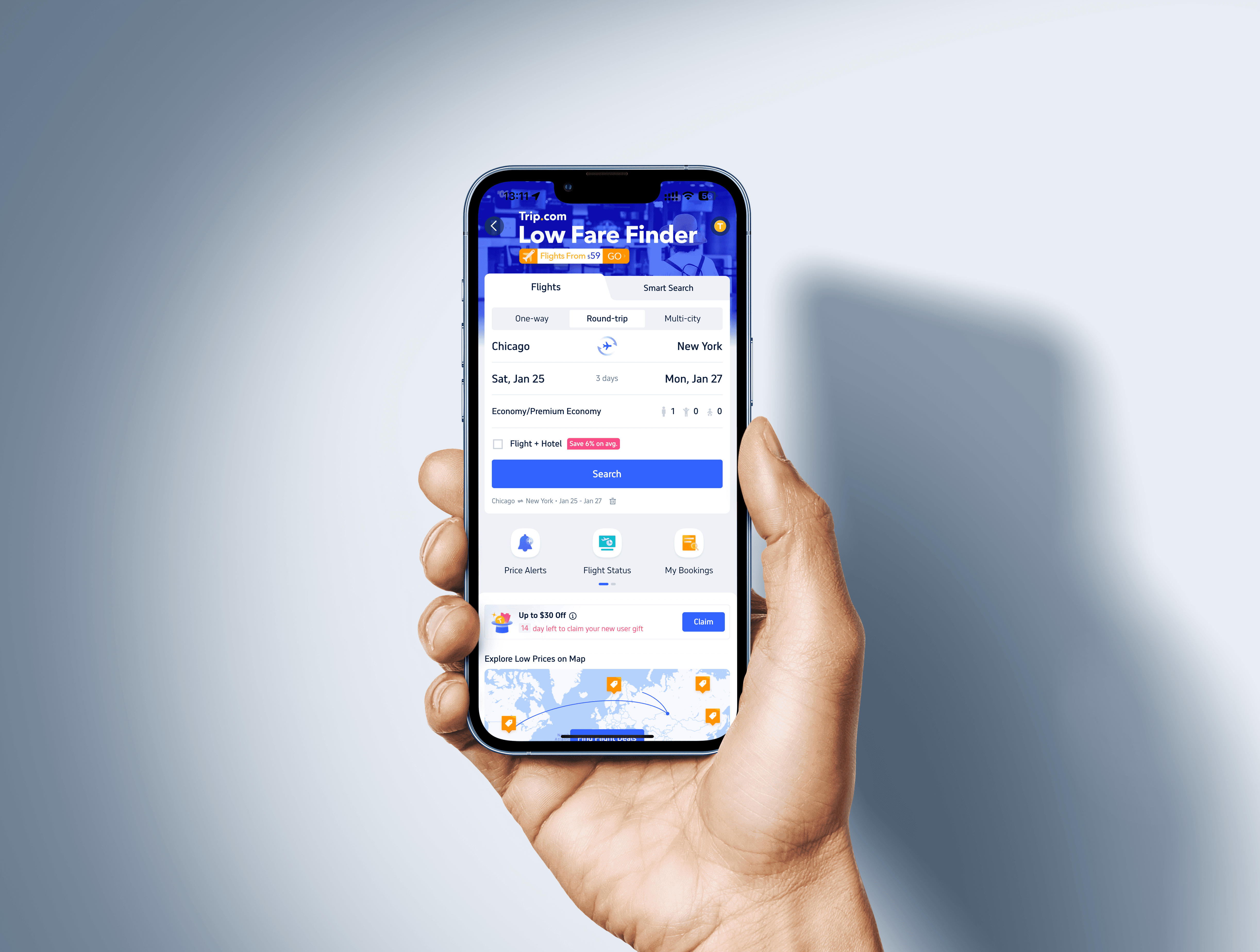
Quick Links
Quick Links
Project Overview
Project Overview
Project Overview
GOAL
GOAL
GOAL
Unify the flight booking and in-trip notification experience across Web/App/H5, reducing the learning curve and cognitive load when booking and checking flight info so the journey feels smoother and clearer—ultimately improving conversion and trust in Trip.com.
Unify the flight booking and in-trip notification experience across Web/App/H5, reducing the learning curve and cognitive load when booking and checking flight info so the journey feels smoother and clearer—ultimately improving conversion and trust in Trip.com.
Unify the flight booking and in-trip notification experience across Web/App/H5, reducing the learning curve and cognitive load when booking and checking flight info so the journey feels smoother and clearer—ultimately improving conversion and trust in Trip.com.
MY ROLE
MY ROLE
MY ROLE
As an assistant interaction designer, I mapped end-to-end flows and designed key interfaces, advanced the Flight Dynamic Island notification concept, and refreshed the UX/visuals for guarantee pop-ups/landing pages and flight-change emails; I iterated with data and usability testing and shipped across platforms.
As an assistant interaction designer, I mapped end-to-end flows and designed key interfaces, advanced the Flight Dynamic Island notification concept, and refreshed the UX/visuals for guarantee pop-ups/landing pages and flight-change emails; I iterated with data and usability testing and shipped across platforms.
As an assistant interaction designer, I mapped end-to-end flows and designed key interfaces, advanced the Flight Dynamic Island notification concept, and refreshed the UX/visuals for guarantee pop-ups/landing pages and flight-change emails; I iterated with data and usability testing and shipped across platforms.
About Trip.com
About Trip.com
About Trip.com
Trip.com is a leading global online travel platform that offers comprehensive travel services, including flight tickets, hotel bookings, train tickets, car rentals, and travel activities, covering over 200 countries and regions.
Trip.com is a leading global online travel platform that offers comprehensive travel services, including flight tickets, hotel bookings, train tickets, car rentals, and travel activities, covering over 200 countries and regions.
Trip.com is a leading global online travel platform that offers comprehensive travel services, including flight tickets, hotel bookings, train tickets, car rentals, and travel activities, covering over 200 countries and regions.
Key Figures
Key Figures
Key Figures
35
35
35
Language
Language
Language
220
220
220
Countries and Regions
Countries and Regions
Countries and Regions
48
48
48
Sites
Sites
Sites
640
640
640
Airlines
Airlines
Airlines
3400
3400
3400
Airports
Airports
Airports
1.5M
1.5M
1.5M
Hotels
Hotels
Hotels

Part 1: 37-Screen Redesign
Part 1: 37-Screen Redesign
Part 1: 37-Screen Redesign
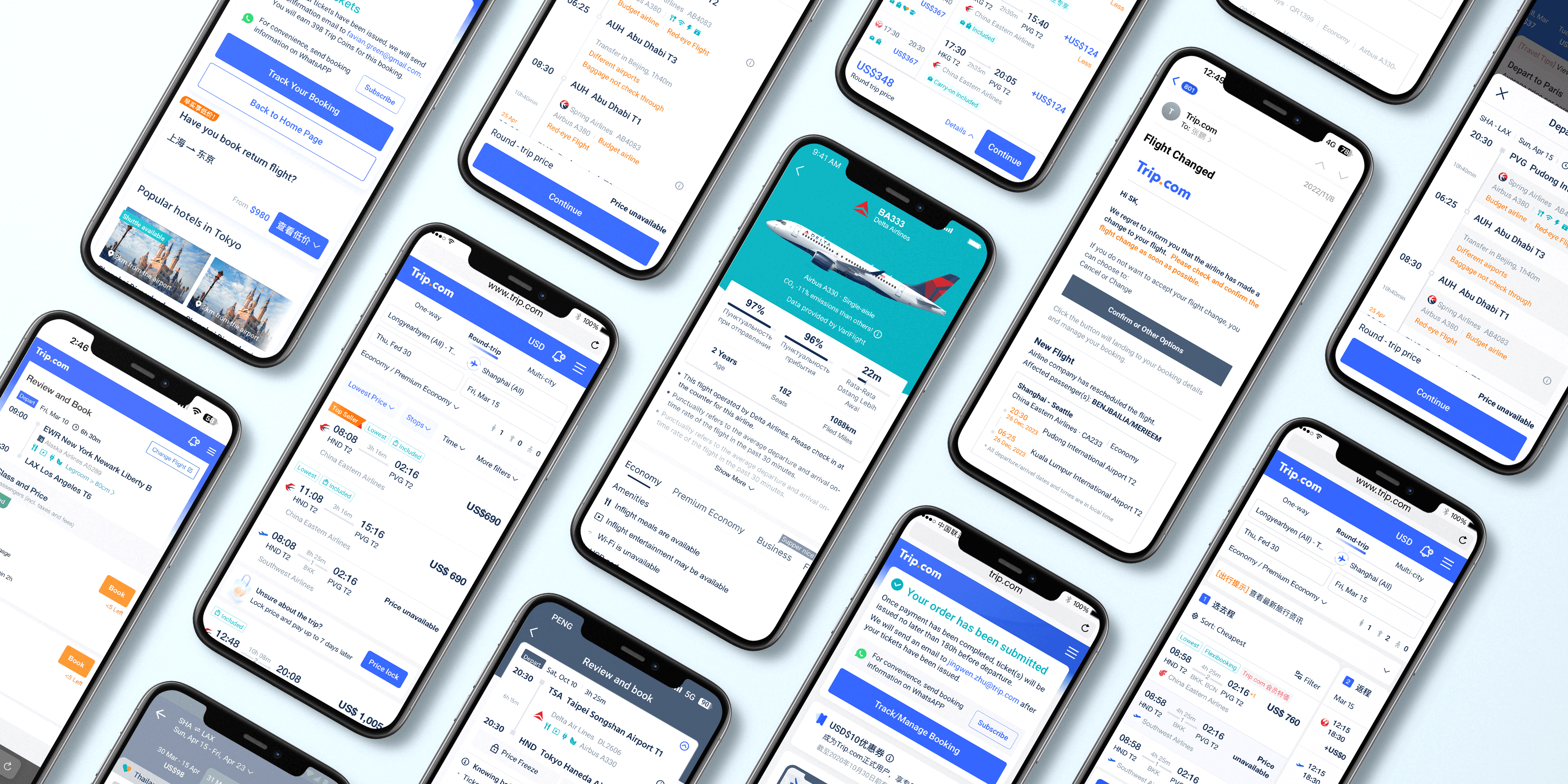
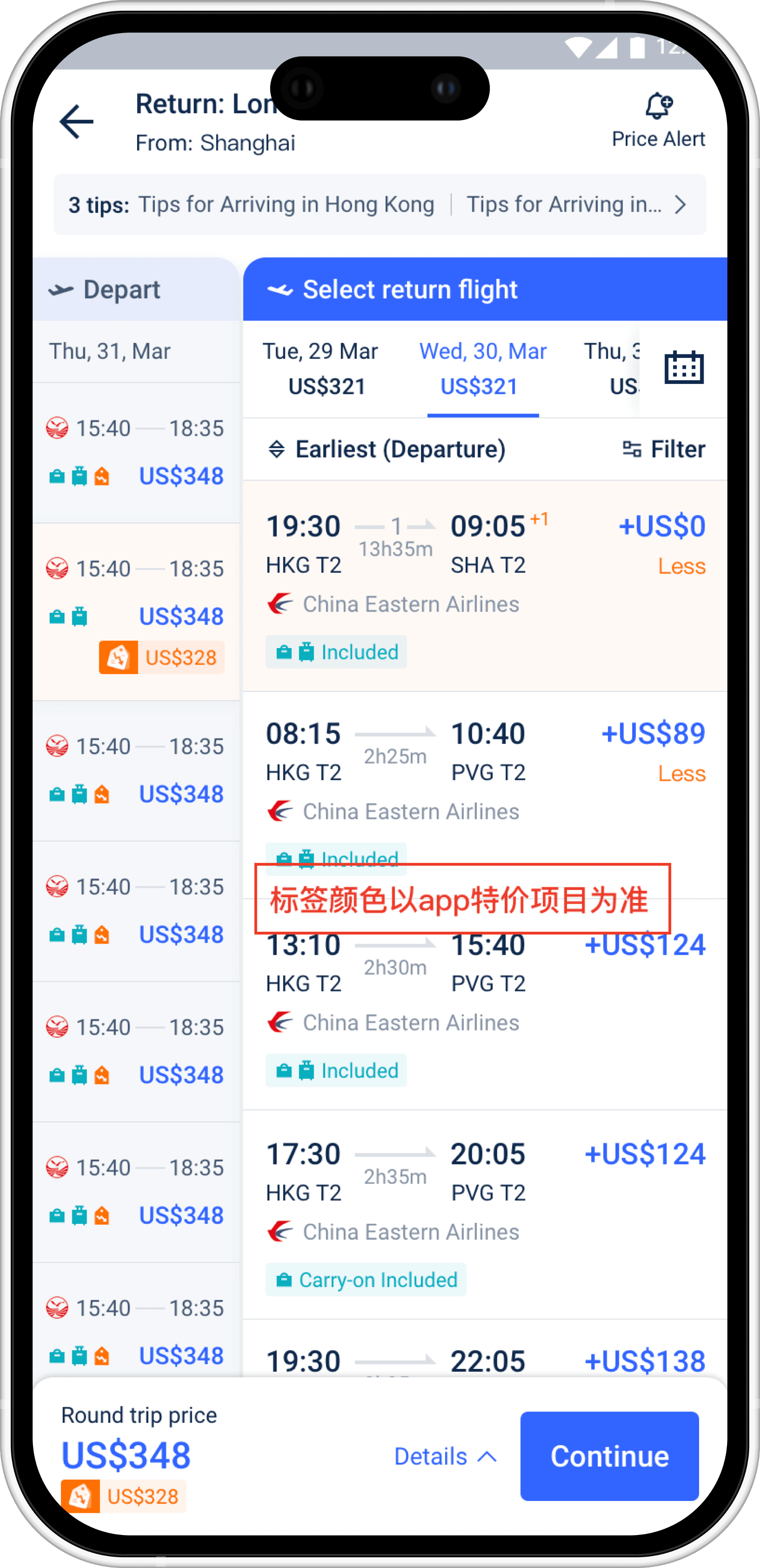
As Trip.com expands globally, the existing flight booking interface struggles to support increasingly complex data structures such as multi-language, multi-currency, layered promotions, and long-haul transfer scenarios. To improve user experience and scalability, we carried out a comprehensive redesign across 37 booking screens.
As Trip.com expands globally, the existing flight booking interface struggles to support increasingly complex data structures such as multi-language, multi-currency, layered promotions, and long-haul transfer scenarios. To improve user experience and scalability, we carried out a comprehensive redesign across 37 booking screens.
As Trip.com expands globally, the existing flight booking interface struggles to support increasingly complex data structures such as multi-language, multi-currency, layered promotions, and long-haul transfer scenarios. To improve user experience and scalability, we carried out a comprehensive redesign across 37 booking screens.
Project Goals
Project Goals
Project Goals
Unify card structure to enhance readability
Unify card structure to enhance readability
Unify card structure to enhance readability
Redesign the layout of Departure and Return cards, standardizing the display of time, price, and tags.
Redesign the layout of Departure and Return cards, standardizing the display of time, price, and tags.
Redesign the layout of Departure and Return cards, standardizing the display of time, price, and tags.
Optimize adaptability for extreme cases
Optimize adaptability for extreme cases
Optimize adaptability for extreme cases
Address issues such as ultra-long prices, abnormal text lengths, and overflow of currency symbols to ensure component stability.
Address issues such as ultra-long prices, abnormal text lengths, and overflow of currency symbols to ensure component stability.
Address issues such as ultra-long prices, abnormal text lengths, and overflow of currency symbols to ensure component stability.
Enhance system flexibility and scalability
Enhance system flexibility and scalability
Enhance system flexibility and scalability
Develop display strategies for multi-language content, promotional labels, app/credit card exclusive pricing, and complex transfer scenarios.
Develop display strategies for multi-language content, promotional labels, app/credit card exclusive pricing, and complex transfer scenarios.
Develop display strategies for multi-language content, promotional labels, app/credit card exclusive pricing, and complex transfer scenarios.
Improve interaction consistency on mobile
Improve interaction consistency on mobile
Improve interaction consistency on mobile
Establish cross-platform visual and interaction guidelines from Web to App to ensure a unified user experience.
Establish cross-platform visual and interaction guidelines from Web to App to ensure a unified user experience.
Establish cross-platform visual and interaction guidelines from Web to App to ensure a unified user experience.
Design Principles & Component Strategies
Design Principles & Component Strategies
Design Principles & Component Strategies
Responsive Adaptation
Responsive Adaptation
Responsive Adaptation
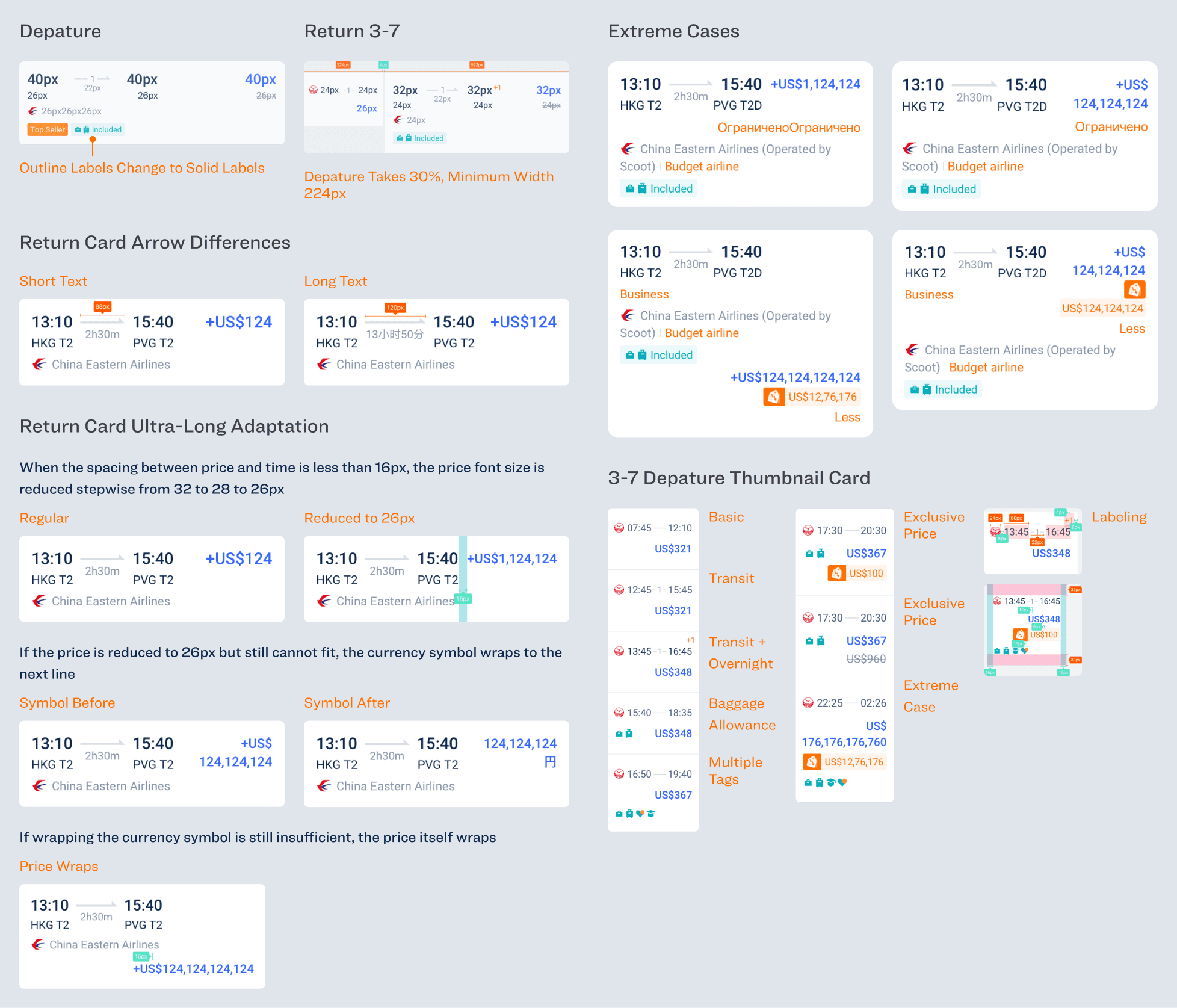
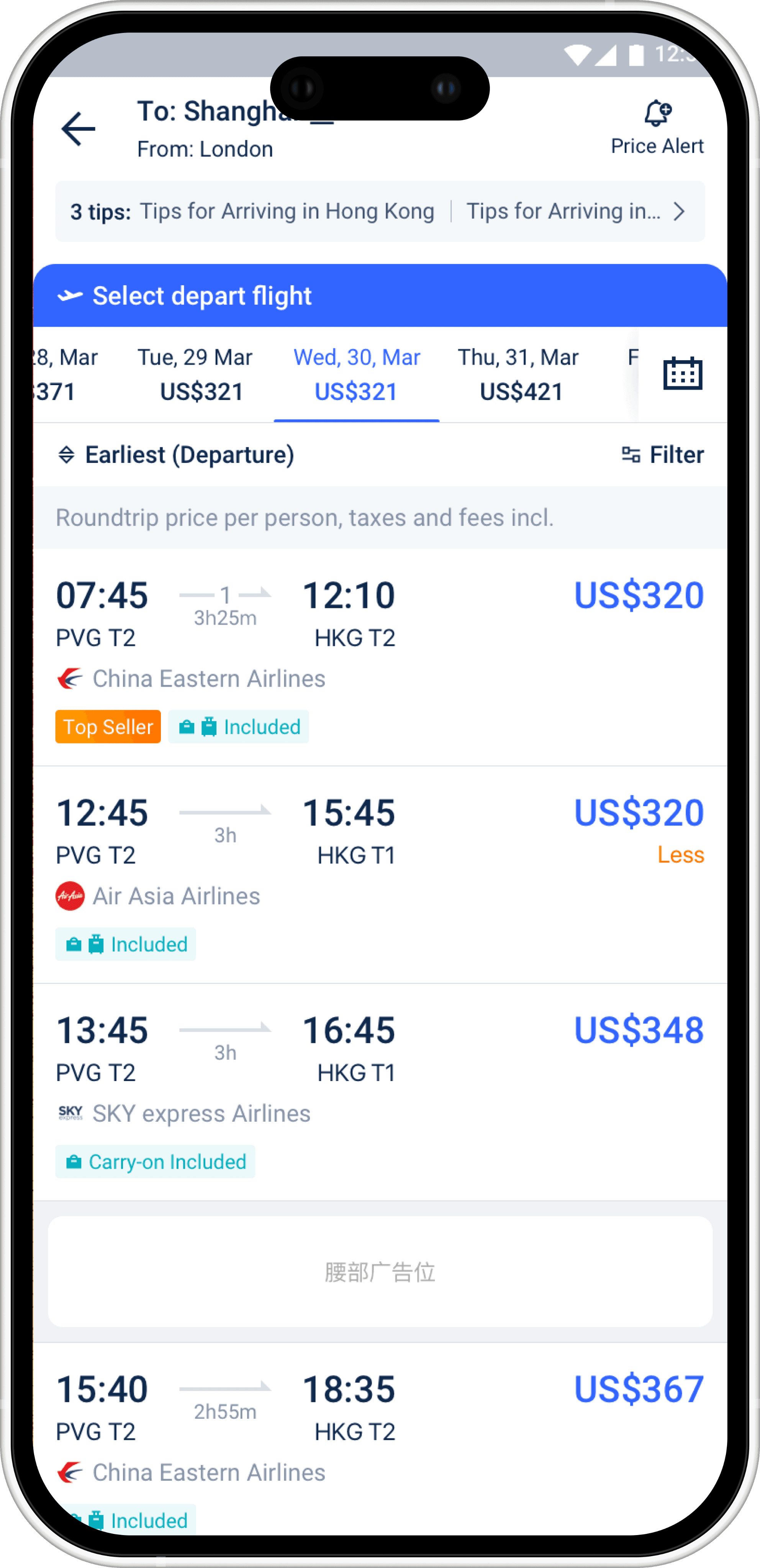
Price font size adjusts dynamically from 32px to 26px based on spacing. If needed, the currency symbol or entire price wraps to preserve layout.
Price font size adjusts dynamically from 32px to 26px based on spacing. If needed, the currency symbol or entire price wraps to preserve layout.
Price font size adjusts dynamically from 32px to 26px based on spacing. If needed, the currency symbol or entire price wraps to preserve layout.
Prioritizing Readability
Prioritizing Readability
Prioritizing Readability
Prices are highlighted in blue; time uses 40px font; tags follow a color hierarchy: orange for key promos, blue for general info.
Prices are highlighted in blue; time uses 40px font; tags follow a color hierarchy: orange for key promos, blue for general info.
Prices are highlighted in blue; time uses 40px font; tags follow a color hierarchy: orange for key promos, blue for general info.
Visual Consistency & Standardization
Visual Consistency & Standardization
Visual Consistency & Standardization
All components follow a unified visual system to ensure structural stability in 3–7 card layouts, scrollable views, and multilingual environments:
All components follow a unified visual system to ensure structural stability in 3–7 card layouts, scrollable views, and multilingual environments:
All components follow a unified visual system to ensure structural stability in 3–7 card layouts, scrollable views, and multilingual environments:
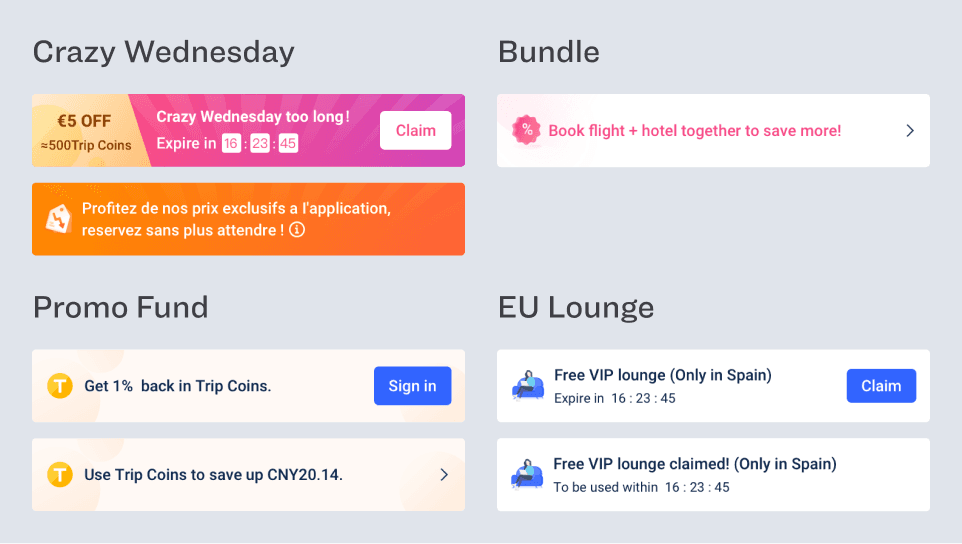
Components Update
Components Update
Components Update
Card Rules
Card Rules
Card Rules
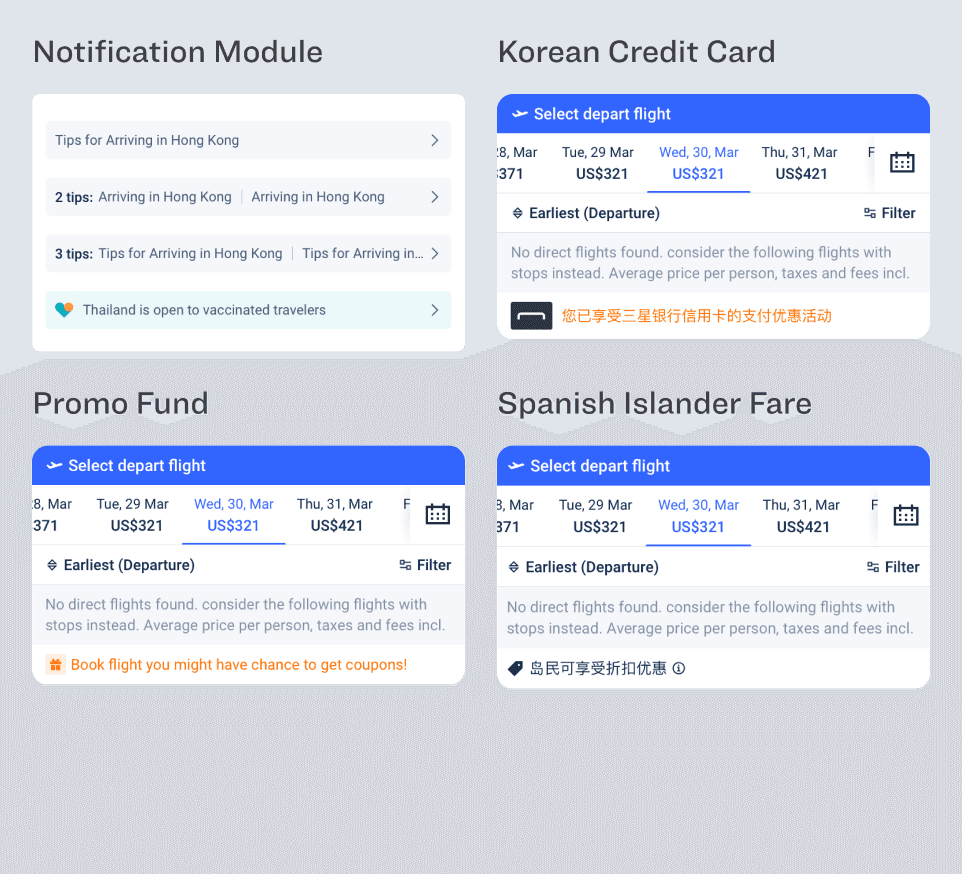
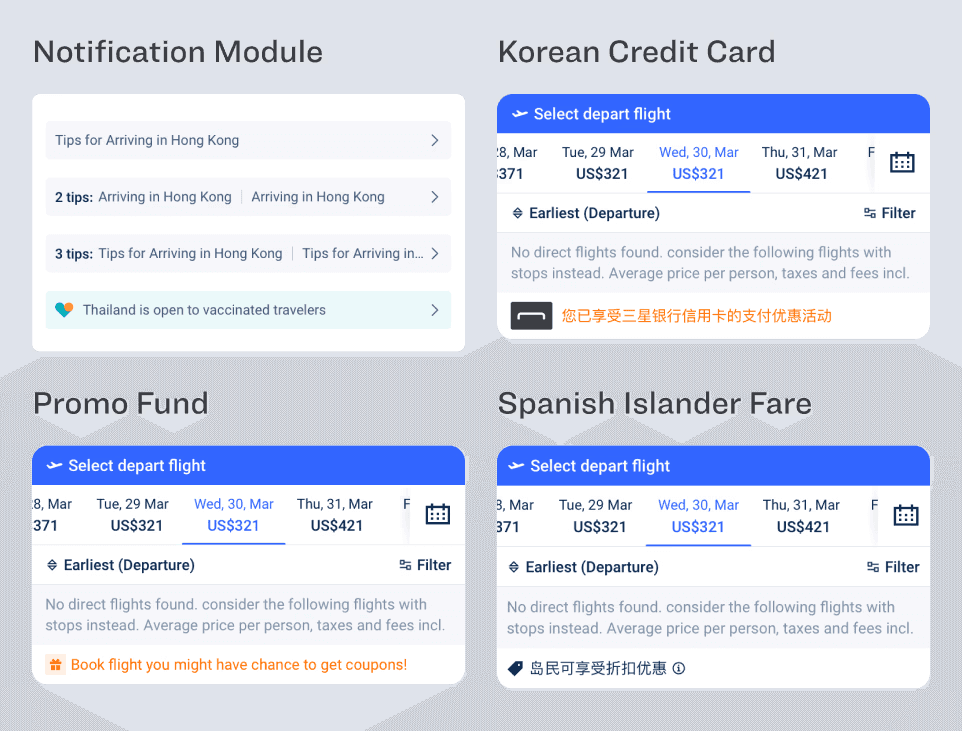
Depature Header Status
Depature Header Status
Depature Header Status
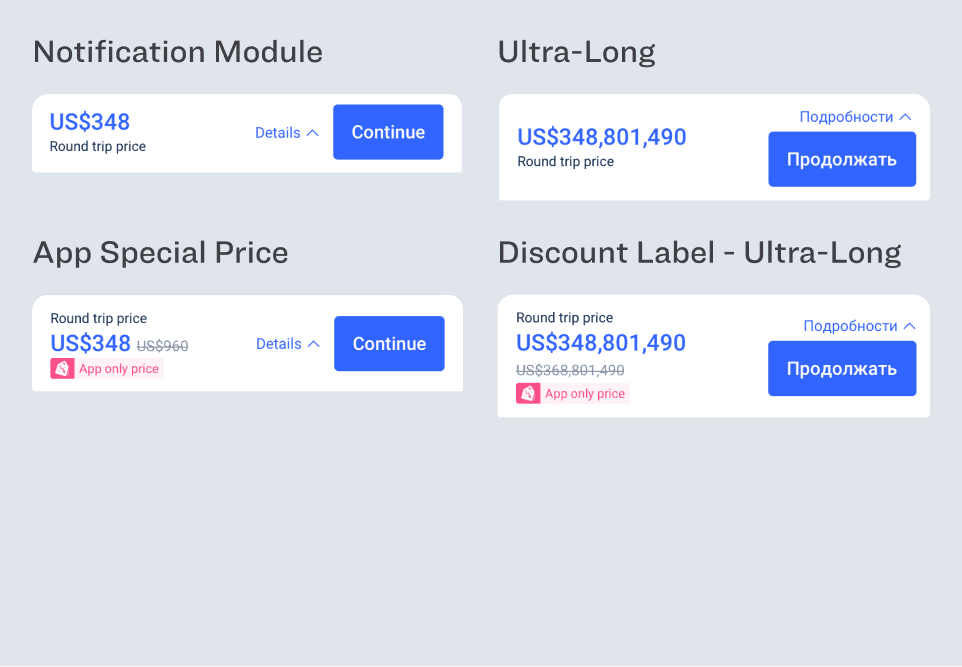
Price bar
Price bar
Price bar
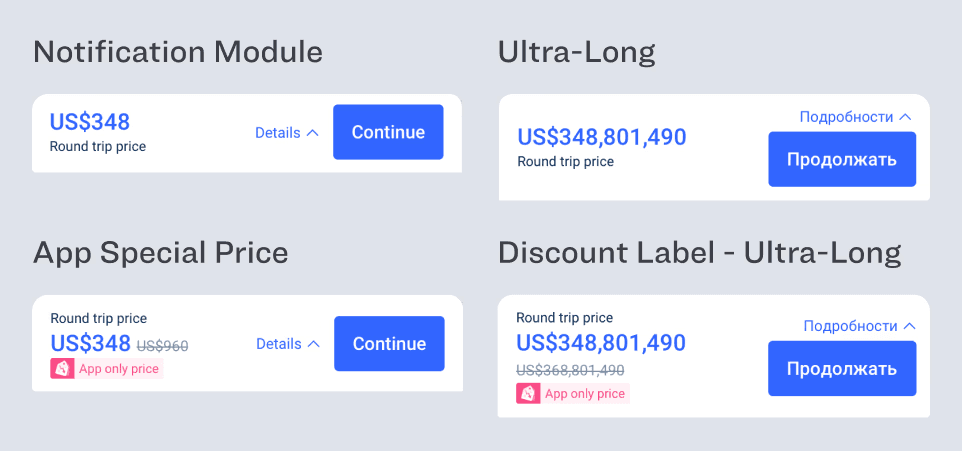
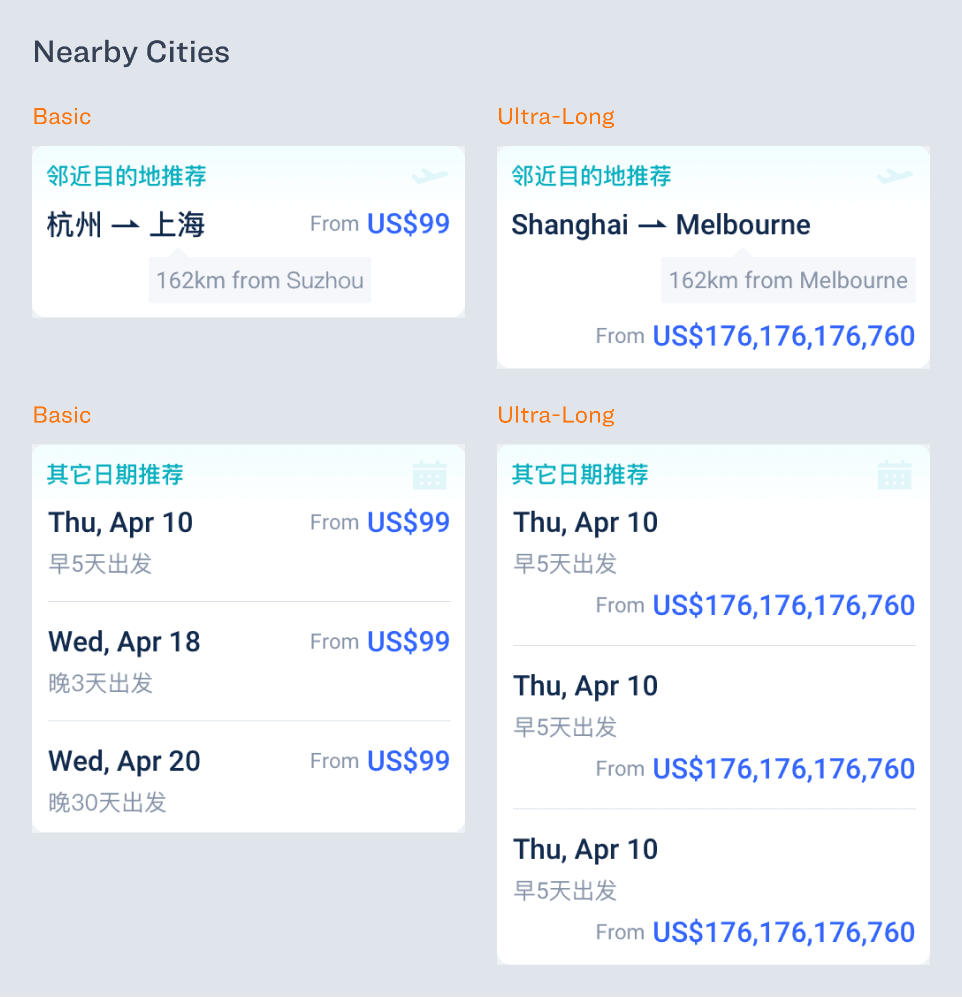
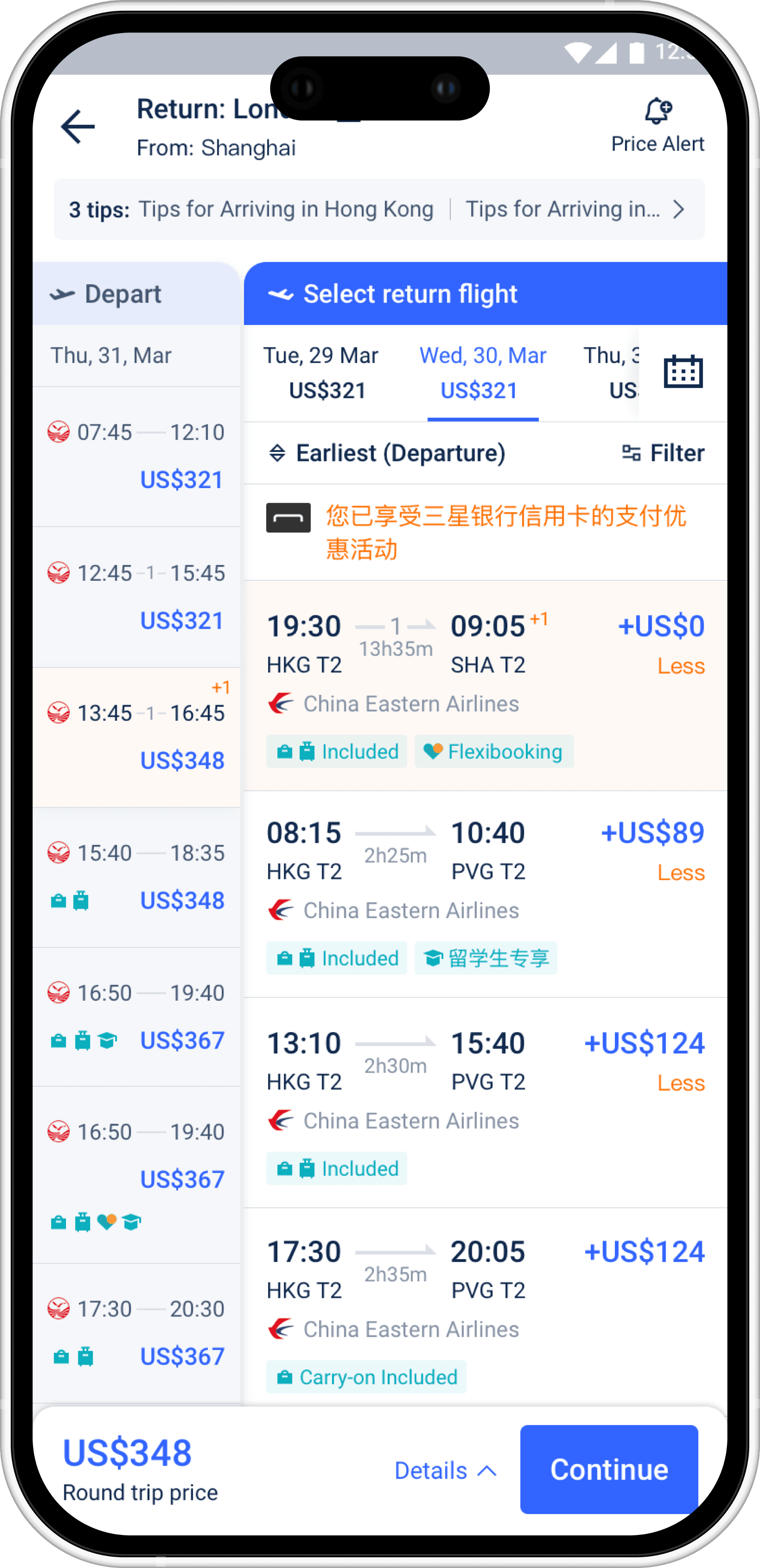
37 Return Recommendation Card
37 Return Recommendation Card
37 Return Recommendation Card
Mid-Page Banner
Mid-Page Banner
Mid-Page Banner
Key Screenshots
Key Screenshots
Key Screenshots
Depature
Depature
Depature
Return
Return
Return
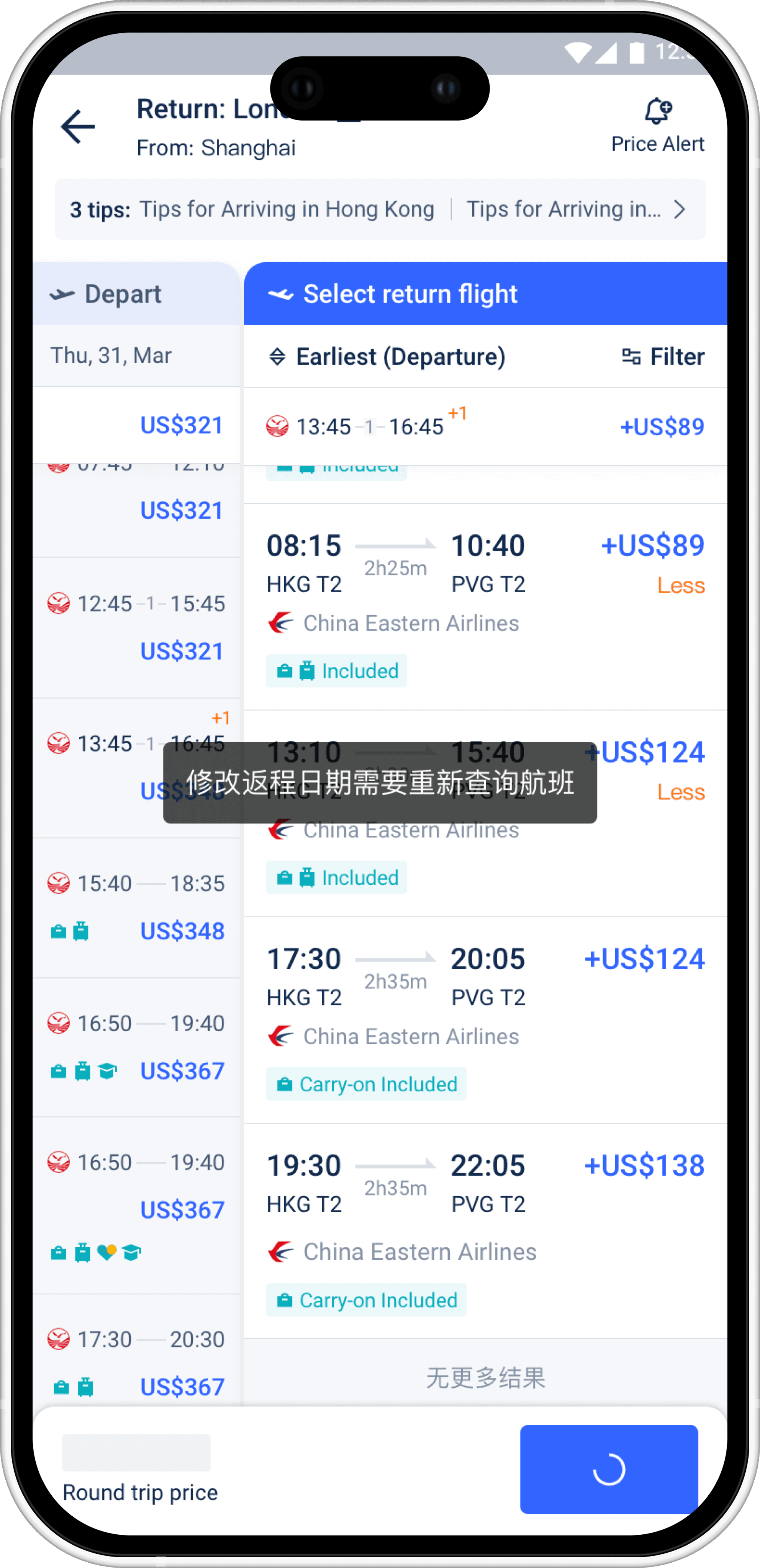
Return - Slide Up to Stick
Return - Slide Up to Stick
Return - Slide Up to Stick
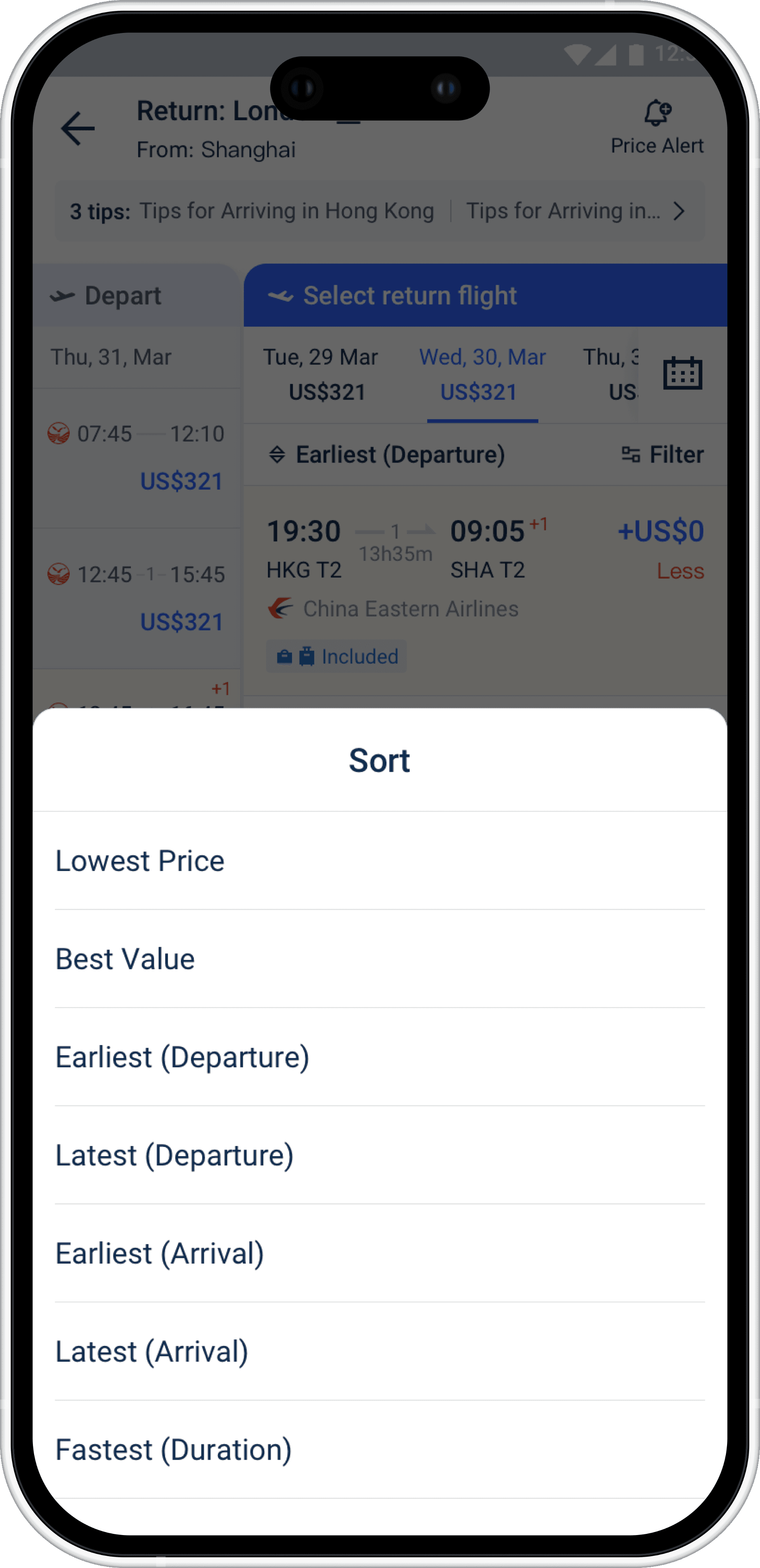
Return - Sorting
Return - Sorting
Return - Sorting
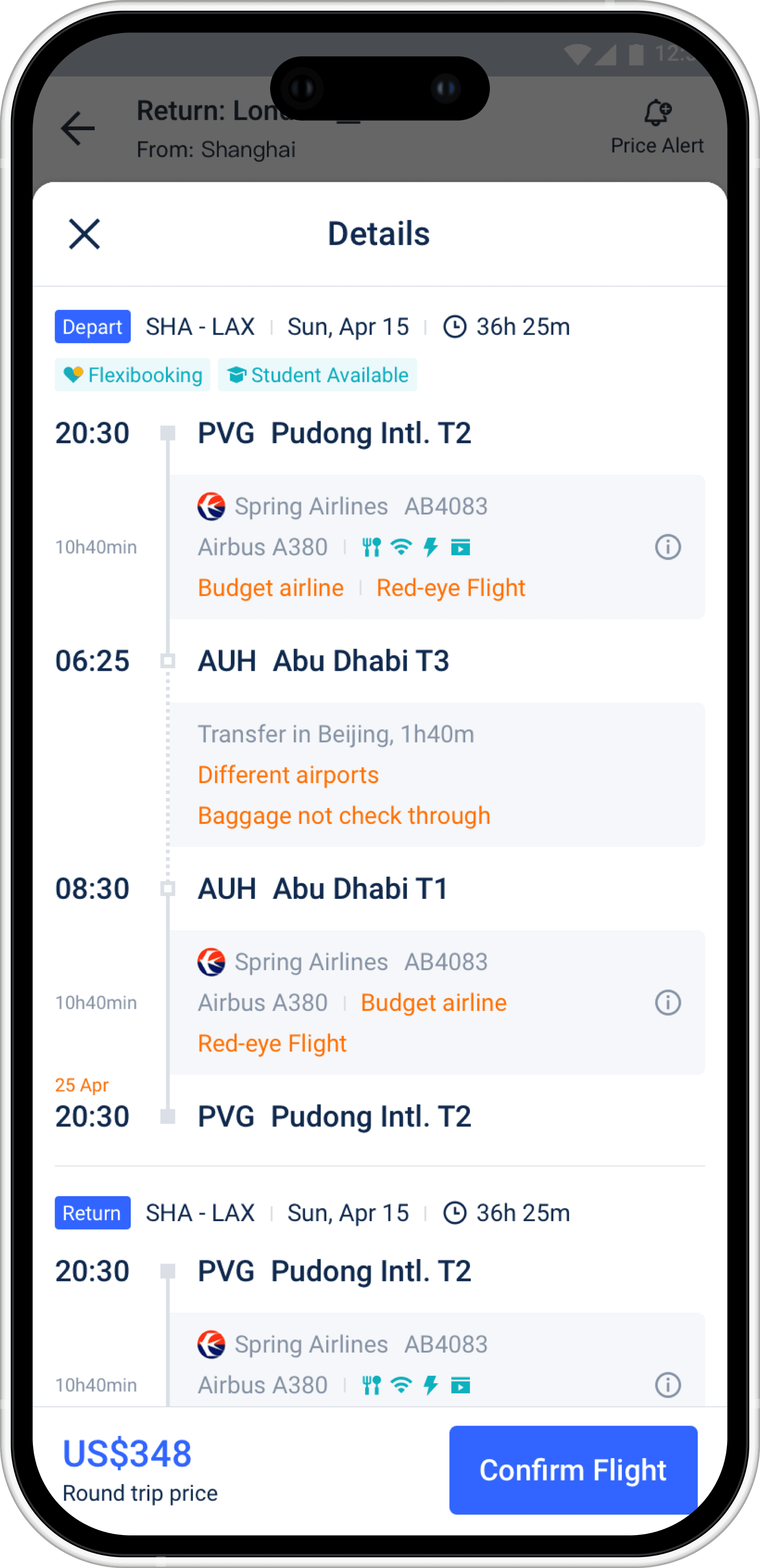
Return - Flight Details
Return - Flight Details
Return - Flight Details
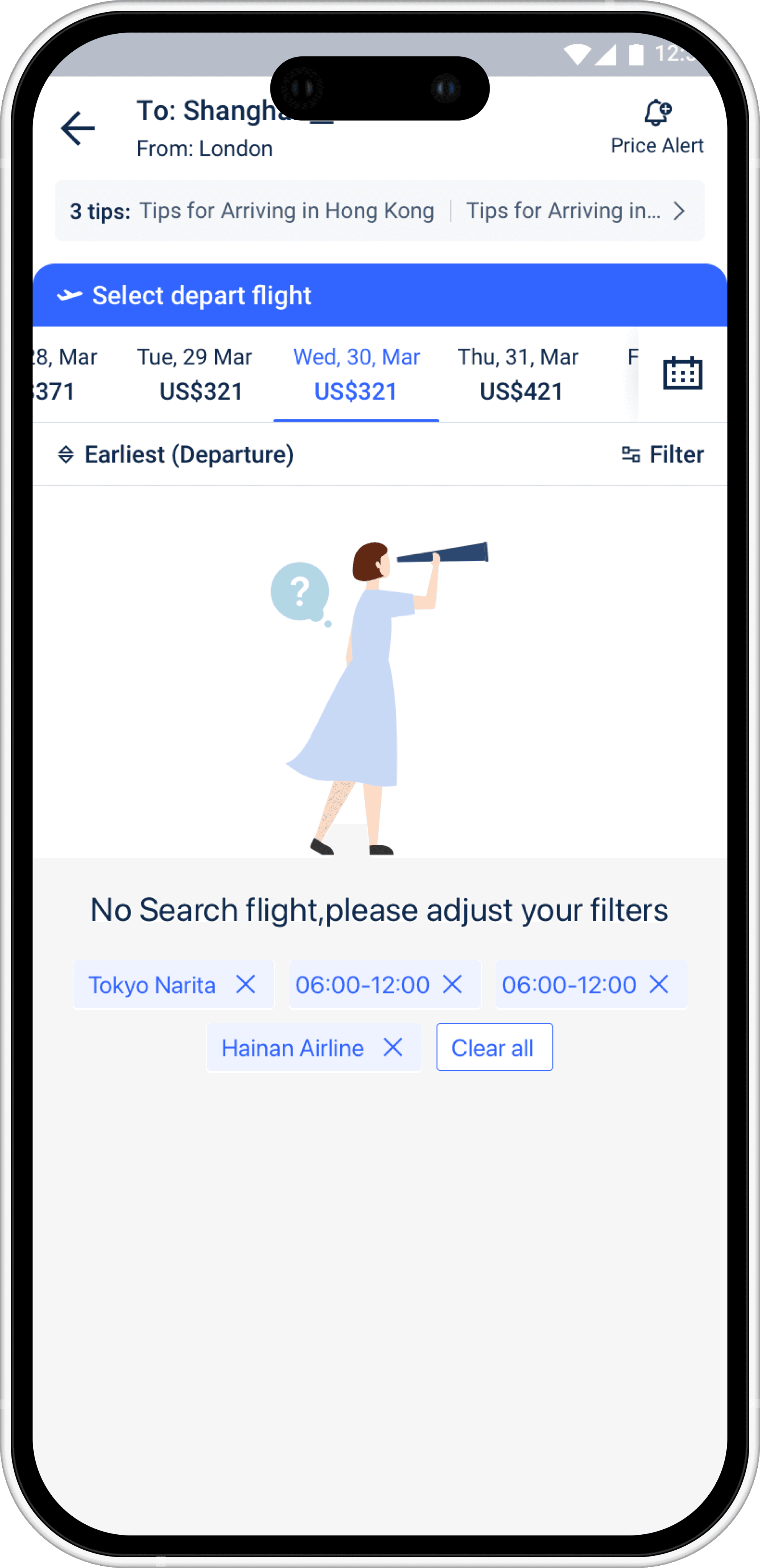
Departure - No Results
Departure - No Results
Departure - No Results
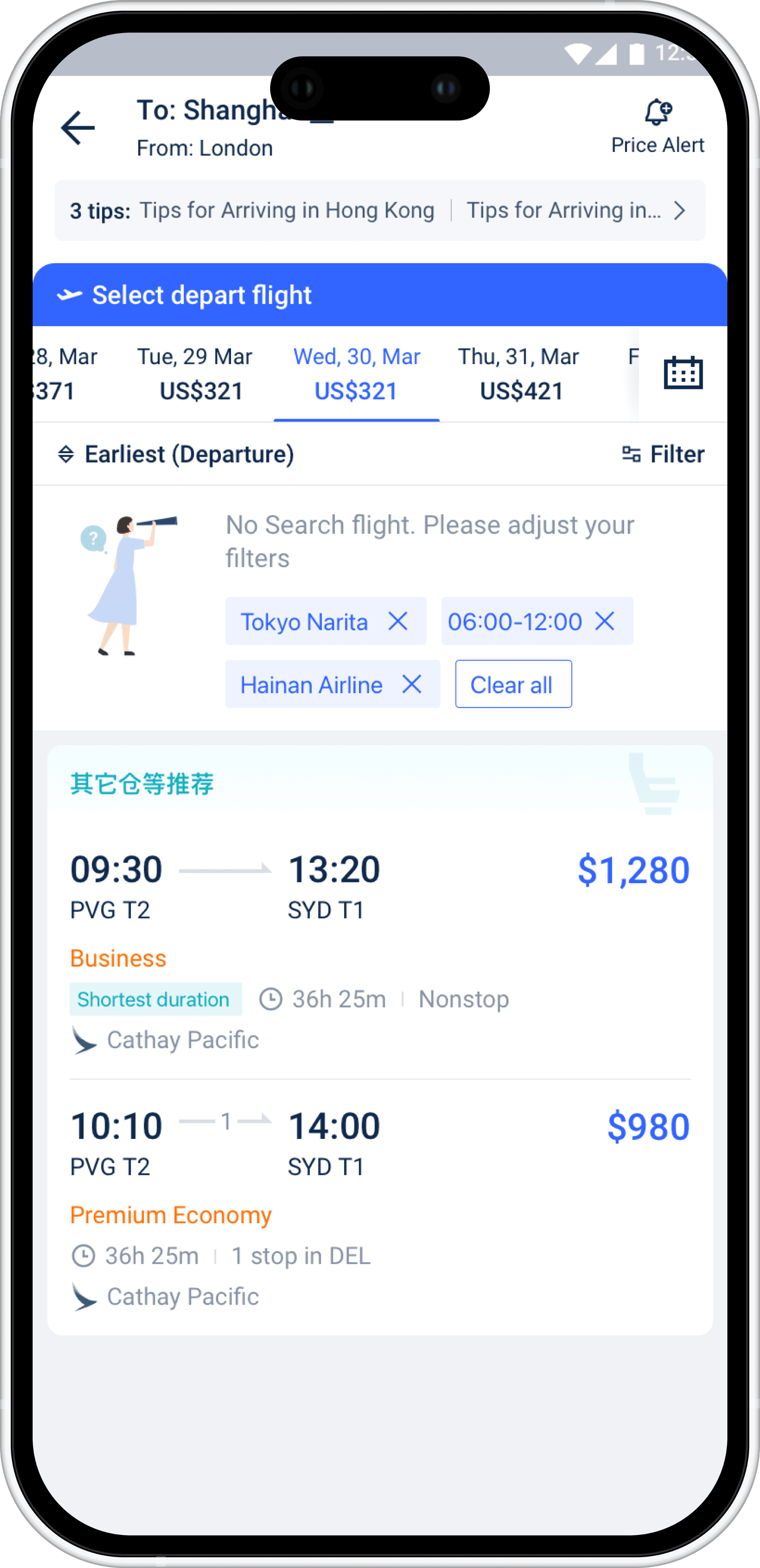
Departure - Recommendation
Departure - Recommendation
Departure - Recommendation
Return - No Results
Return - No Results
Return - No Results
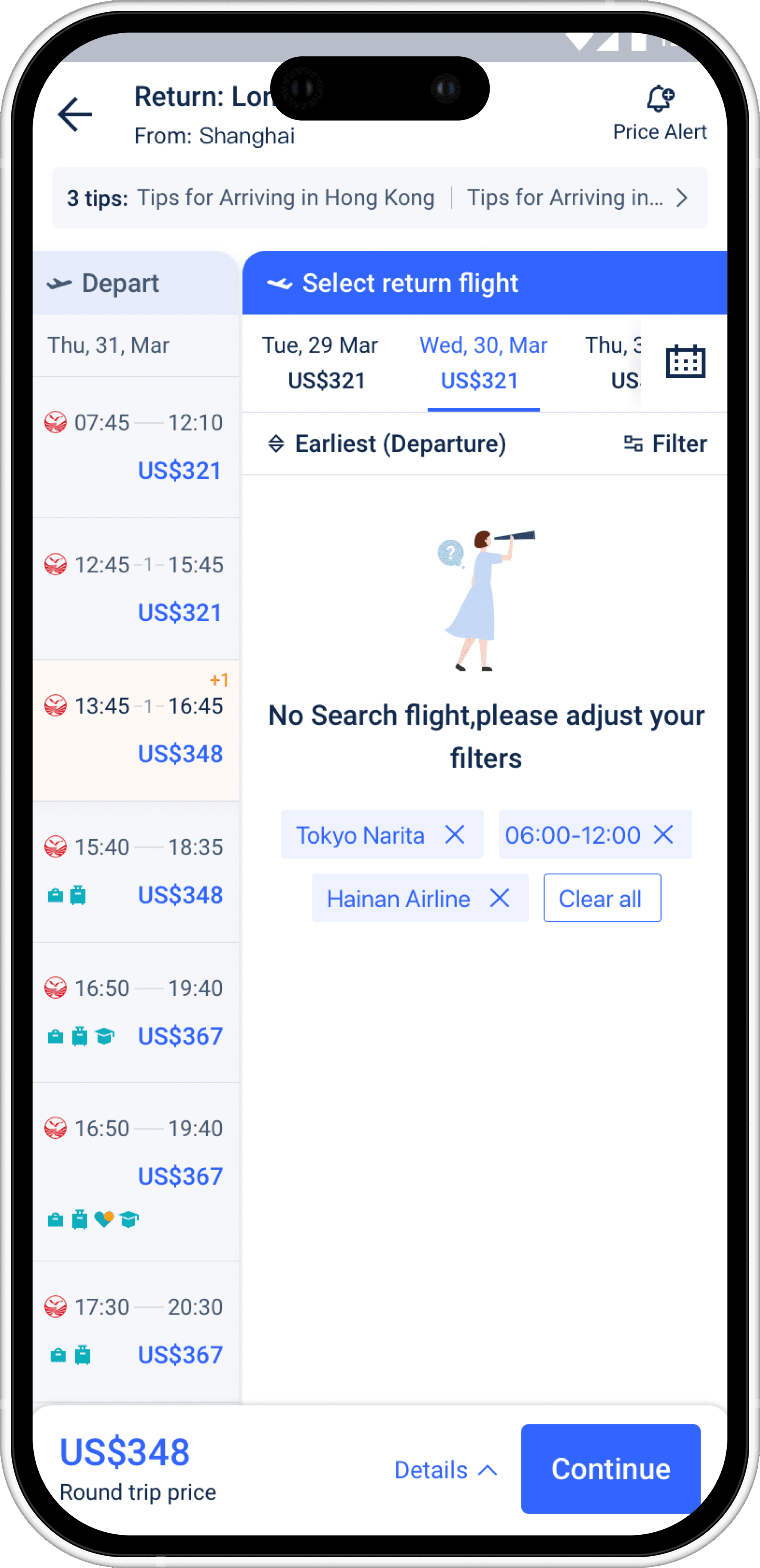
Departure - Cabin Class Recommendation
Departure - Cabin Class Recommendation
Departure - Cabin Class Recommendation
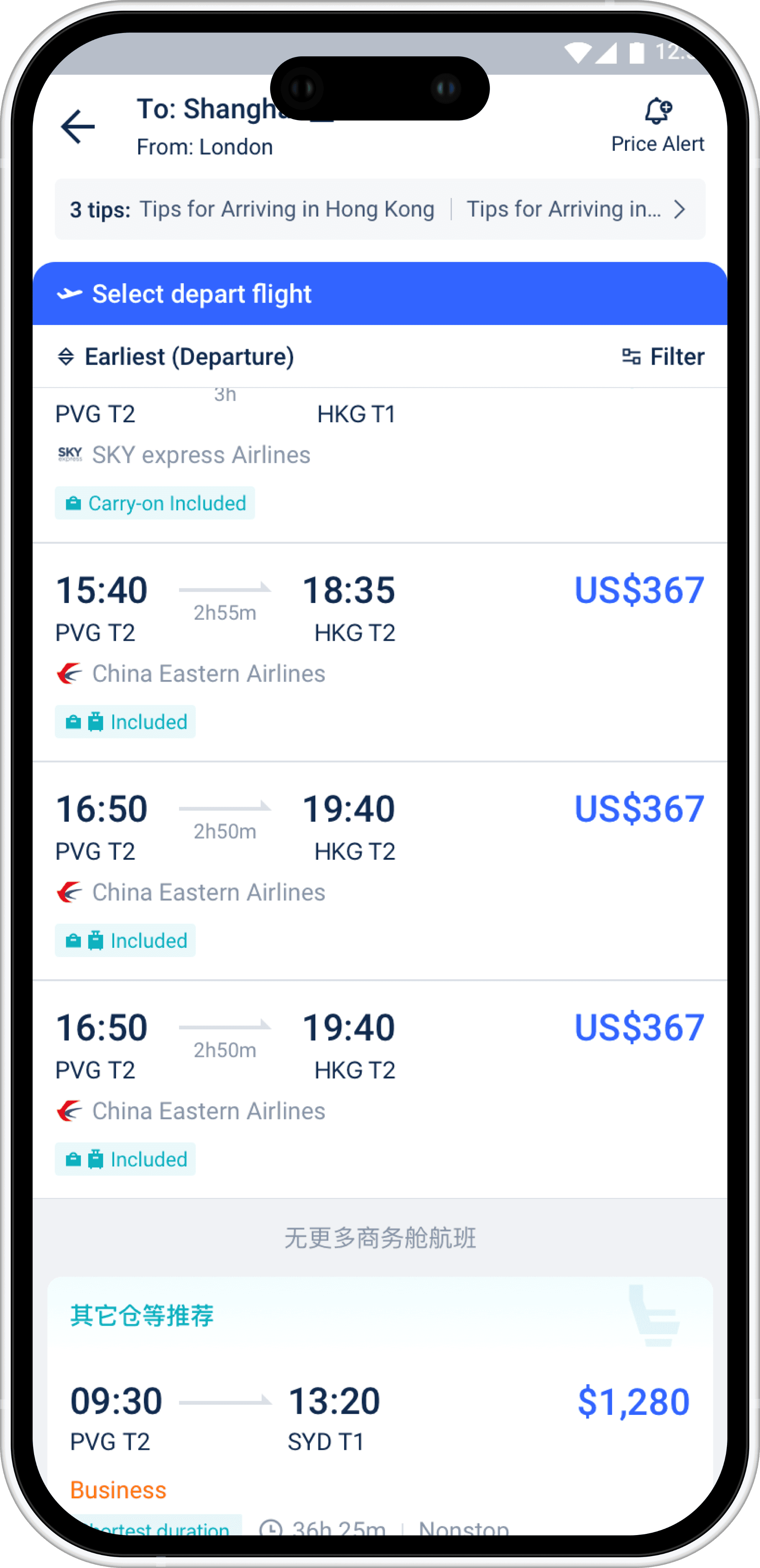
Return - Cabin Class Recommendation
Return - Cabin Class Recommendation
Return - Cabin Class Recommendation
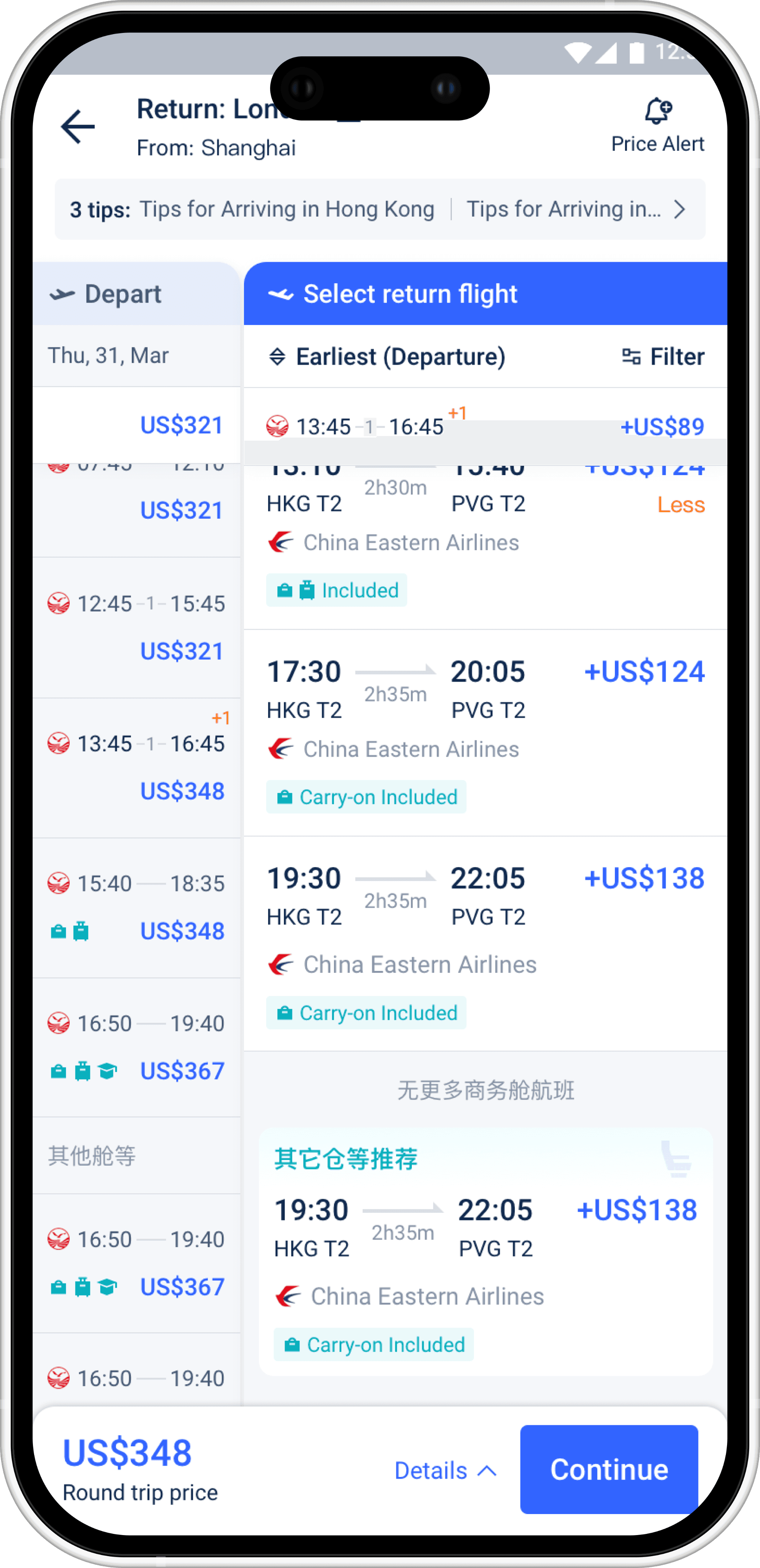
Departure - Loading
Departure - Loading
Departure - Loading
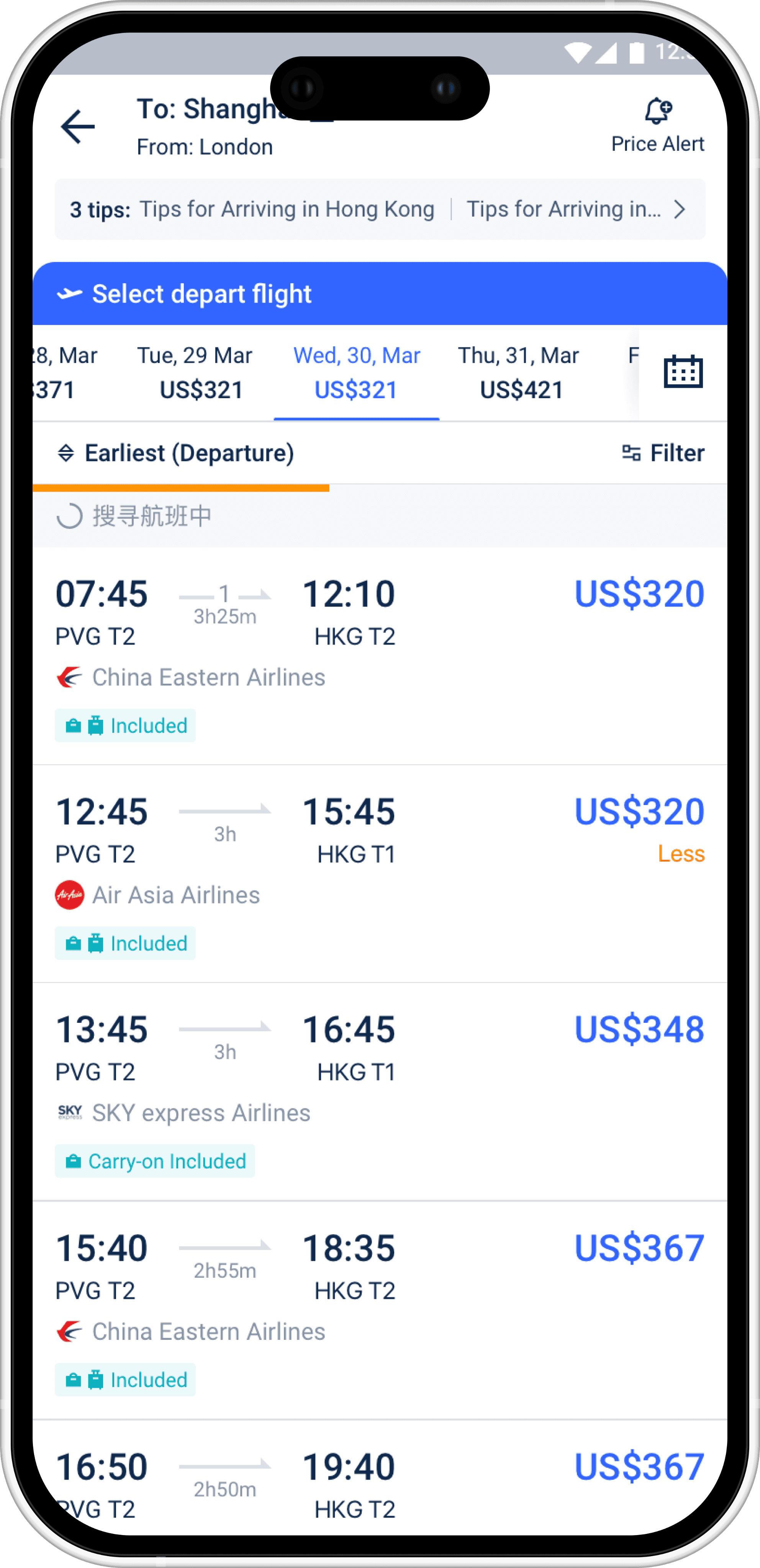
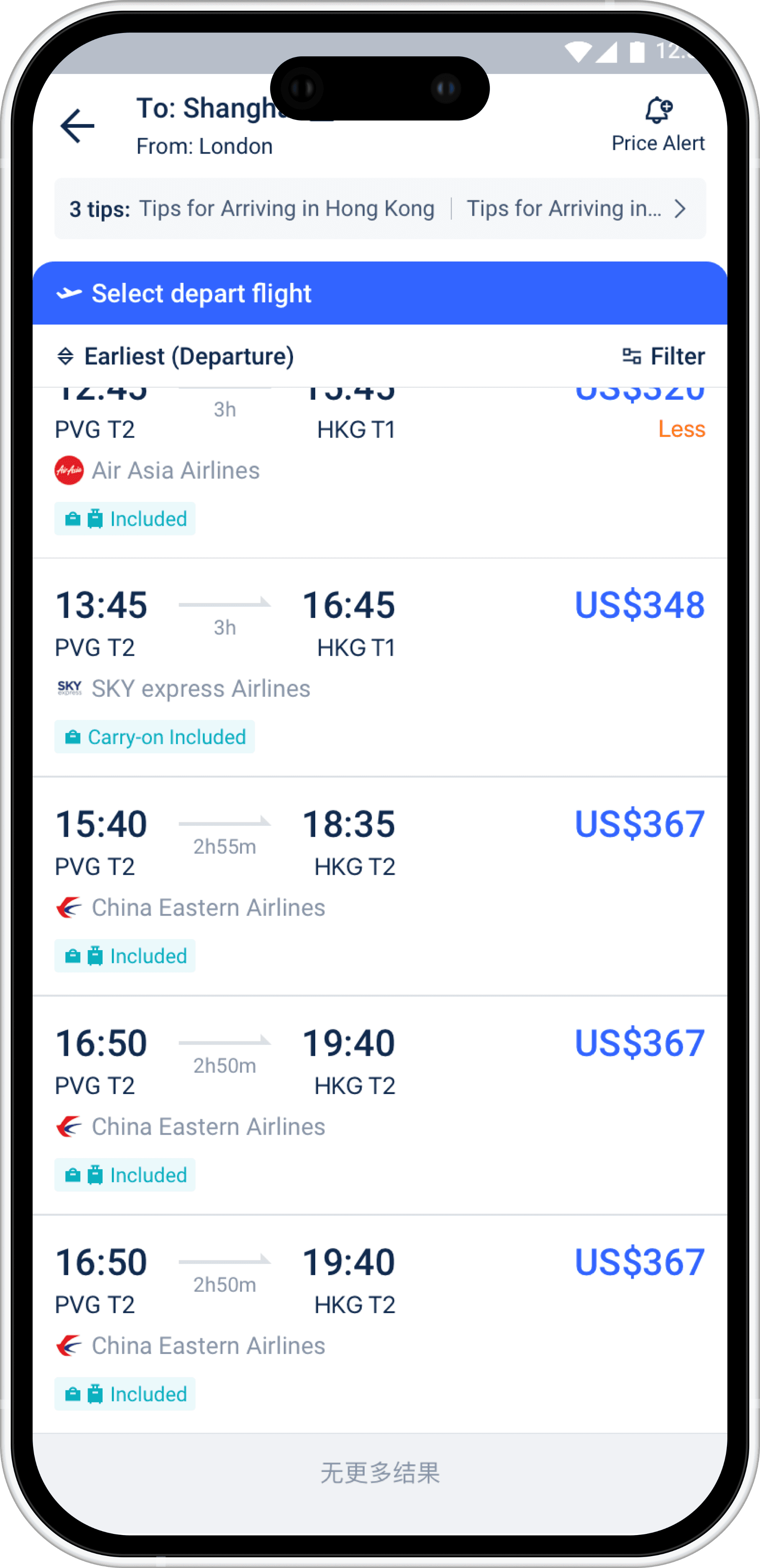
Departure - First Screen Scroll Down
Departure - First Screen Scroll Down
Departure - First Screen Scroll Down
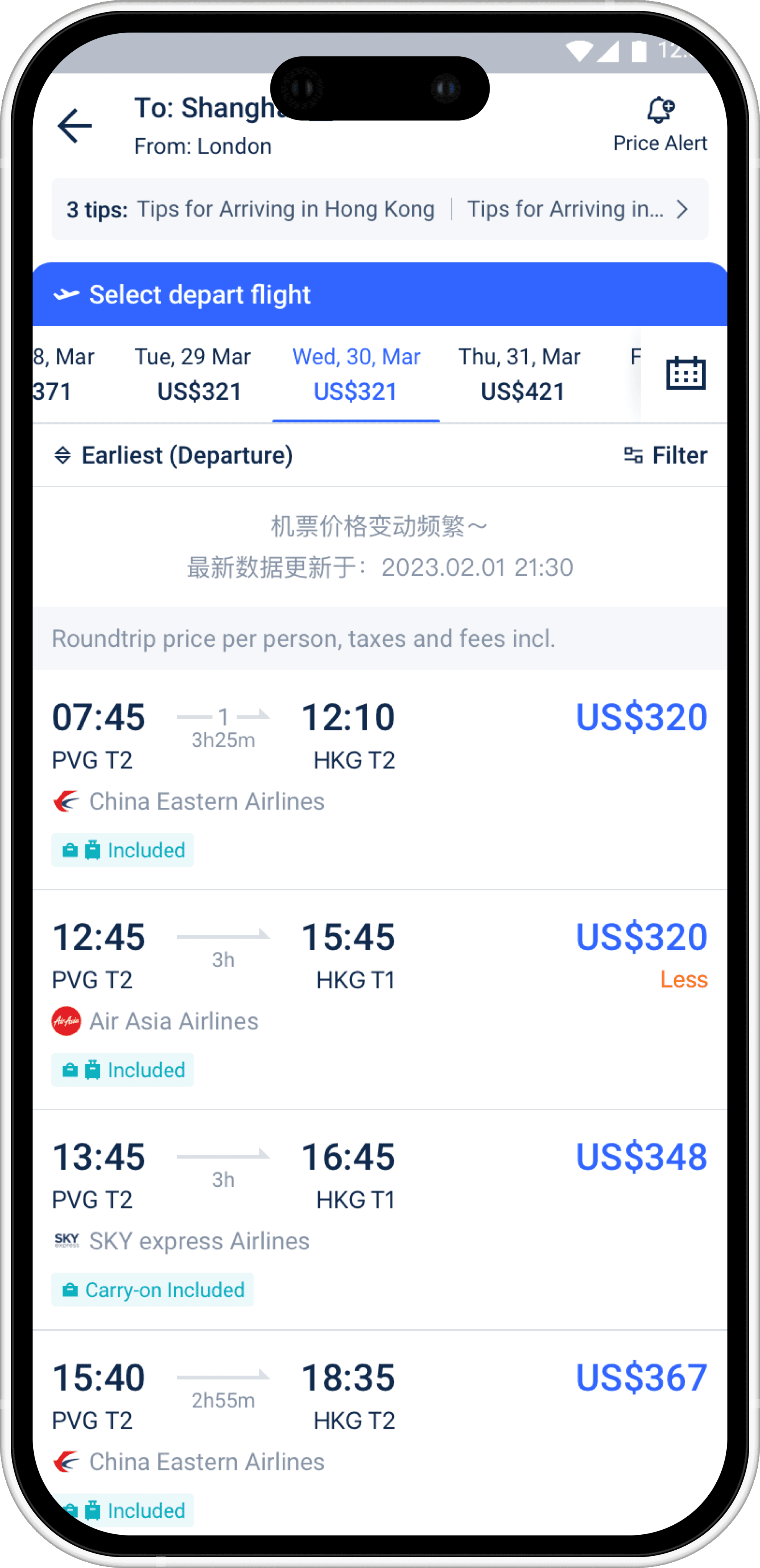
Departure - Price Explanation Slides Up
Departure - Price Explanation Slides Up
Departure - Price Explanation Slides Up
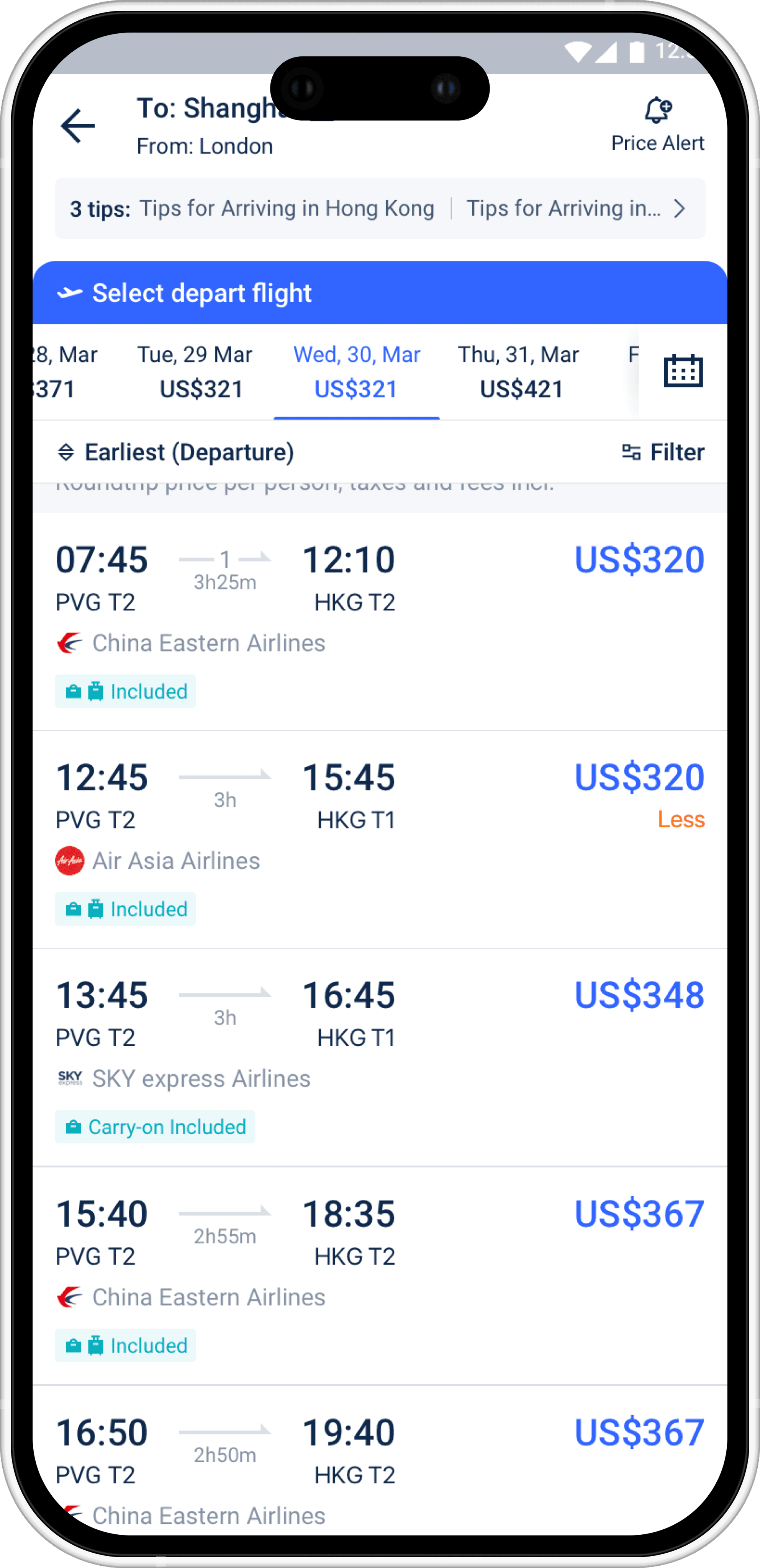
Departure - Slide Up to Stick
Departure - Slide Up to Stick
Departure - Slide Up to Stick
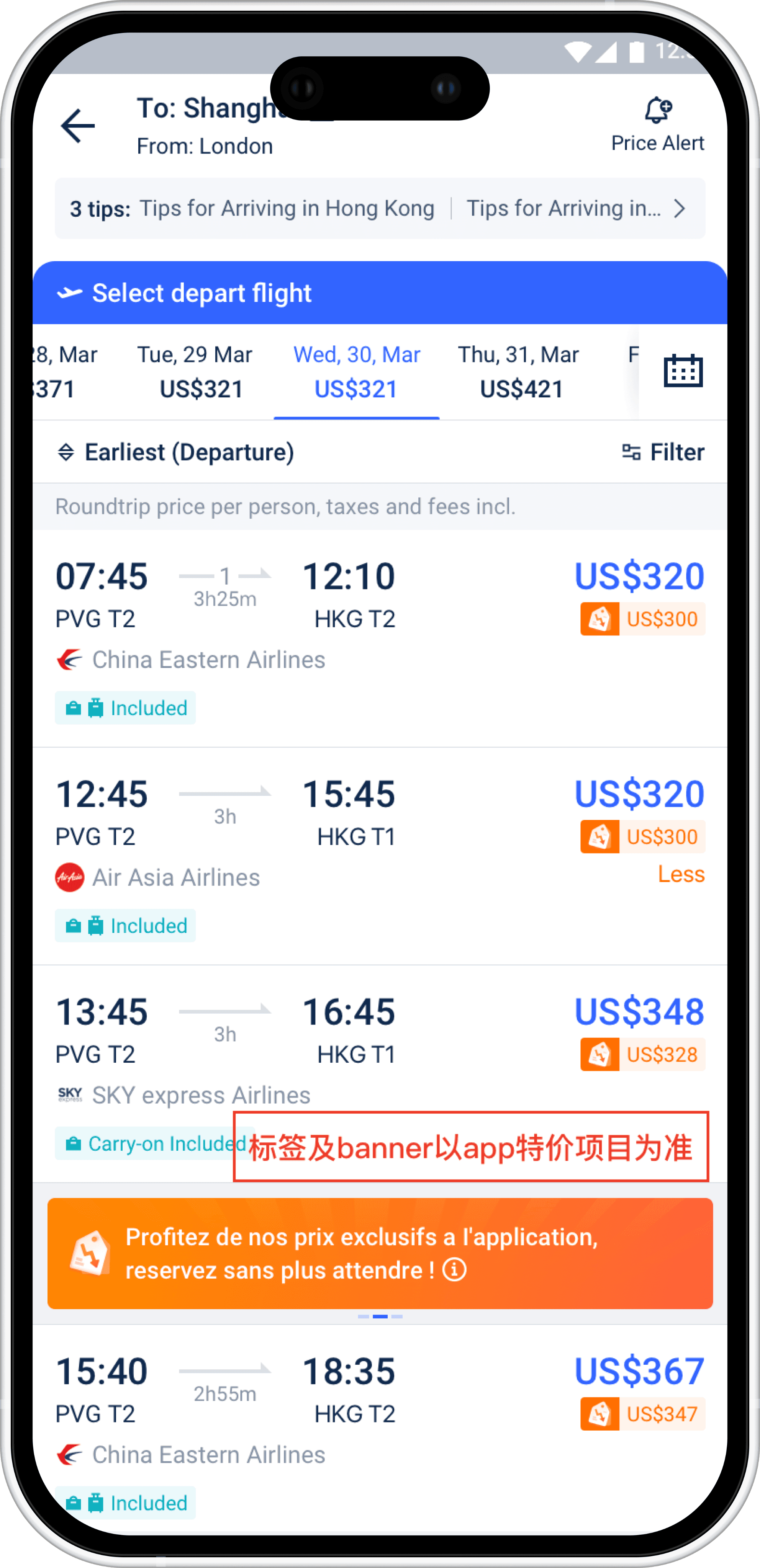
Departure - App Special Price
Departure - App Special Price
Departure - App Special Price
Return - App Special Price
Return - App Special Price
Return - App Special Price
Part 2: Trip.com Flight Homepage Redesign
Part 2: Trip.com Flight Homepage Redesign
Part 2: Trip.com Flight Homepage Redesign
This project focuses on redesigning the Trip.com mobile flight homepage. In the legacy version, the homepage simultaneously functioned as a search entry, booking center, and promotional surface. Search inputs, booking status, price-related products (Price Freeze / Price Alert), and flight recommendations were stacked within a single vertical flow.
As more features were added over time, the page became information-dense but cognitively inefficient, making it difficult for users to quickly identify their primary task upon entry.
The new design reorganizes the information structure without removing business modules, re-establishing a clear hierarchy that brings the homepage back to its core purpose: efficient flight search and clear decision support.
This project focuses on redesigning the Trip.com mobile flight homepage. In the legacy version, the homepage simultaneously functioned as a search entry, booking center, and promotional surface. Search inputs, booking status, price-related products (Price Freeze / Price Alert), and flight recommendations were stacked within a single vertical flow.
As more features were added over time, the page became information-dense but cognitively inefficient, making it difficult for users to quickly identify their primary task upon entry.
The new design reorganizes the information structure without removing business modules, re-establishing a clear hierarchy that brings the homepage back to its core purpose: efficient flight search and clear decision support.
This project focuses on redesigning the Trip.com mobile flight homepage. In the legacy version, the homepage simultaneously functioned as a search entry, booking center, and promotional surface. Search inputs, booking status, price-related products (Price Freeze / Price Alert), and flight recommendations were stacked within a single vertical flow.
As more features were added over time, the page became information-dense but cognitively inefficient, making it difficult for users to quickly identify their primary task upon entry.
The new design reorganizes the information structure without removing business modules, re-establishing a clear hierarchy that brings the homepage back to its core purpose: efficient flight search and clear decision support.
Design Goals
Design Goals
Design Goals
Re-focus the homepage on its primary task
Re-focus the homepage on its primary task
Re-focus the homepage on its primary task
Reinforce flight search as the dominant action, both visually and structurally.
Reinforce flight search as the dominant action, both visually and structurally.
Reinforce flight search as the dominant action, both visually and structurally.
Reduce first-screen cognitive noise
Reduce first-screen cognitive noise
Reduce first-screen cognitive noise
Retain business modules (bookings, price freeze, price alerts) without letting them compete with search intent.
Retain business modules (bookings, price freeze, price alerts) without letting them compete with search intent.
Retain business modules (bookings, price freeze, price alerts) without letting them compete with search intent.
Create a predictable information hierarchy
Create a predictable information hierarchy
Create a predictable information hierarchy
Ensure users see a stable layout regardless of whether they have existing bookings or not.
Ensure users see a stable layout regardless of whether they have existing bookings or not.
Ensure users see a stable layout regardless of whether they have existing bookings or not.
Problem Identification & Analysis
Problem Identification & Analysis
Problem Identification & Analysis
High Information Density Within the Search Module
High Information Density Within the Search Module
High Information Density Within the Search Module
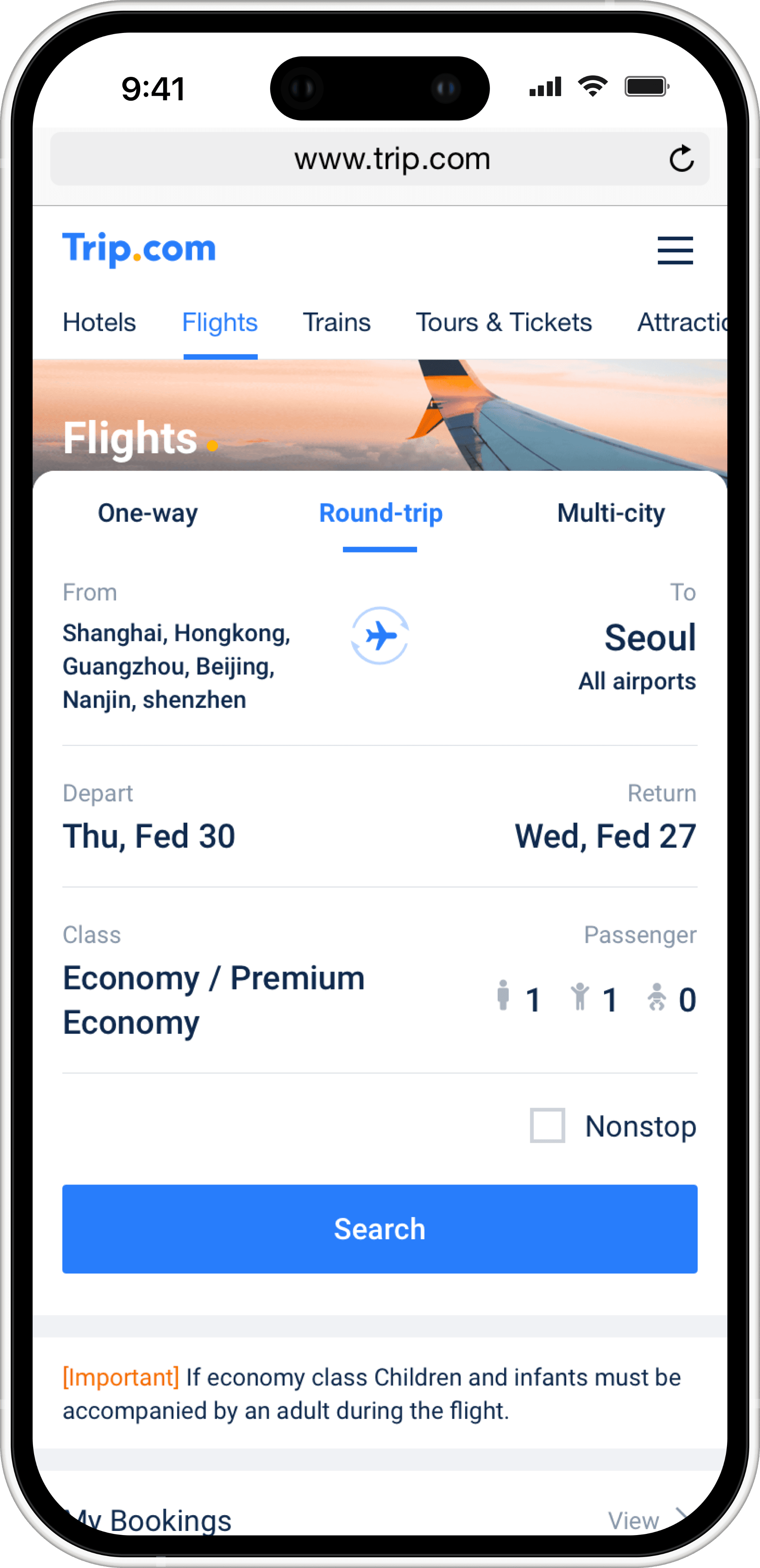
When users performed round-trip or multi-city searches, especially with long city names, they had to read through multiple lines of text to confirm whether the search conditions were correct. The design focused on reducing the impact of this issue through page-level hierarchy and structural adjustments:
The search module was consistently positioned as the primary focal area of the page, ensuring search remains the dominant task upon entry;
Booking-related and price-related modules were moved downward and clearly grouped, preventing them from competing visually with search inputs;
When users performed round-trip or multi-city searches, especially with long city names, they had to read through multiple lines of text to confirm whether the search conditions were correct. The design focused on reducing the impact of this issue through page-level hierarchy and structural adjustments:
The search module was consistently positioned as the primary focal area of the page, ensuring search remains the dominant task upon entry;
Booking-related and price-related modules were moved downward and clearly grouped, preventing them from competing visually with search inputs;
When users performed round-trip or multi-city searches, especially with long city names, they had to read through multiple lines of text to confirm whether the search conditions were correct. The design focused on reducing the impact of this issue through page-level hierarchy and structural adjustments:
The search module was consistently positioned as the primary focal area of the page, ensuring search remains the dominant task upon entry;
Booking-related and price-related modules were moved downward and clearly grouped, preventing them from competing visually with search inputs;
Search Module Competes Visually With Downstream Content
Search Module Competes Visually With Downstream Content
Search Module Competes Visually With Downstream Content
In the old homepage layout, the search module was immediately followed by multiple content sections such as My Bookings, Flight Status, and Recommended Flights, all presented with similar card styles and visual weight. As a result, the search area failed to establish itself as a clear task entry point, and users’ attention was often pulled away before fully confirming their search conditions.
Reducing immediate visual interference from downstream modules, such as bookings and price-related content, so they do not compete for attention before users confirm their search conditions.
Establishing a clear reading flow from “search confirmation” to “content exploration”, guiding users to validate their search state first before engaging with related information.
In the old homepage layout, the search module was immediately followed by multiple content sections such as My Bookings, Flight Status, and Recommended Flights, all presented with similar card styles and visual weight. As a result, the search area failed to establish itself as a clear task entry point, and users’ attention was often pulled away before fully confirming their search conditions.
Reducing immediate visual interference from downstream modules, such as bookings and price-related content, so they do not compete for attention before users confirm their search conditions.
Establishing a clear reading flow from “search confirmation” to “content exploration”, guiding users to validate their search state first before engaging with related information.
In the old homepage layout, the search module was immediately followed by multiple content sections such as My Bookings, Flight Status, and Recommended Flights, all presented with similar card styles and visual weight. As a result, the search area failed to establish itself as a clear task entry point, and users’ attention was often pulled away before fully confirming their search conditions.
Reducing immediate visual interference from downstream modules, such as bookings and price-related content, so they do not compete for attention before users confirm their search conditions.
Establishing a clear reading flow from “search confirmation” to “content exploration”, guiding users to validate their search state first before engaging with related information.
Solution Exploration
Solution Exploration
Solution Exploration
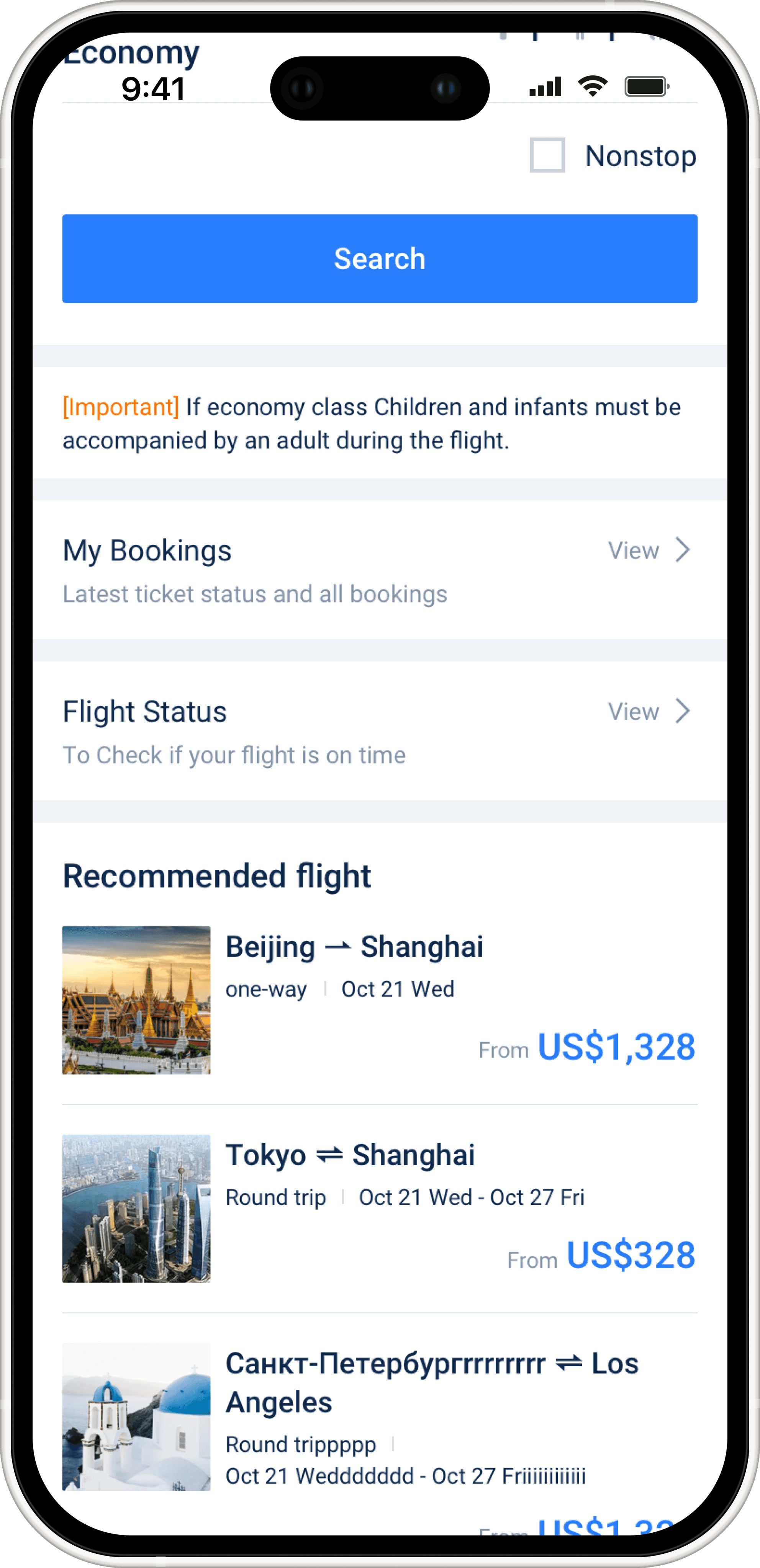
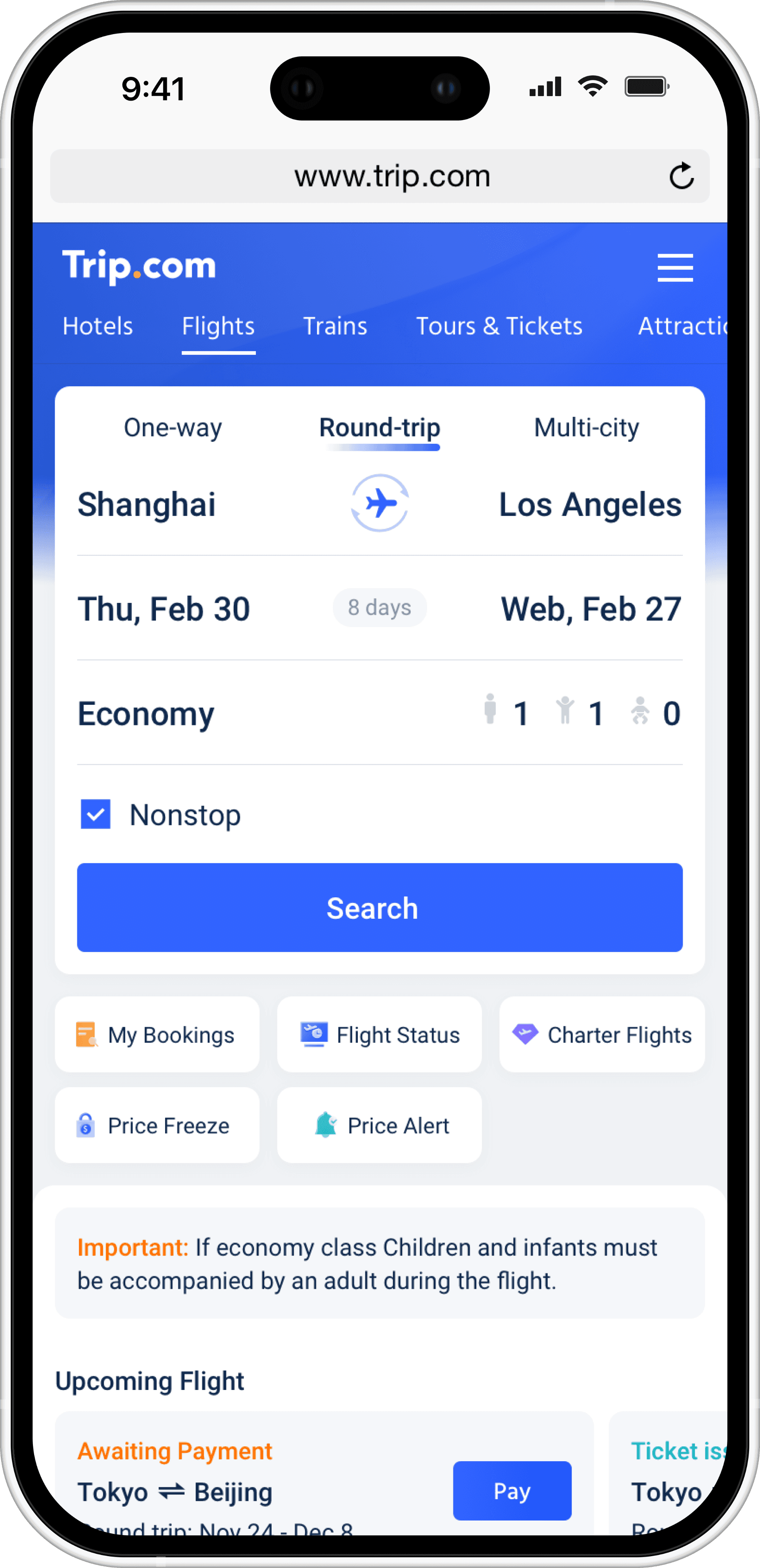
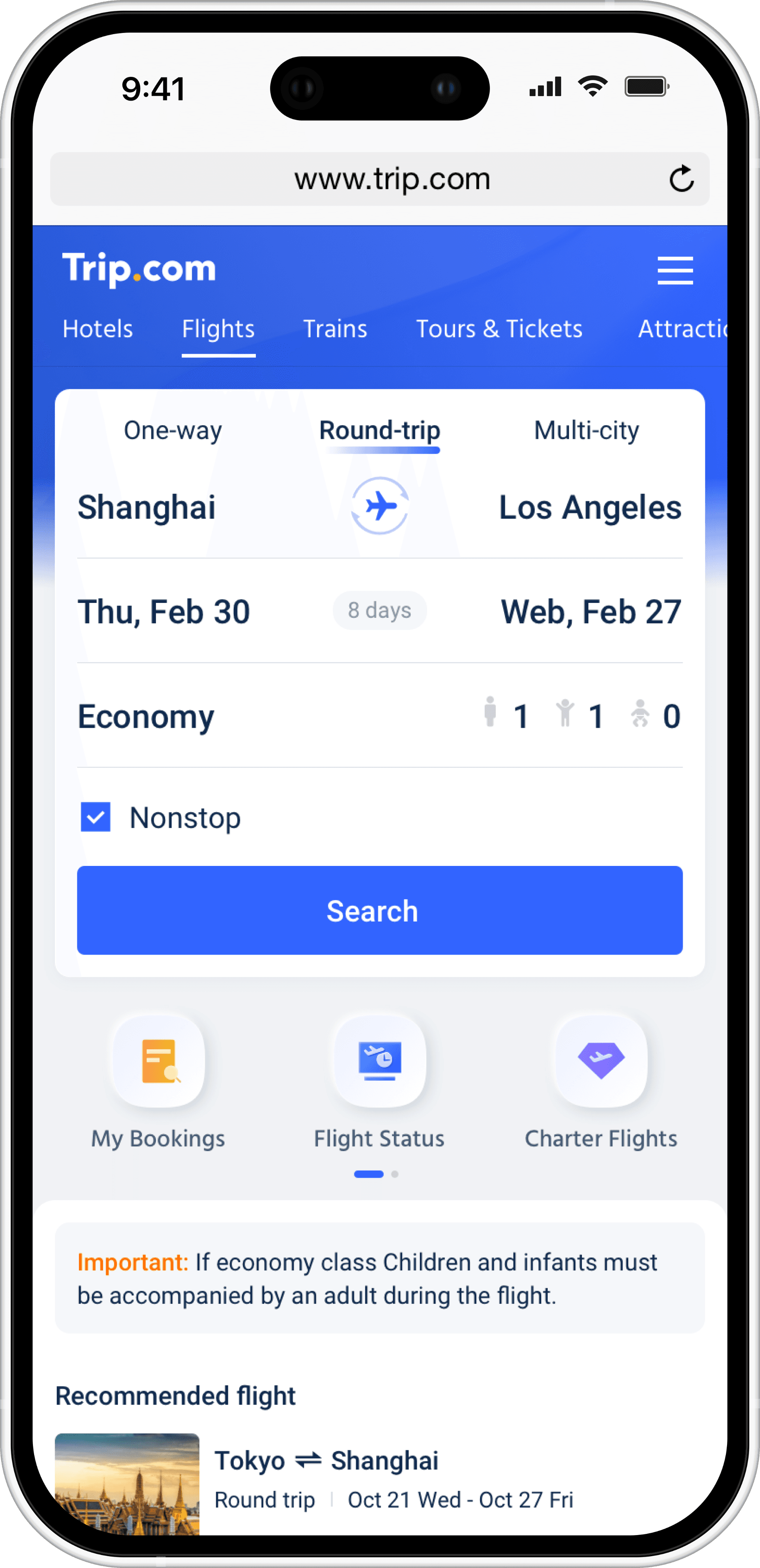
To address the issue of the search module competing visually with downstream content, three structural approaches were explored. The goal was to re-establish a clear task hierarchy without removing any existing business modules.
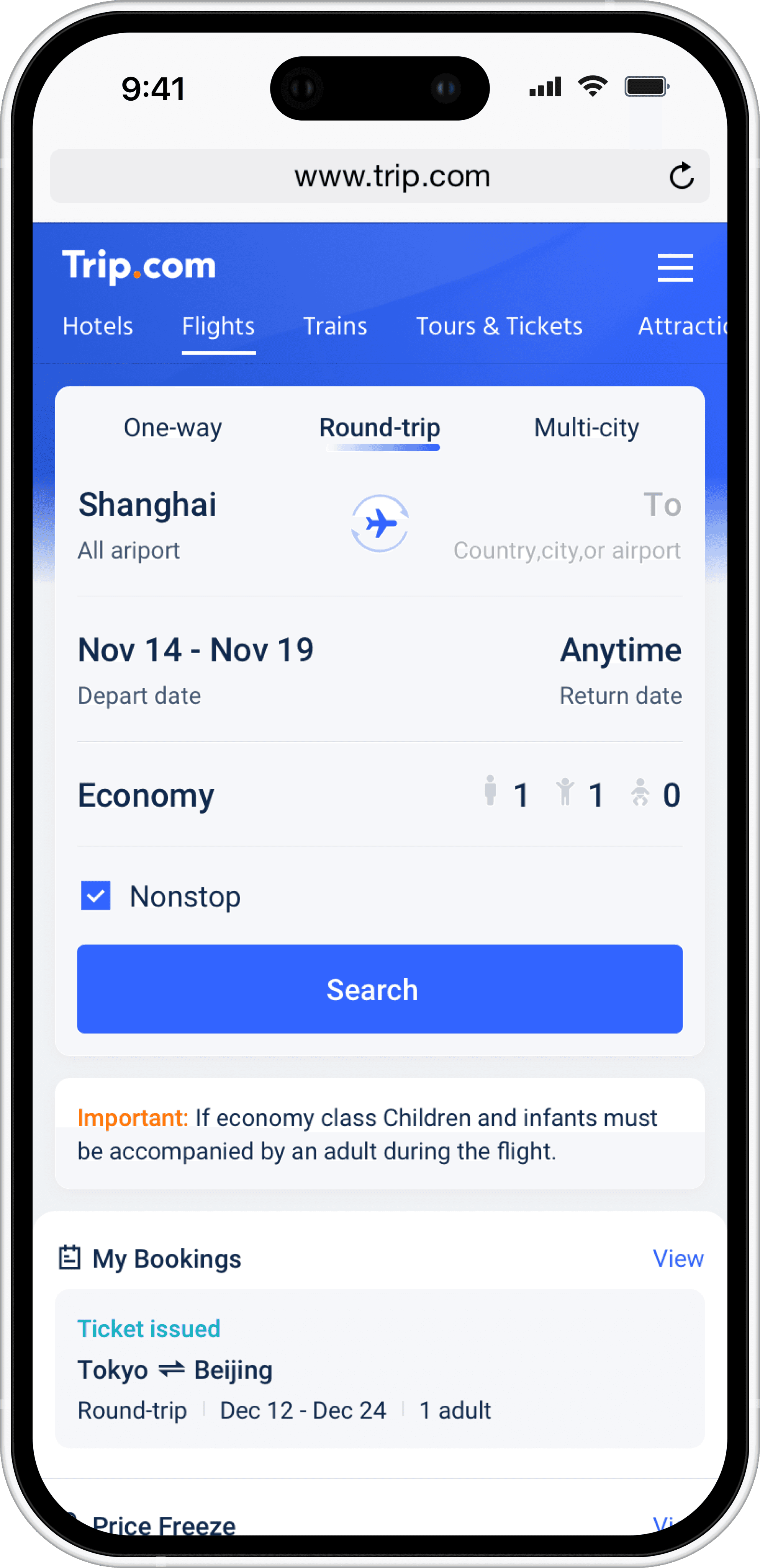
During the exploration phase, instead of directly redesigning the search module itself, I tried different page-level structural strategies to rebalance the relationship between search and downstream content. Three directions were explored: reordering content in a single vertical flow, adjusting downstream module emphasis based on user state, and separating downstream functions into independent entry areas.
Although these approaches differed in layout logic, all three shared the same core intent — to reinforce the search module as the primary focal point on the first screen. In every option, the search area was deliberately positioned as the visual and cognitive entry point, while downstream content was either de-emphasized, deferred, or structurally separated to minimize distraction and ensure users could first validate their search conditions.
To address the issue of the search module competing visually with downstream content, three structural approaches were explored. The goal was to re-establish a clear task hierarchy without removing any existing business modules.
During the exploration phase, instead of directly redesigning the search module itself, I tried different page-level structural strategies to rebalance the relationship between search and downstream content. Three directions were explored: reordering content in a single vertical flow, adjusting downstream module emphasis based on user state, and separating downstream functions into independent entry areas.
Although these approaches differed in layout logic, all three shared the same core intent — to reinforce the search module as the primary focal point on the first screen. In every option, the search area was deliberately positioned as the visual and cognitive entry point, while downstream content was either de-emphasized, deferred, or structurally separated to minimize distraction and ensure users could first validate their search conditions.
To address the issue of the search module competing visually with downstream content, three structural approaches were explored. The goal was to re-establish a clear task hierarchy without removing any existing business modules.
During the exploration phase, instead of directly redesigning the search module itself, I tried different page-level structural strategies to rebalance the relationship between search and downstream content. Three directions were explored: reordering content in a single vertical flow, adjusting downstream module emphasis based on user state, and separating downstream functions into independent entry areas.
Although these approaches differed in layout logic, all three shared the same core intent — to reinforce the search module as the primary focal point on the first screen. In every option, the search area was deliberately positioned as the visual and cognitive entry point, while downstream content was either de-emphasized, deferred, or structurally separated to minimize distraction and ensure users could first validate their search conditions.
Solution 1
Solution 1
Solution 1
Solution 2
Solution 2
Solution 2
Solution 3
Solution 3
Solution 3
Final Solution & System Optimization
Final Solution & System Optimization
Final Solution & System Optimization
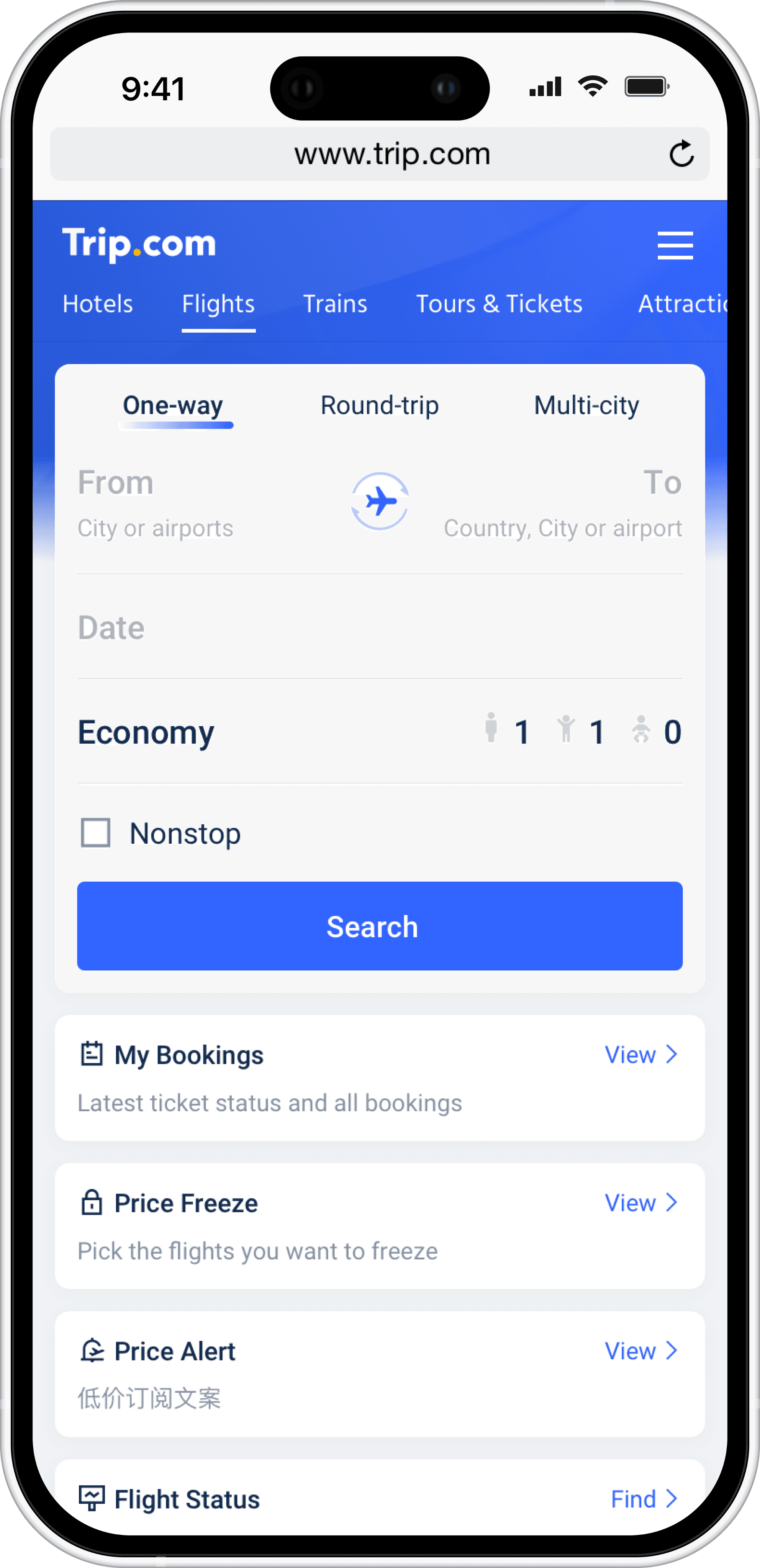
The final solution reinforced the search module as the primary task entry through a clear vertical hierarchy, ensuring it consistently serves as the visual and functional starting point of the homepage. Booking-, pricing-, and recommendation-related content was systematically placed downstream to reduce attention competition before users confirmed their search conditions. Compared to more radical layout changes, this approach minimized distraction while preserving structural familiarity and lowering cognitive cost.
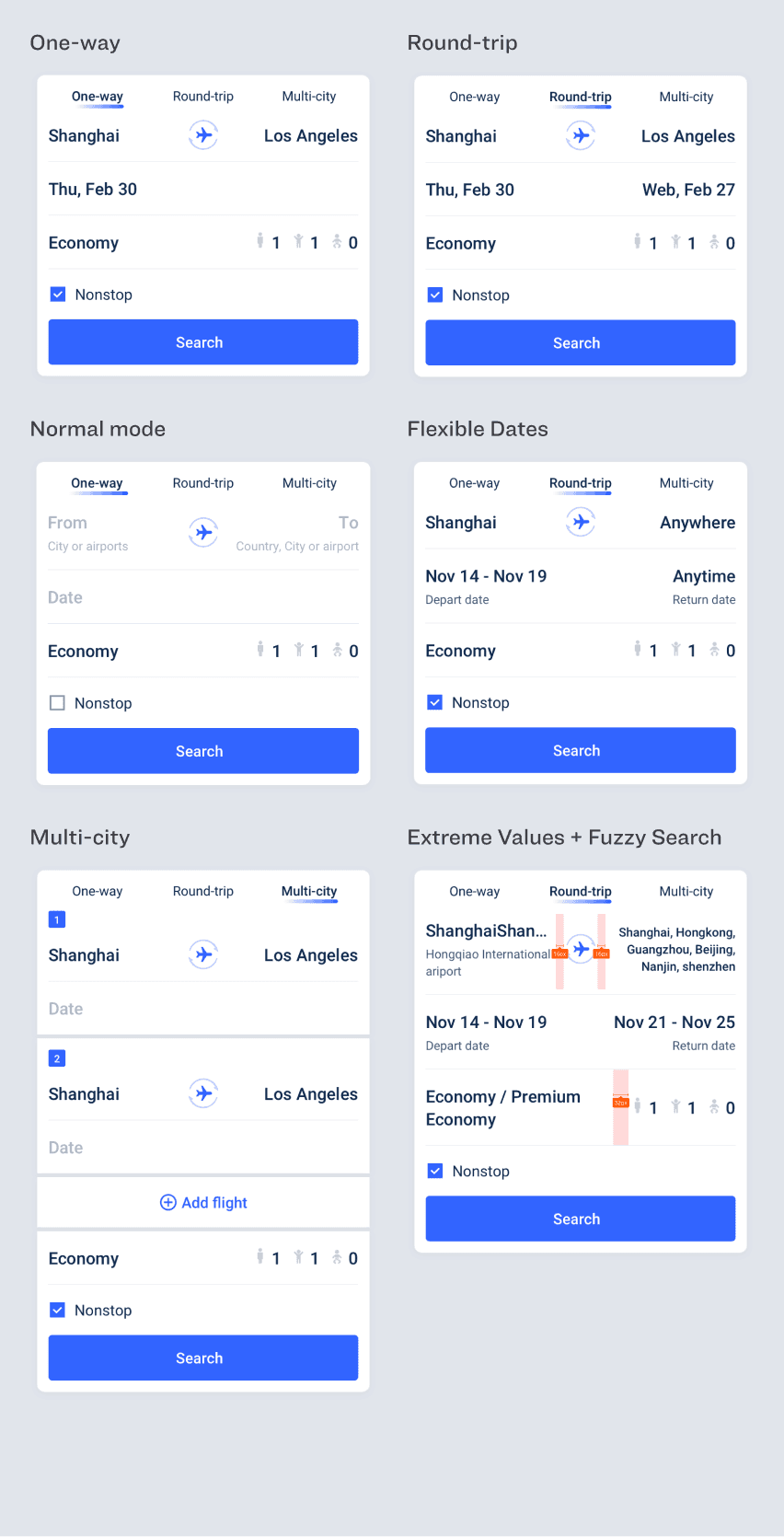
Building on this structure, the optimization extended to a system-level component upgrade. Core components—including the search module, booking cards, price alerts, and price freeze elements—were redesigned to support multiple trip types, extreme text lengths, multilingual content, and complex business states.
The final solution reinforced the search module as the primary task entry through a clear vertical hierarchy, ensuring it consistently serves as the visual and functional starting point of the homepage. Booking-, pricing-, and recommendation-related content was systematically placed downstream to reduce attention competition before users confirmed their search conditions. Compared to more radical layout changes, this approach minimized distraction while preserving structural familiarity and lowering cognitive cost.
Building on this structure, the optimization extended to a system-level component upgrade. Core components—including the search module, booking cards, price alerts, and price freeze elements—were redesigned to support multiple trip types, extreme text lengths, multilingual content, and complex business states.
The final solution reinforced the search module as the primary task entry through a clear vertical hierarchy, ensuring it consistently serves as the visual and functional starting point of the homepage. Booking-, pricing-, and recommendation-related content was systematically placed downstream to reduce attention competition before users confirmed their search conditions. Compared to more radical layout changes, this approach minimized distraction while preserving structural familiarity and lowering cognitive cost.
Building on this structure, the optimization extended to a system-level component upgrade. Core components—including the search module, booking cards, price alerts, and price freeze elements—were redesigned to support multiple trip types, extreme text lengths, multilingual content, and complex business states.
Components Update
Components Update
Components Update
Search Bar Components
Search Bar Components
Search Bar Components
My Orders Components
My Orders Components
My Orders Components
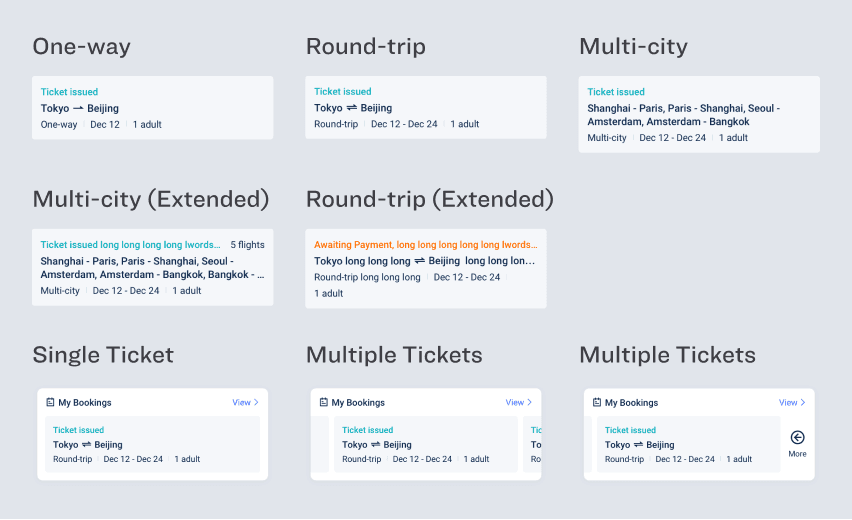
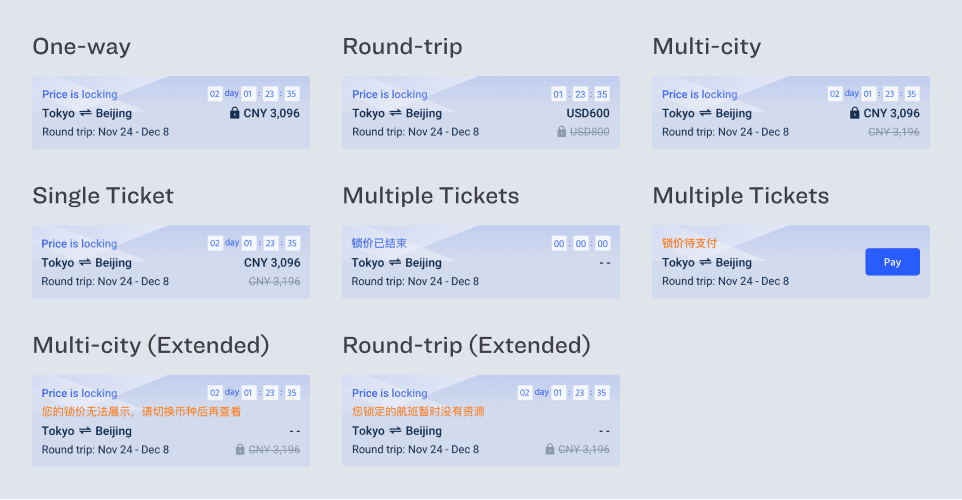
Price Freeze Components
Price Freeze Components
Price Freeze Components
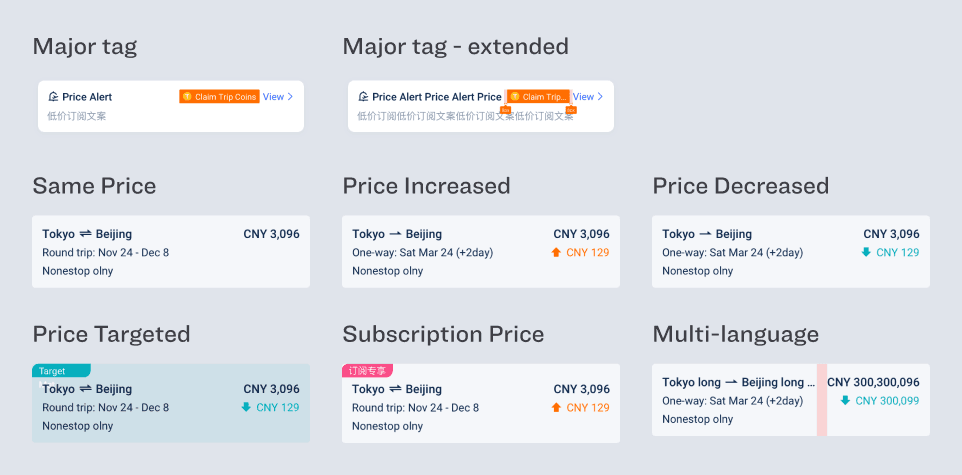
Low Price Subscription components
Low Price Subscription components
Low Price Subscription components
Part 3: WhatsApp Subscription Component
Part 3: WhatsApp Subscription Component
Part 3: WhatsApp Subscription Component
To complement email-based reminders for Trip.com users, we introduced WhatsApp as a new real-time notification channel. The goal was to integrate WhatsApp subscription into key user moments, and deliver a measurable, scalable subscription capability.
To complement email-based reminders for Trip.com users, we introduced WhatsApp as a new real-time notification channel. The goal was to integrate WhatsApp subscription into key user moments, and deliver a measurable, scalable subscription capability.
To complement email-based reminders for Trip.com users, we introduced WhatsApp as a new real-time notification channel. The goal was to integrate WhatsApp subscription into key user moments, and deliver a measurable, scalable subscription capability.
Project Goals
Project Goals
Project Goals
The goal of this project was to introduce WhatsApp as a real-time notification channel for overseas users, complementing the existing email-based communication and improving the timeliness and reliability of critical order updates.
The goal of this project was to introduce WhatsApp as a real-time notification channel for overseas users, complementing the existing email-based communication and improving the timeliness and reliability of critical order updates.
The goal of this project was to introduce WhatsApp as a real-time notification channel for overseas users, complementing the existing email-based communication and improving the timeliness and reliability of critical order updates.
Improving the delivery of critical order updates
Improving the delivery of critical order updates
Improving the delivery of critical order updates
Ensuring timely notifications for key moments such as order submission, ticket issuance,
Ensuring timely notifications for key moments such as order submission, ticket issuance,
Ensuring timely notifications for key moments such as order submission, ticket issuance,
Encouraging opt-in at high-intent moments
Encouraging opt-in at high-intent moments
Encouraging opt-in at high-intent moments
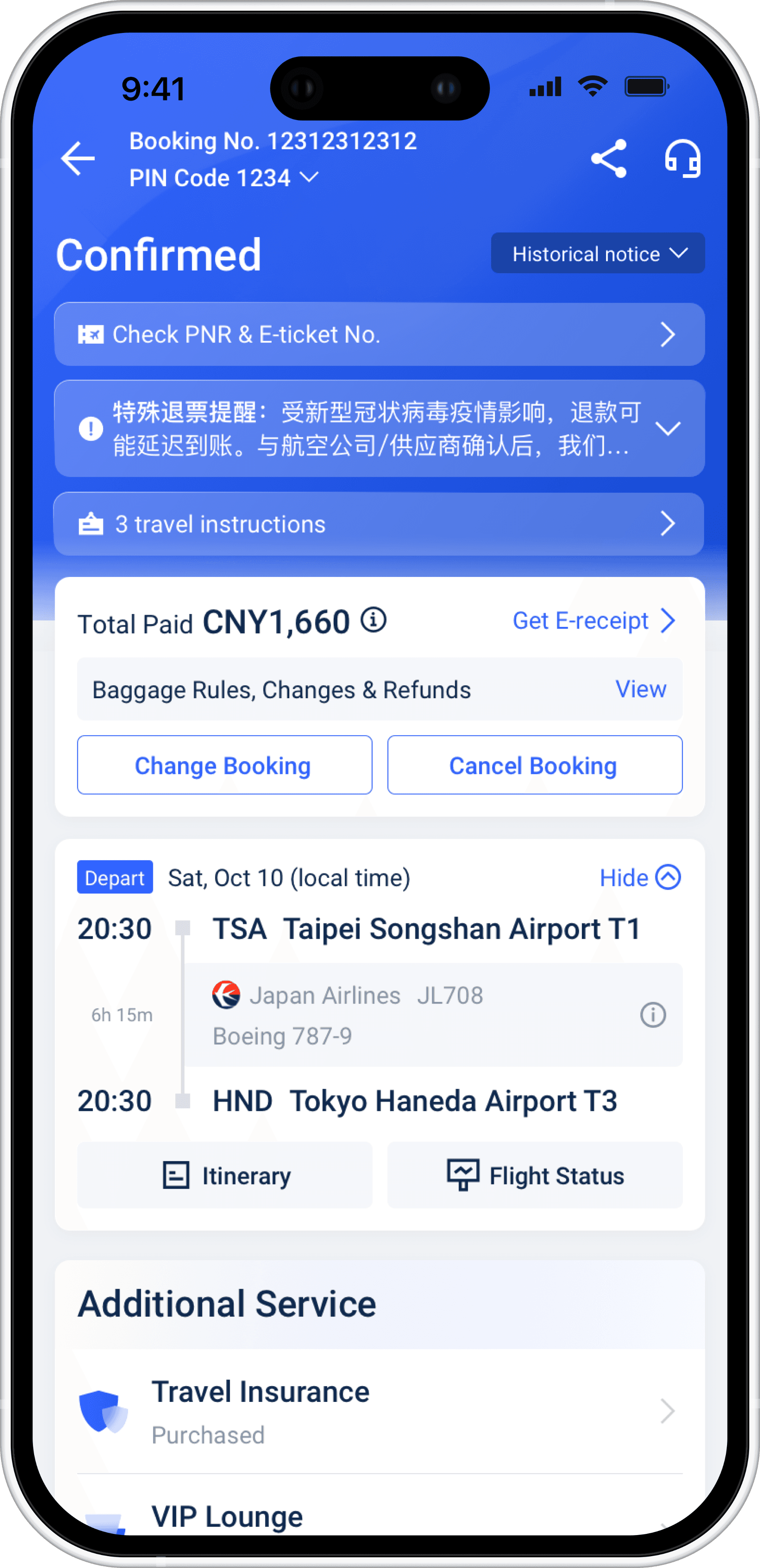
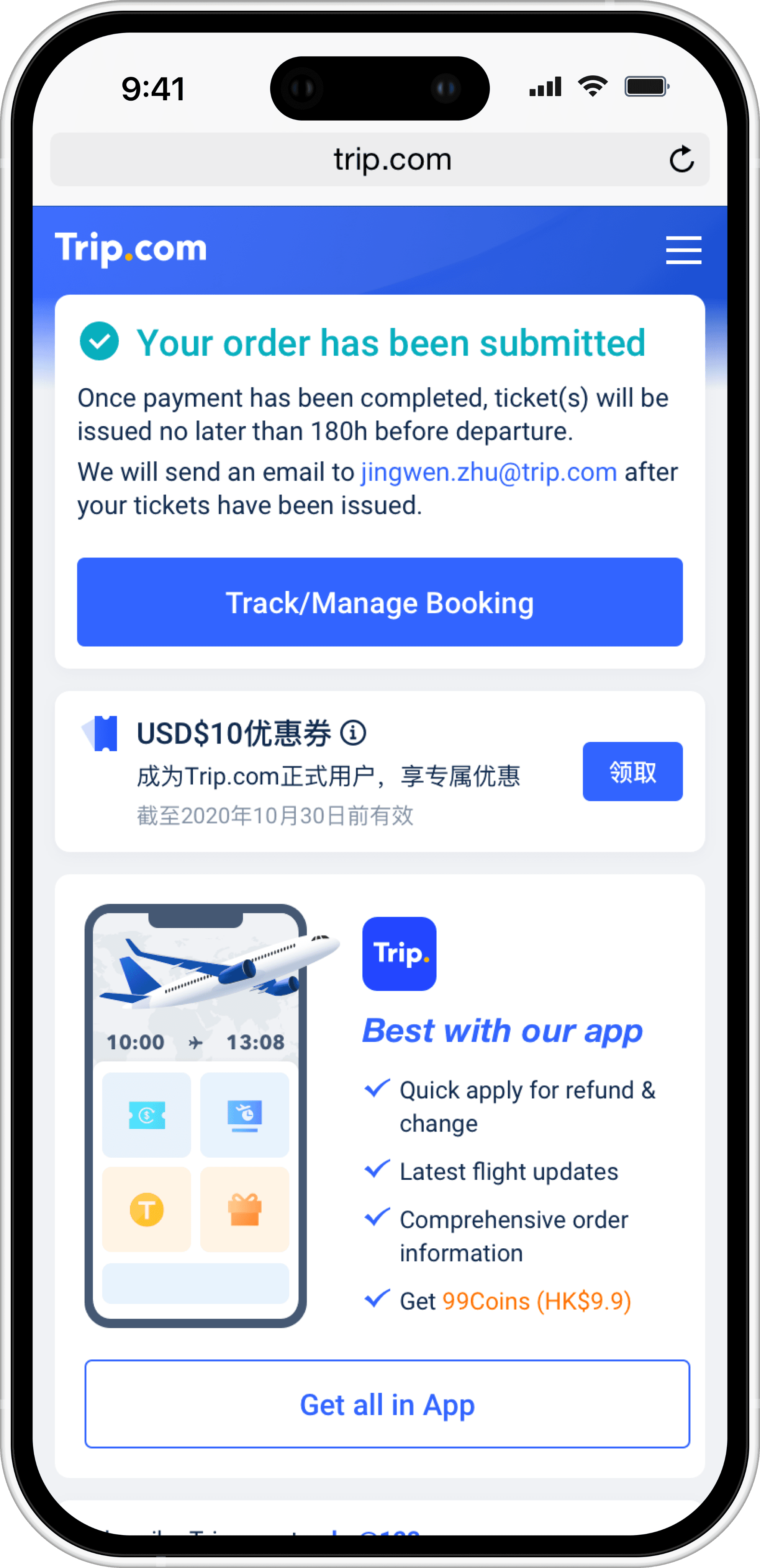
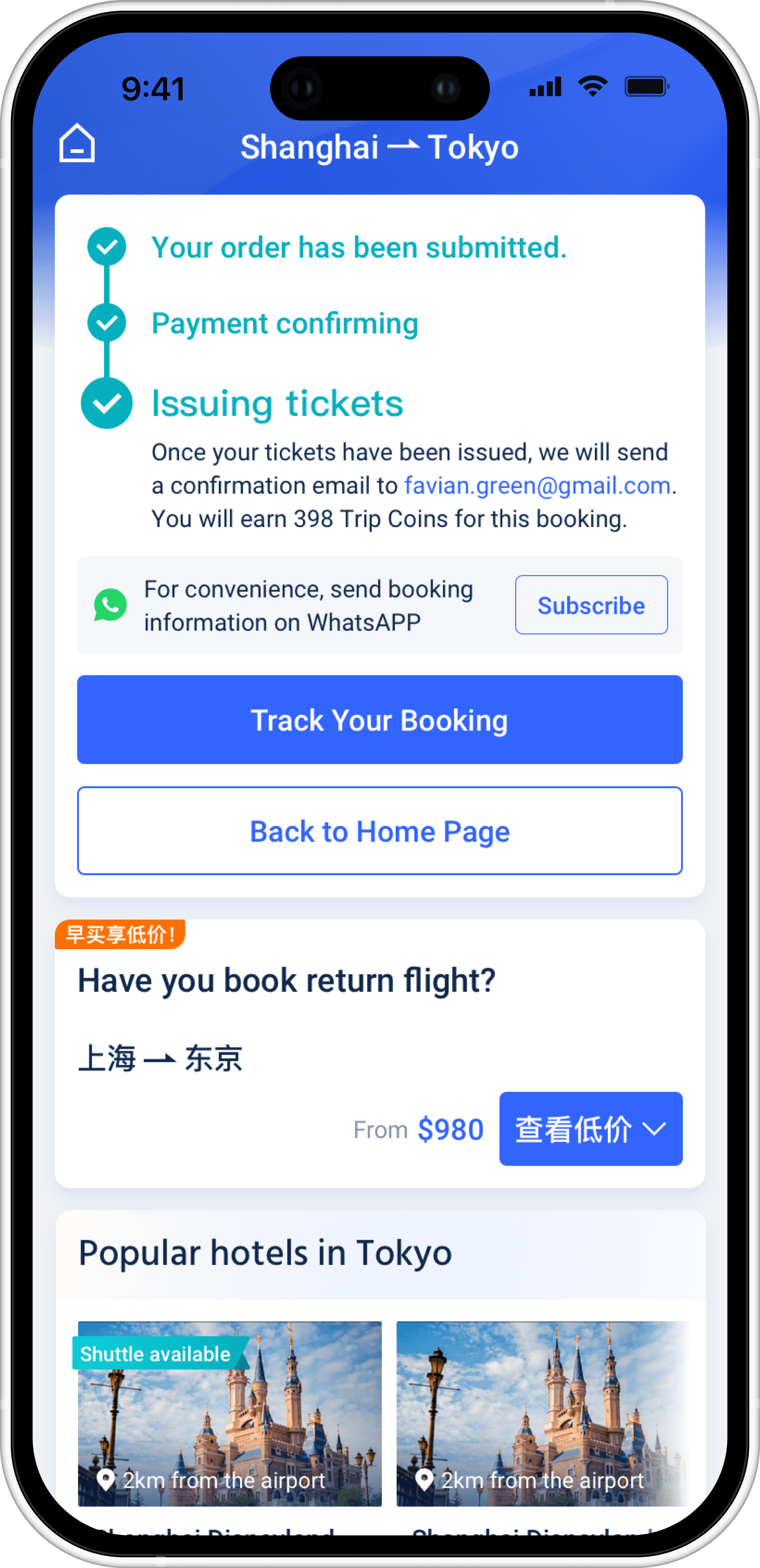
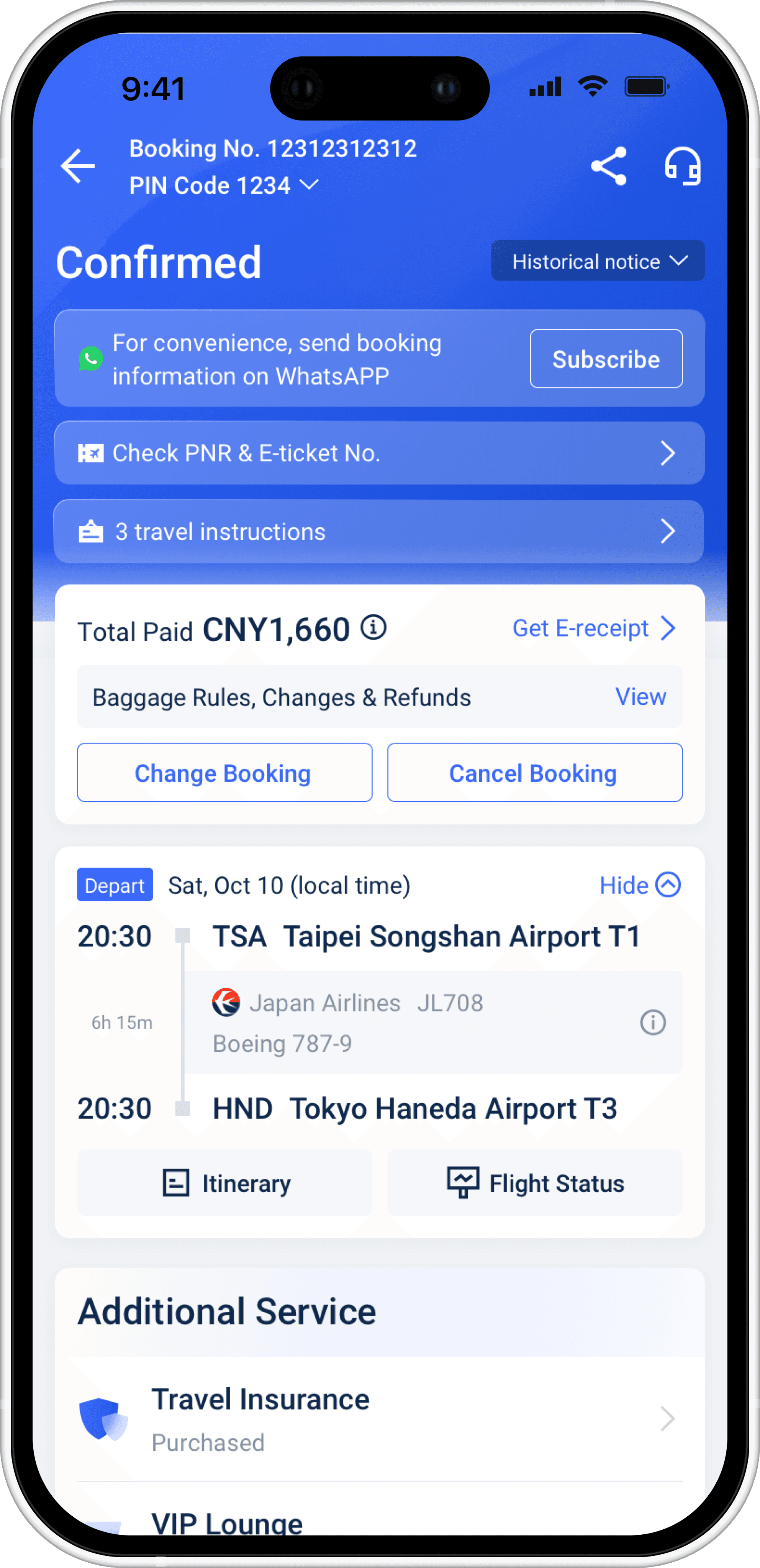
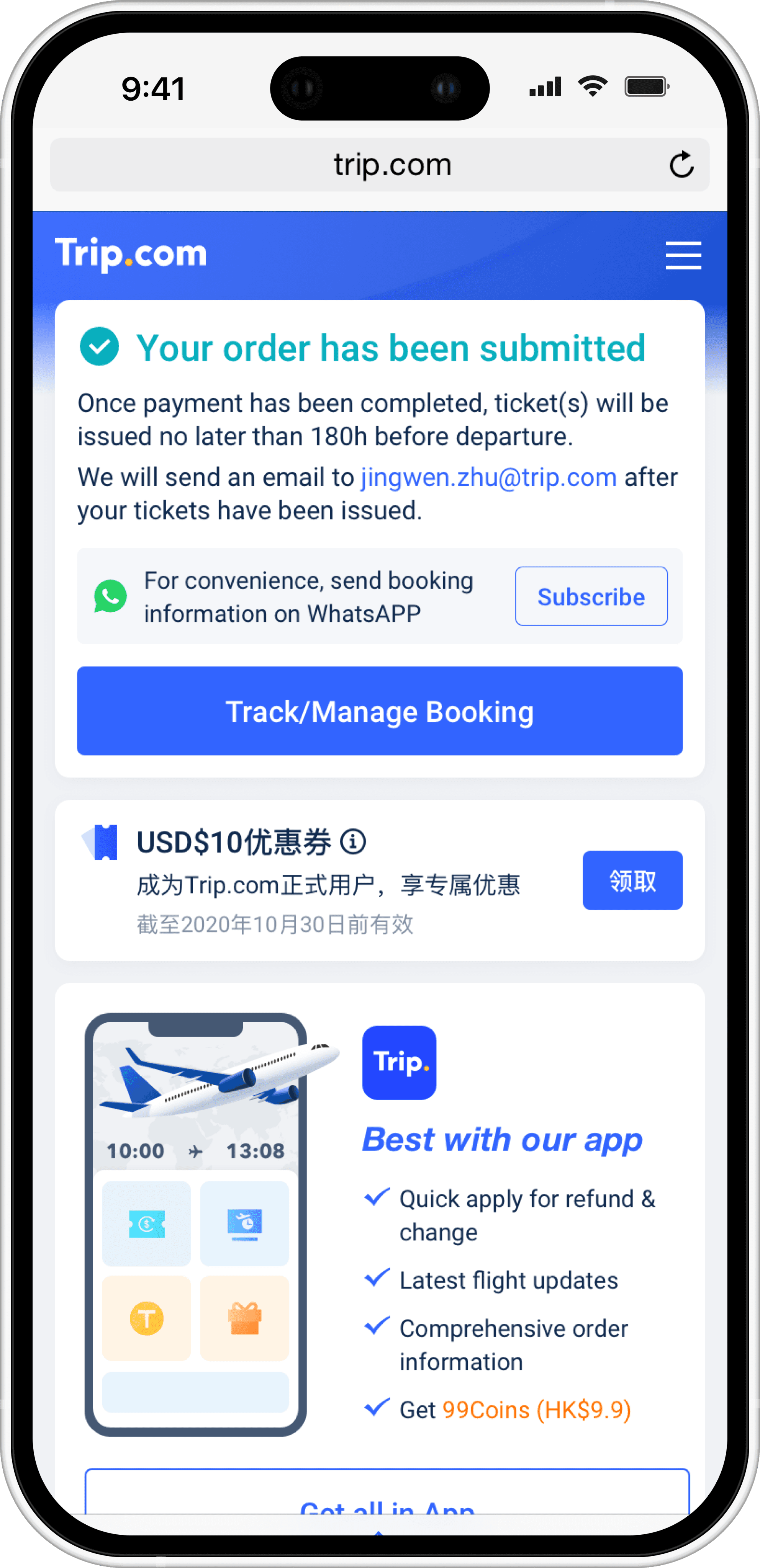
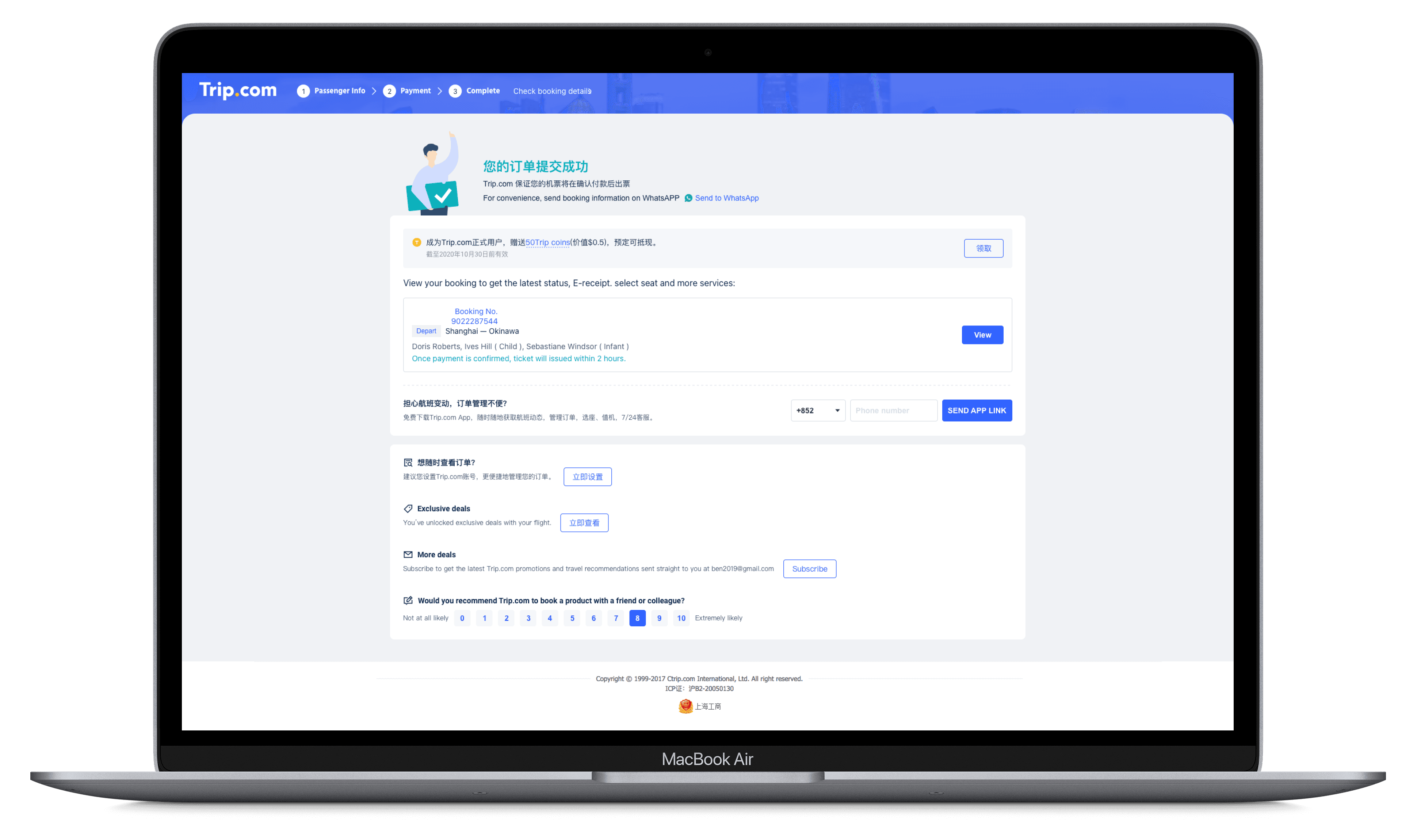
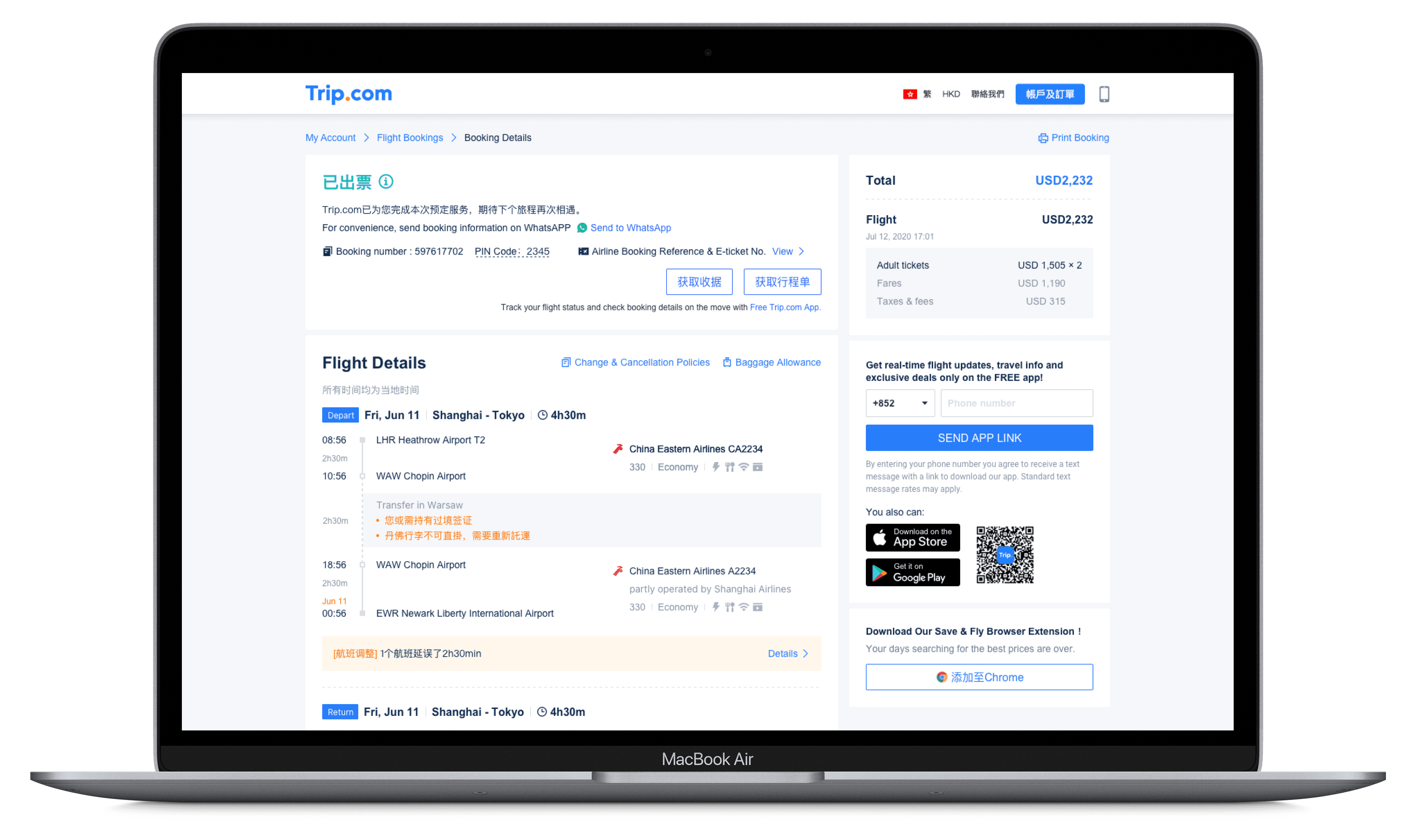
Surfacing WhatsApp subscription entry points on completion pages and booking detail pages, where users are most receptive after completing a primary task.
Surfacing WhatsApp subscription entry points on completion pages and booking detail pages, where users are most receptive after completing a primary task.
Surfacing WhatsApp subscription entry points on completion pages and booking detail pages, where users are most receptive after completing a primary task.
Laying the foundation for future scalability
Laying the foundation for future scalability
Laying the foundation for future scalability
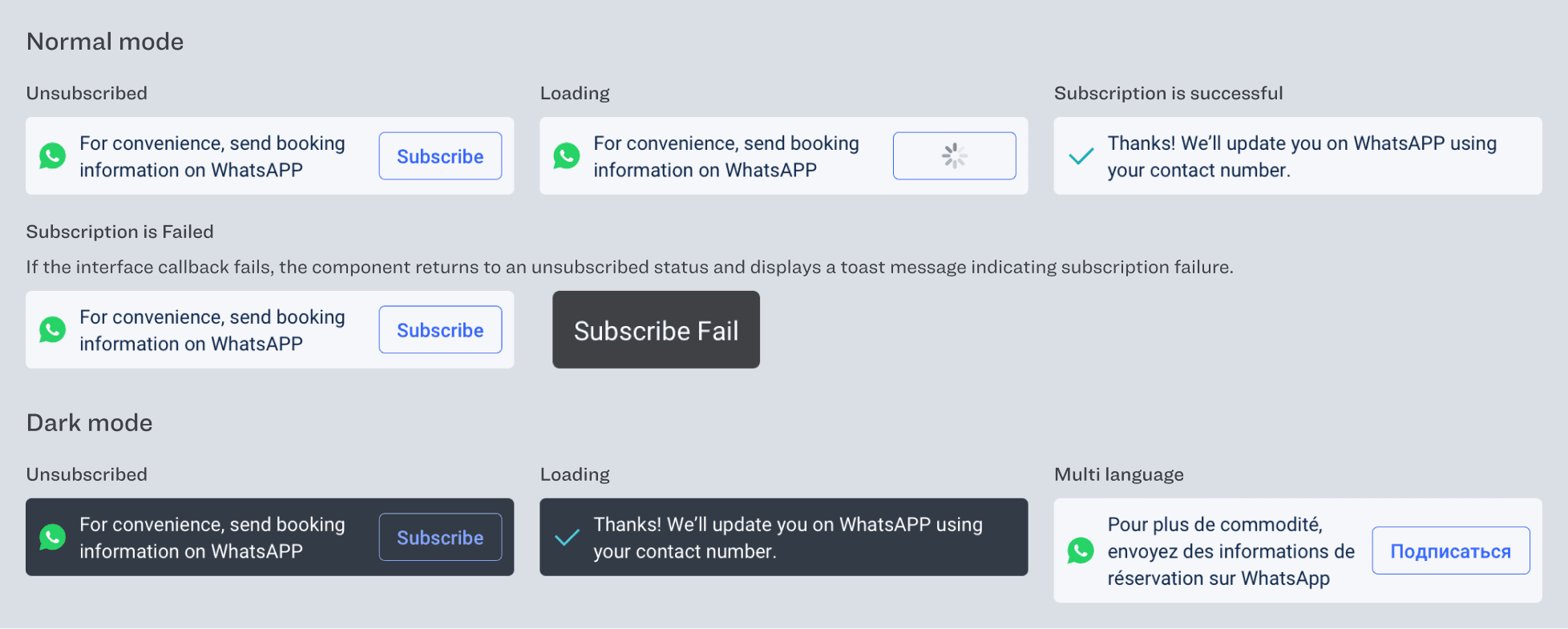
Abstracting WhatsApp subscription into a reusable component system that supports multi-language content, dark mode, and complex business states, enabling future expansion across regions and product lines.
Abstracting WhatsApp subscription into a reusable component system that supports multi-language content, dark mode, and complex business states, enabling future expansion across regions and product lines.
Abstracting WhatsApp subscription into a reusable component system that supports multi-language content, dark mode, and complex business states, enabling future expansion across regions and product lines.
Completion Page (Mobile)
Completion Page (Mobile)
Completion Page (Mobile)
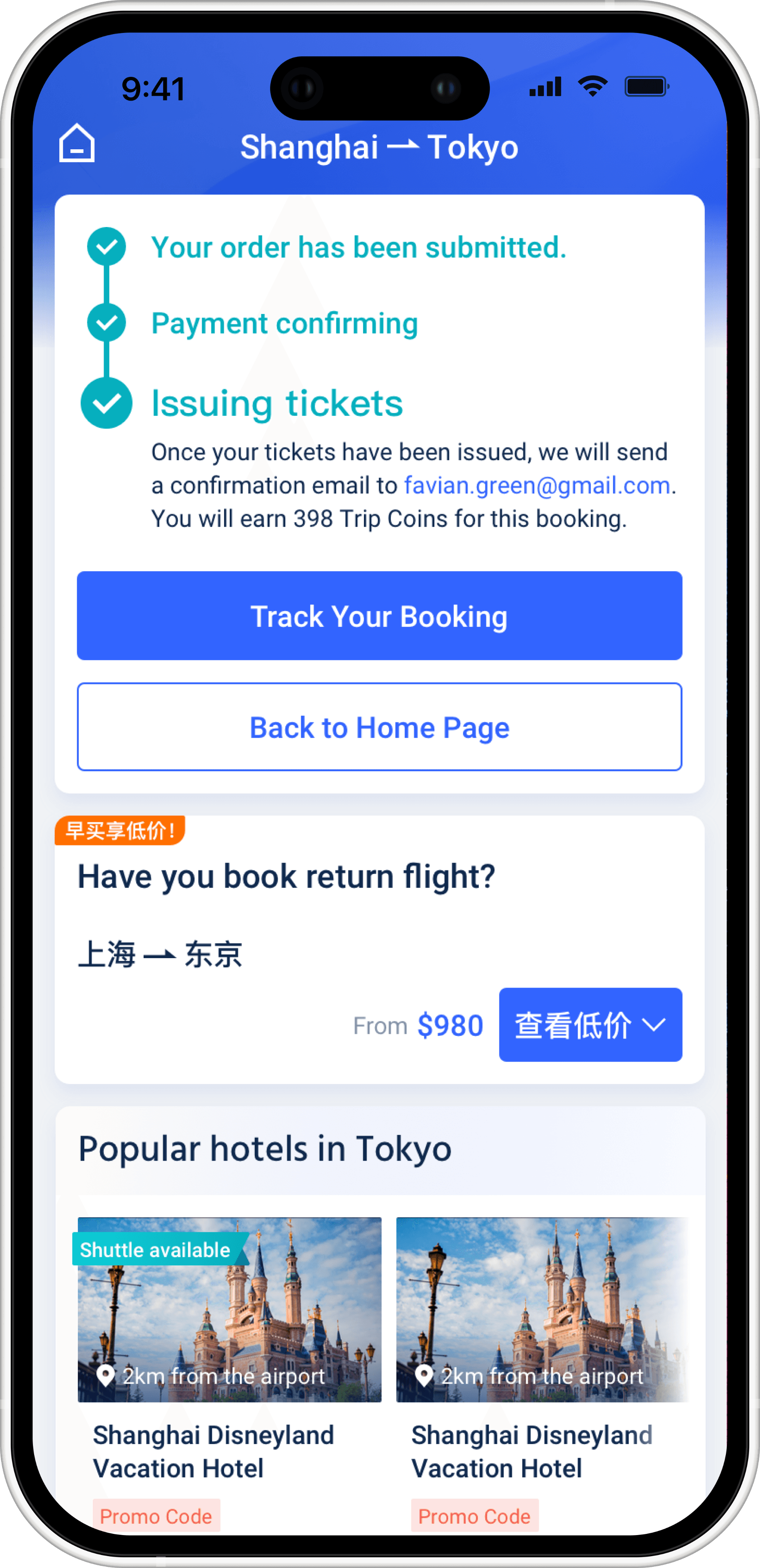
Booking Detail Page (Mobile)
Booking Detail Page (Mobile)
Booking Detail Page (Mobile)
Completion Page (H5)
Completion Page (H5)
Completion Page (H5)
Design Points
Design Points
Design Points
Contextual Entry After Task Completion
Contextual Entry After Task Completion
Contextual Entry After Task Completion
The subscription entry is placed within the order completion and ticket-issuing confirmation area. At this moment, users naturally perceive WhatsApp as a continuation of service rather than a separate action.
The subscription entry is placed within the order completion and ticket-issuing confirmation area. At this moment, users naturally perceive WhatsApp as a continuation of service rather than a separate action.
The subscription entry is placed within the order completion and ticket-issuing confirmation area. At this moment, users naturally perceive WhatsApp as a continuation of service rather than a separate action.
Service-oriented Value Framing
Service-oriented Value Framing
Service-oriented Value Framing
The copy emphasizes booking information and status updates instead of promotional messaging. This clear value framing reduces cognitive load and increases trust in the subscription action.
The copy emphasizes booking information and status updates instead of promotional messaging. This clear value framing reduces cognitive load and increases trust in the subscription action.
The copy emphasizes booking information and status updates instead of promotional messaging. This clear value framing reduces cognitive load and increases trust in the subscription action.
Complete State Coverage
Complete State Coverage
Complete State Coverage
The component defines all key states, including unsubscribed, loading, success, and failure. On failure, it provides clear feedback and safely returns to an actionable state.
The component defines all key states, including unsubscribed, loading, success, and failure. On failure, it provides clear feedback and safely returns to an actionable state.
The component defines all key states, including unsubscribed, loading, success, and failure. On failure, it provides clear feedback and safely returns to an actionable state.
Components Update
Components Update
Components Update
Card Rules
Card Rules
Card Rules
Key Screenshots
Key Screenshots
Key Screenshots
Completion Page (Mobile)
Completion Page (Mobile)
Completion Page (Mobile)
Booking Detail Page (Mobile)
Booking Detail Page (Mobile)
Booking Detail Page (Mobile)
Completion Page (H5)
Completion Page (H5)
Completion Page (H5)
Completion Page (Mobile)
Completion Page (Mobile)
Completion Page (Mobile)
Booking Detail Page (Online)
Booking Detail Page (Online)
Booking Detail Page (Online)
Part 4: Carbon emission tagging
Part 4: Carbon emission tagging
Part 4: Carbon emission tagging
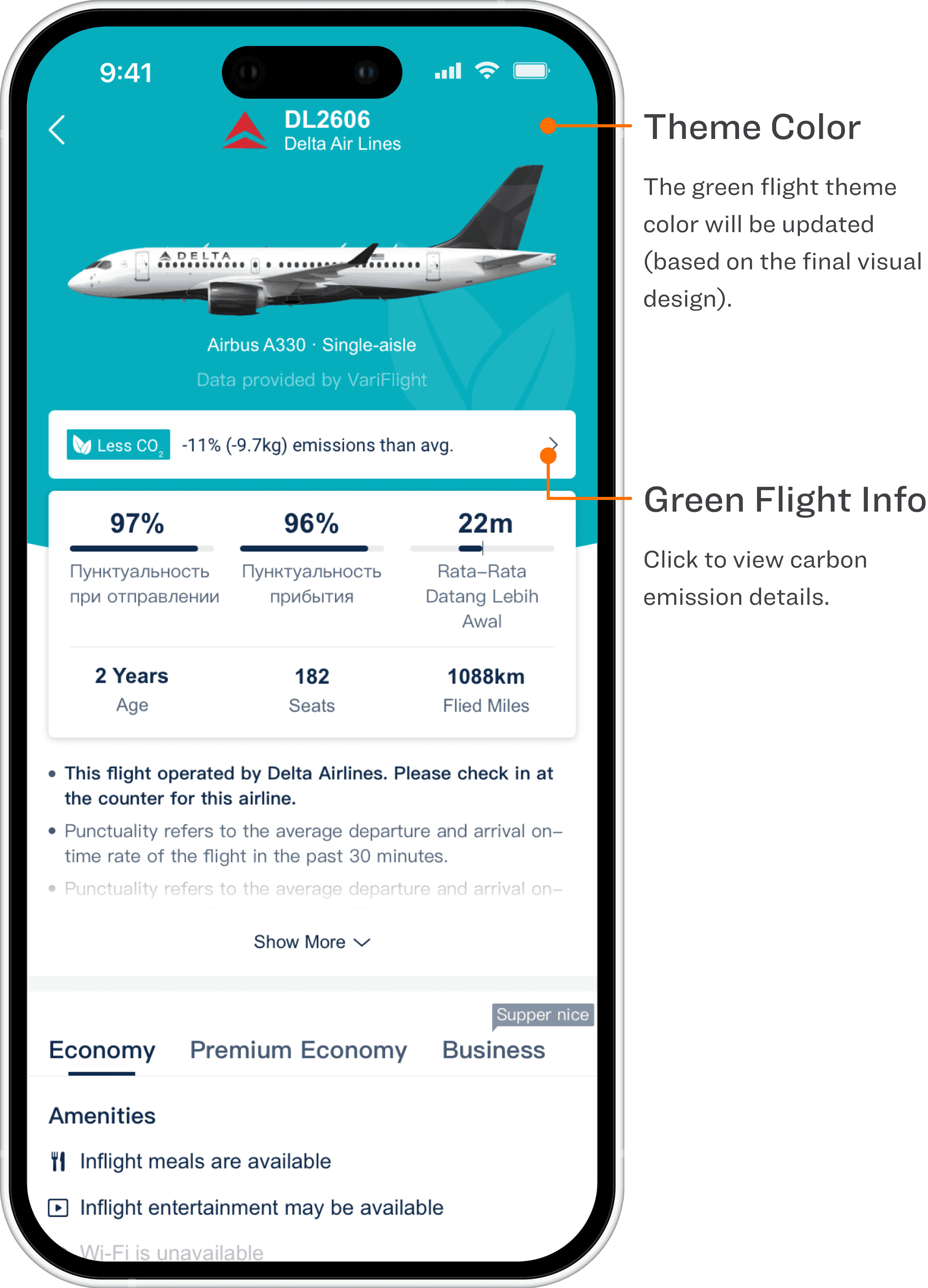
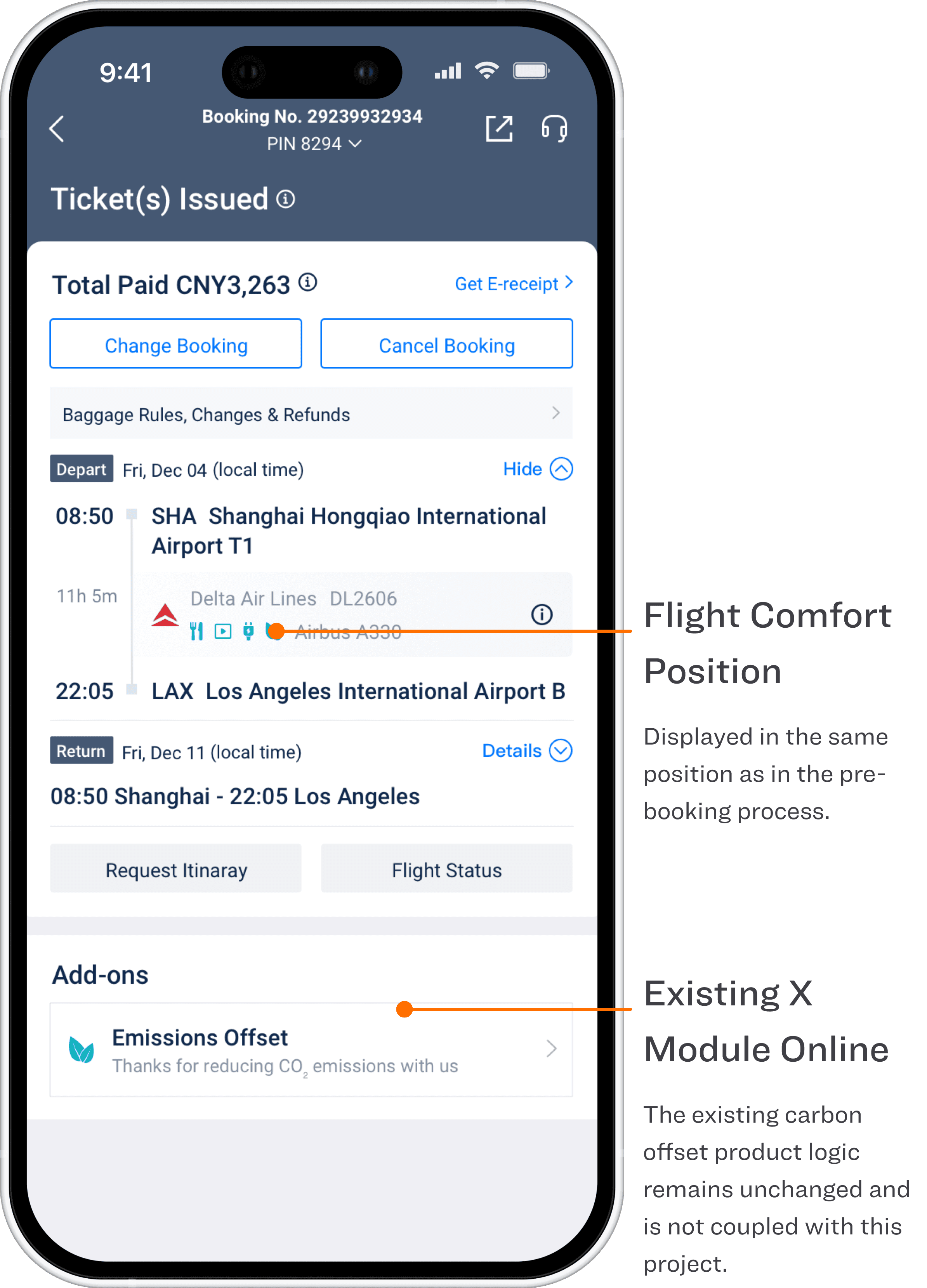
This project upgrades the “Low-CO₂ + Flight Comfort” information system across App, H5, and Online. The goal is to turn sustainability signals from scattered, hard-to-find details into a visible, understandable, decision-ready factor—without disrupting the primary booking flow.
This project upgrades the “Low-CO₂ + Flight Comfort” information system across App, H5, and Online. The goal is to turn sustainability signals from scattered, hard-to-find details into a visible, understandable, decision-ready factor—without disrupting the primary booking flow.
This project upgrades the “Low-CO₂ + Flight Comfort” information system across App, H5, and Online. The goal is to turn sustainability signals from scattered, hard-to-find details into a visible, understandable, decision-ready factor—without disrupting the primary booking flow.
Project Goals
Project Goals
Project Goals
Improve discoverability
Improve discoverability
Improve discoverability
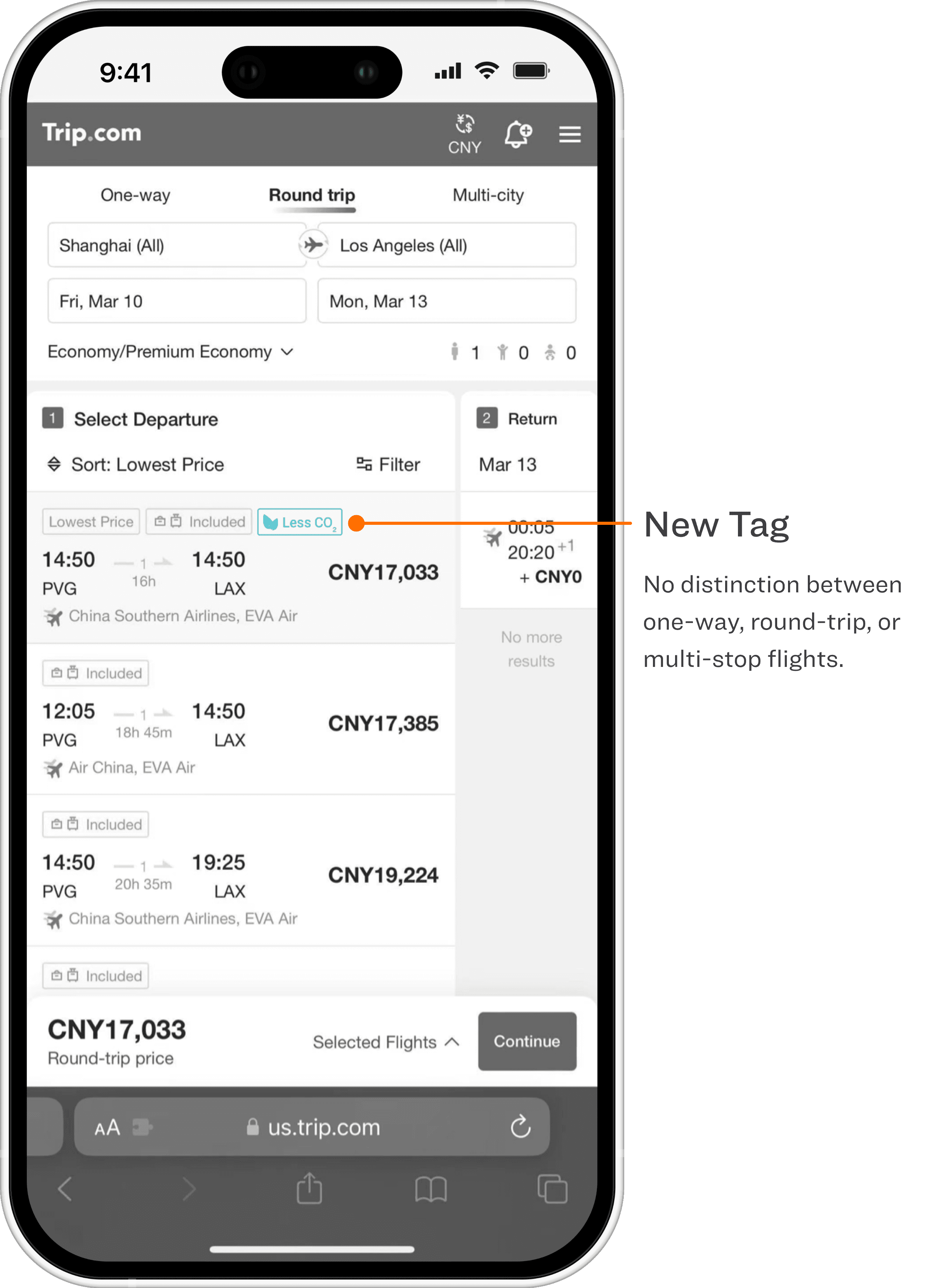
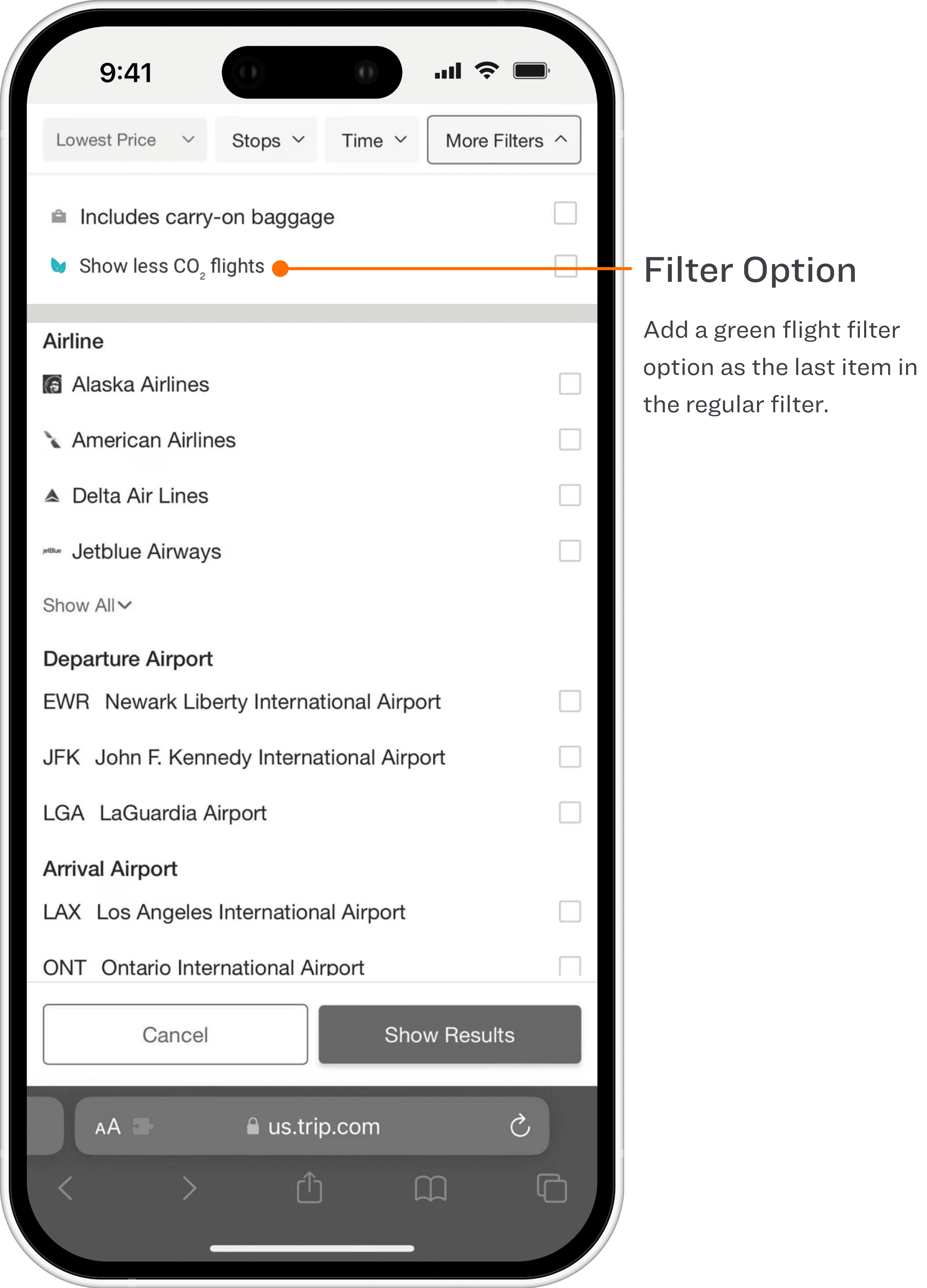
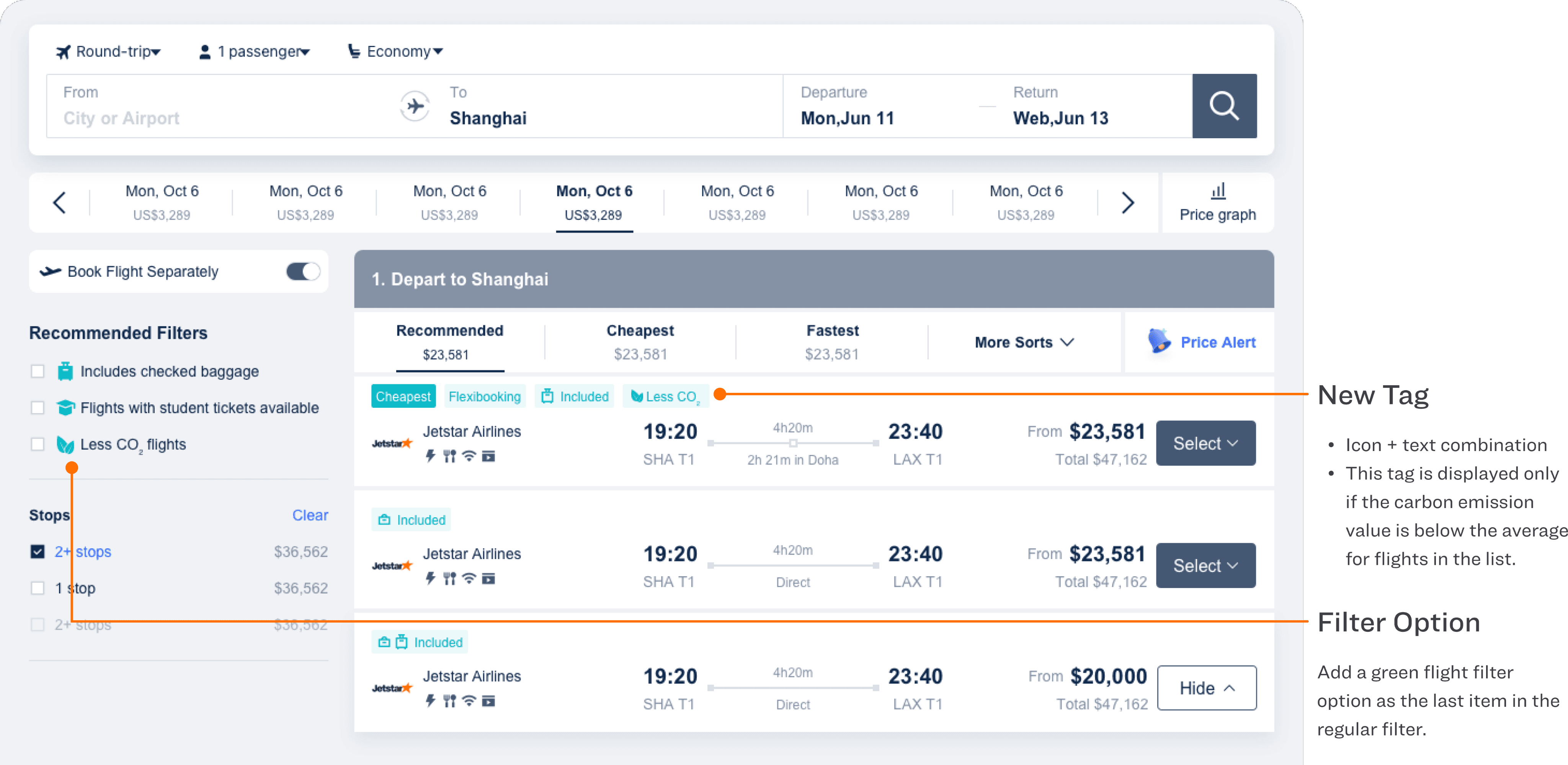
Expose Low-CO₂ & comfort signals at every key decision point (List, Filter, Review & Book, Details), as shown by new labels, filter items, entry points, and modules.
Expose Low-CO₂ & comfort signals at every key decision point (List, Filter, Review & Book, Details), as shown by new labels, filter items, entry points, and modules.
Expose Low-CO₂ & comfort signals at every key decision point (List, Filter, Review & Book, Details), as shown by new labels, filter items, entry points, and modules.
Improve comprehension
Improve comprehension
Improve comprehension
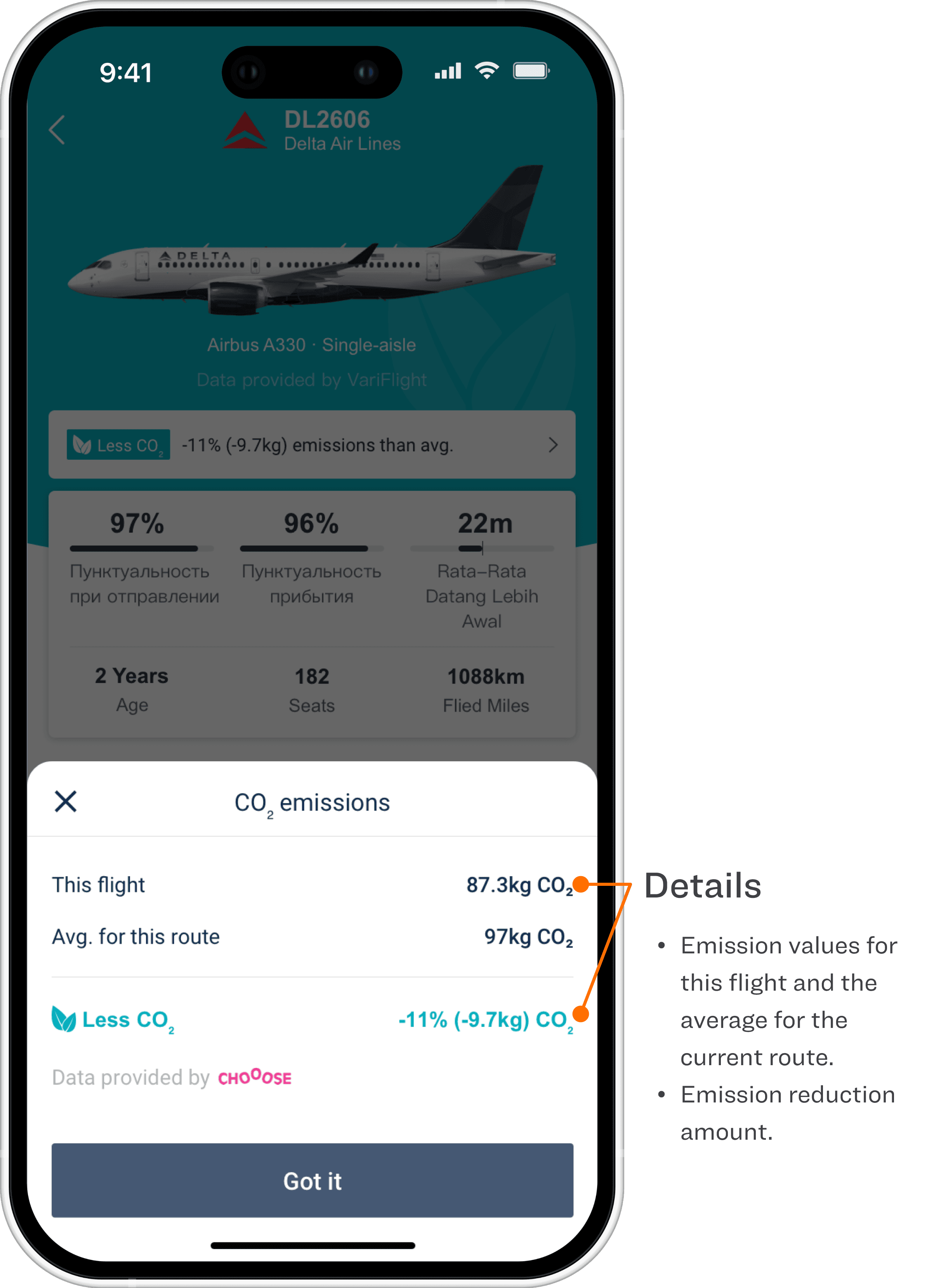
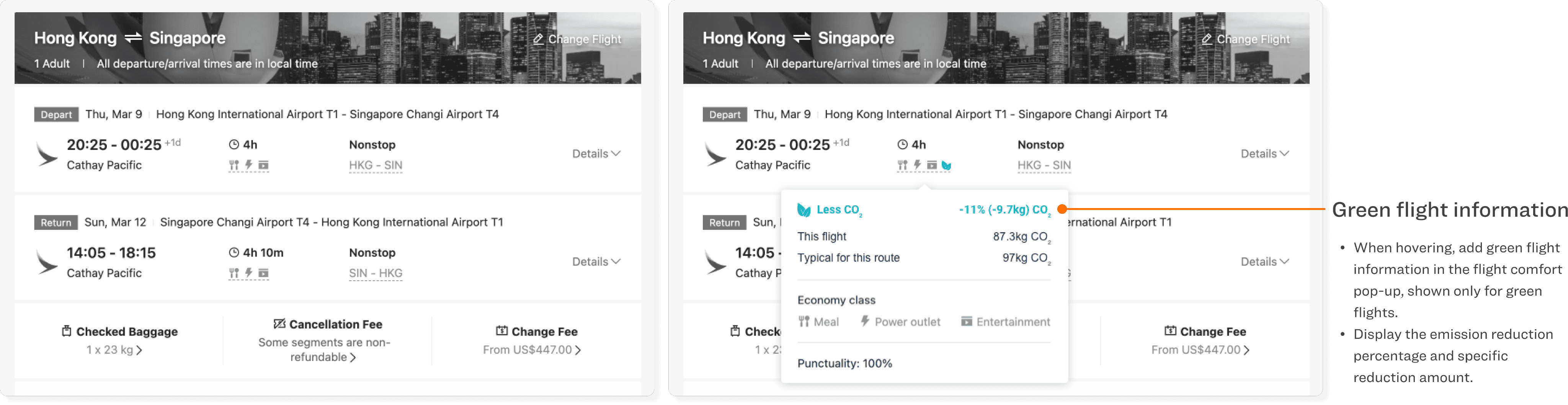
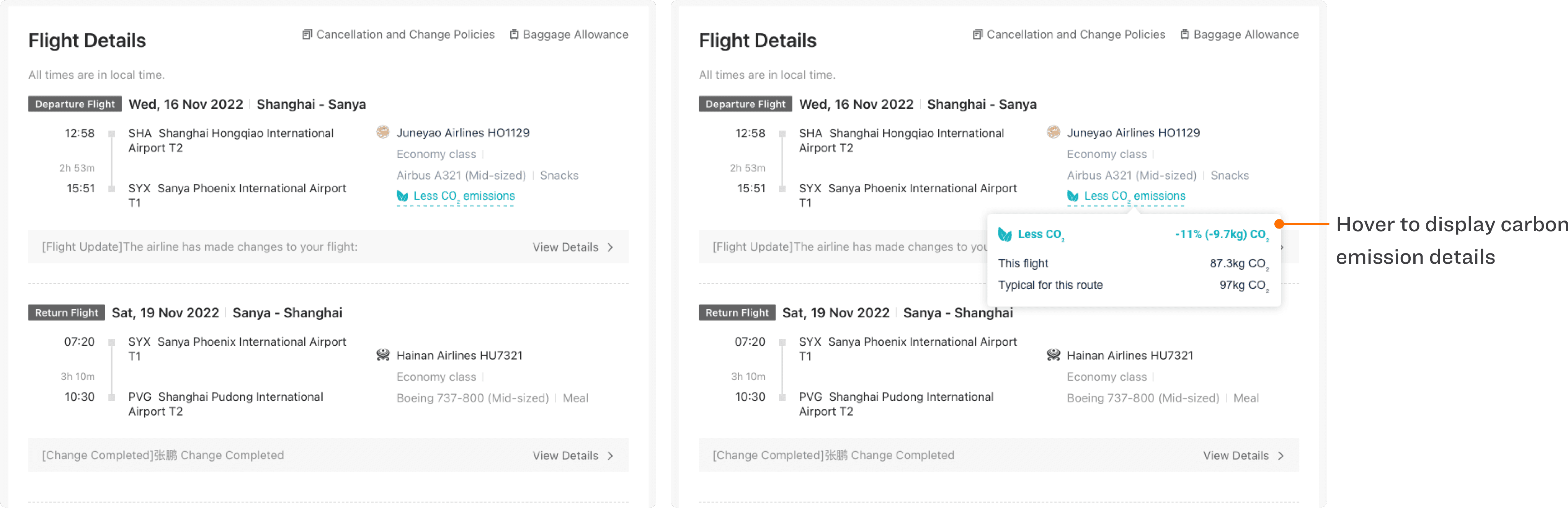
Provide clear, traceable explanations for metrics like “Less CO₂ / -11% / kg CO₂ / route average” via a dedicated explanation sheet (App/H5) and hover popovers
Provide clear, traceable explanations for metrics like “Less CO₂ / -11% / kg CO₂ / route average” via a dedicated explanation sheet (App/H5) and hover popovers
Provide clear, traceable explanations for metrics like “Less CO₂ / -11% / kg CO₂ / route average” via a dedicated explanation sheet (App/H5) and hover popovers
Keep the booking flow non-blocking
Keep the booking flow non-blocking
Keep the booking flow non-blocking
Strengthen information hierarchy without interrupting selection and checkout, using lightweight overlays instead of hard navigation.
Strengthen information hierarchy without interrupting selection and checkout, using lightweight overlays instead of hard navigation.
Strengthen information hierarchy without interrupting selection and checkout, using lightweight overlays instead of hard navigation.
Design Points
Design Points
Design Points
I used a “multi-touchpoint exposure + lightweight explanation loop” strategy: first make signals visible through labels and entry points, then reduce comprehension barriers with a standardized explanation component, ensuring cross-platform consistency and scalability.
I used a “multi-touchpoint exposure + lightweight explanation loop” strategy: first make signals visible through labels and entry points, then reduce comprehension barriers with a standardized explanation component, ensuring cross-platform consistency and scalability.
I used a “multi-touchpoint exposure + lightweight explanation loop” strategy: first make signals visible through labels and entry points, then reduce comprehension barriers with a standardized explanation component, ensuring cross-platform consistency and scalability.
List Page
List Page
List Page
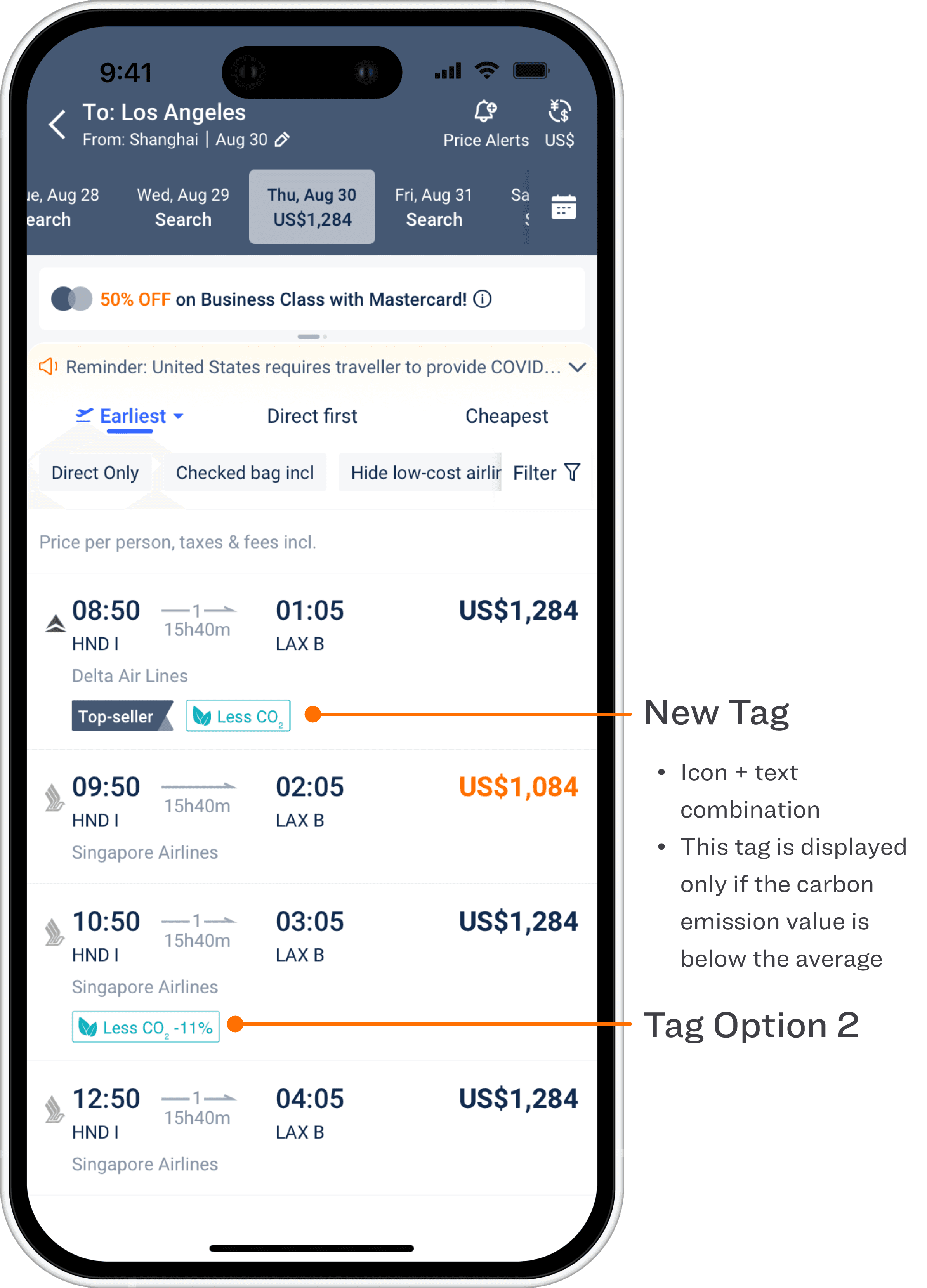
Filter - Collapsed State
Filter - Collapsed State
Filter - Collapsed State
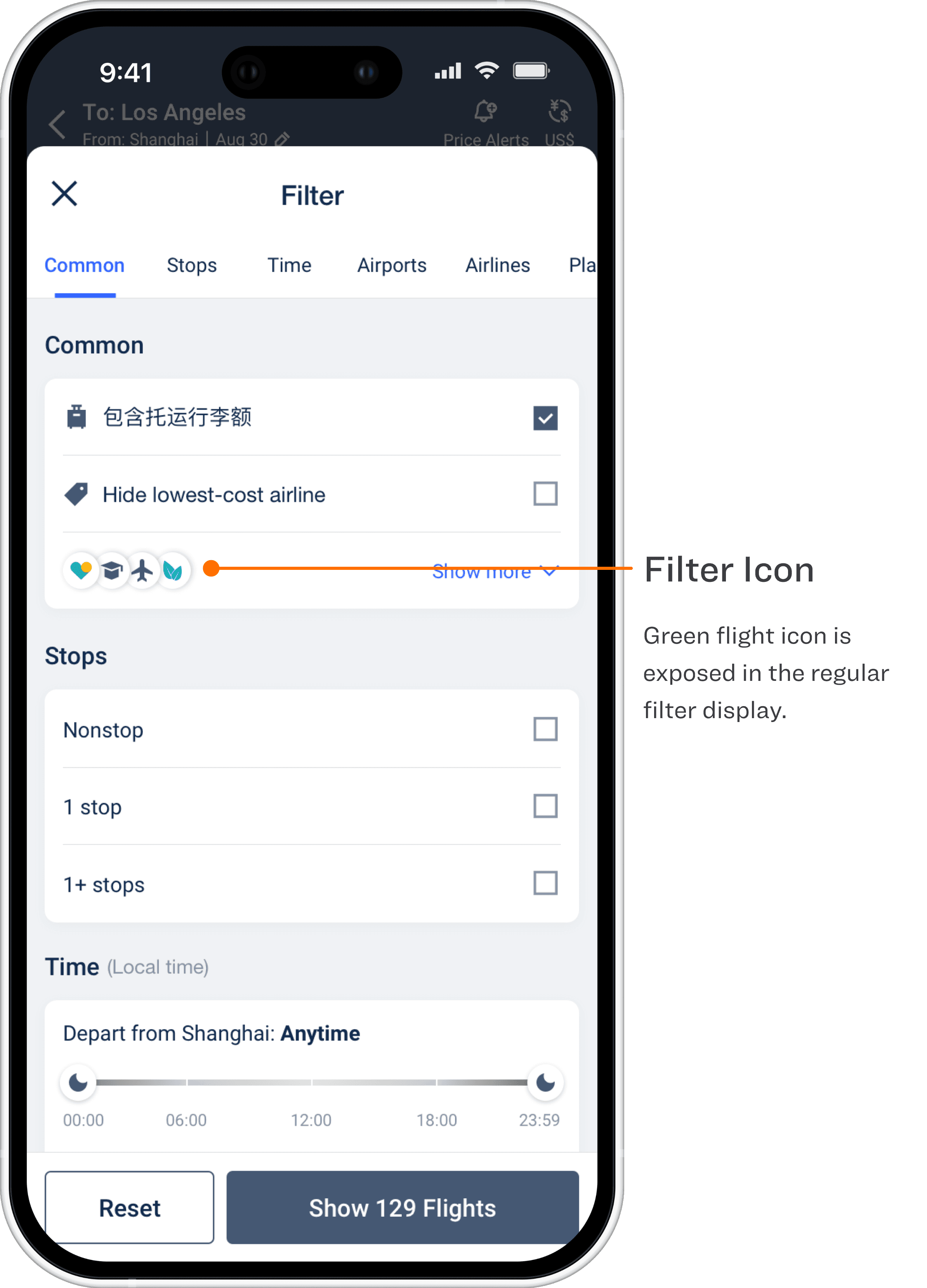
Filter - Expanded State
Filter - Expanded State
Filter - Expanded State
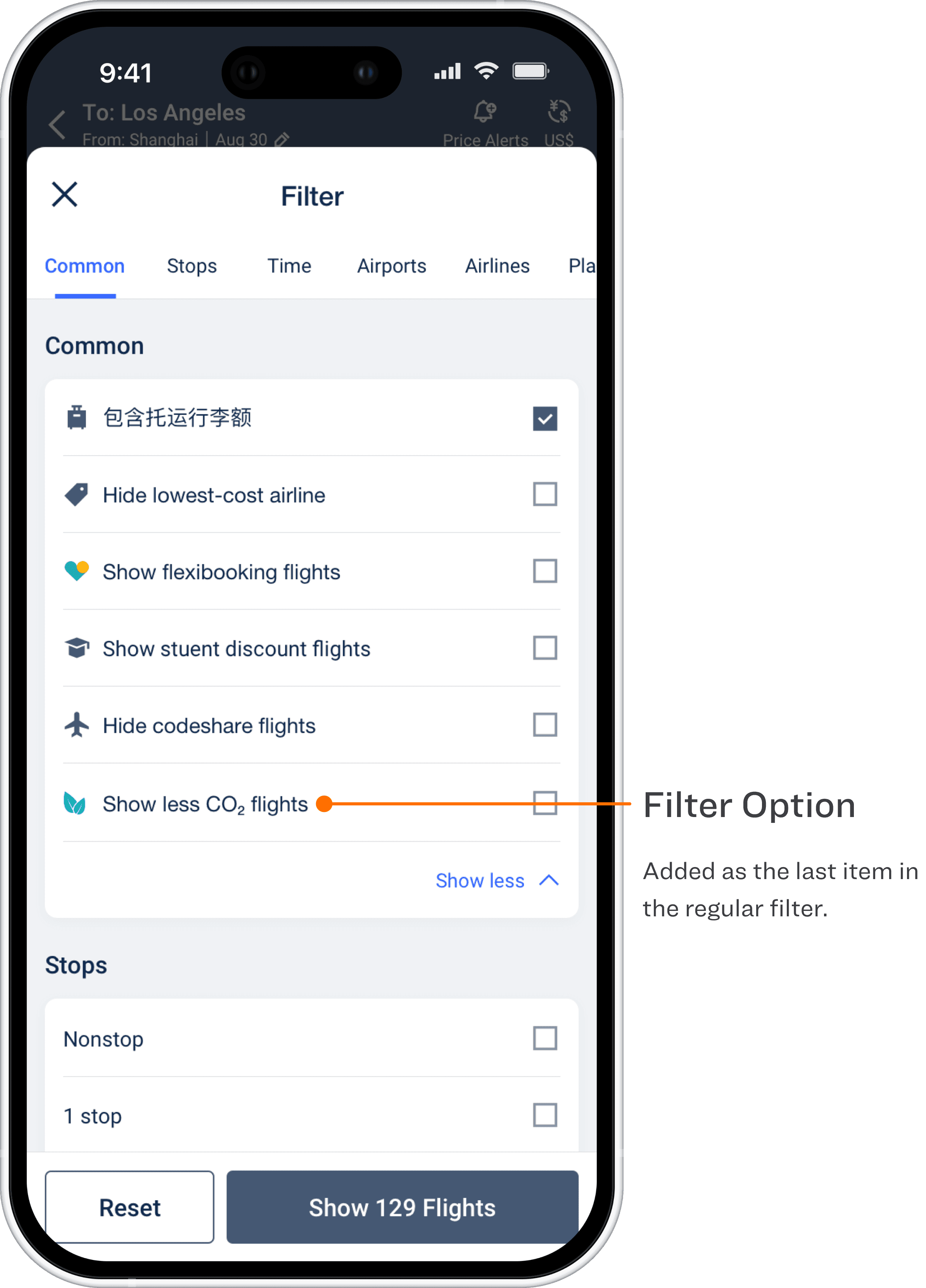
Intermediate Page
Intermediate Page
Intermediate Page
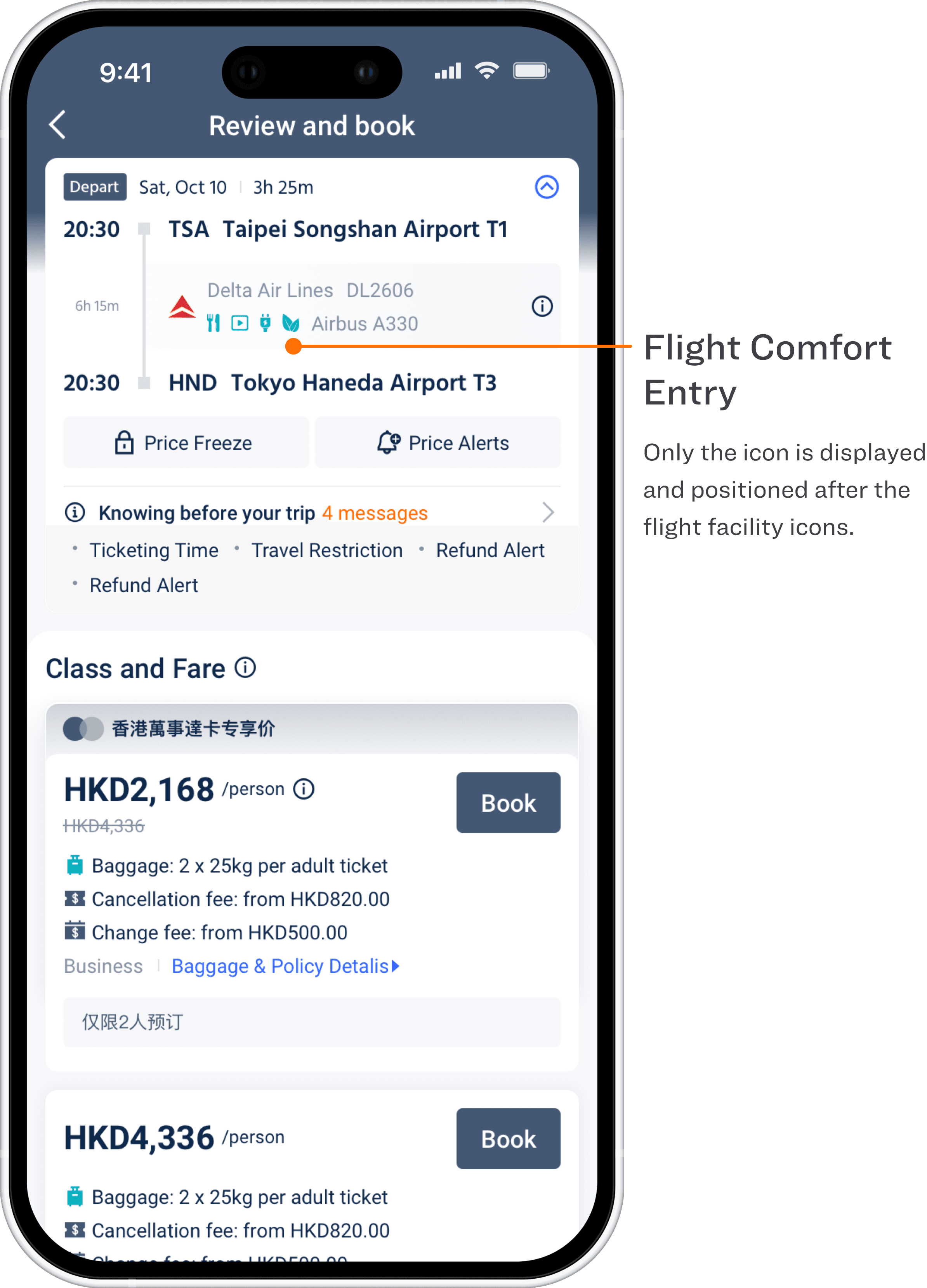
Flights Detail
Flights Detail
Flights Detail
Details Explanation
Details Explanation
Details Explanation
Booking Details
Booking Details
Booking Details
List Page (H5)
List Page (H5)
List Page (H5)
List Page Filter (H5)
List Page Filter (H5)
List Page Filter (H5)
Flight List Page
Flight List Page
Flight List Page
Booking Page
Booking Page
Booking Page
Order Details Page
Order Details Page
Order Details Page
Part 5: H5 Flight List Page Optimization
Part 5: H5 Flight List Page Optimization
Part 5: H5 Flight List Page Optimization
This project focused on a systematic redesign of the H5 flight listing experience (including the 3–7 screen layout). By leveraging data insights and behavioral analysis, the design restructured information hierarchy, refined filtering and sorting logic, and clarified price and itinerary presentation—aiming to help users make faster, more confident decisions within a complex flight comparison environment.
This project focused on a systematic redesign of the H5 flight listing experience (including the 3–7 screen layout). By leveraging data insights and behavioral analysis, the design restructured information hierarchy, refined filtering and sorting logic, and clarified price and itinerary presentation—aiming to help users make faster, more confident decisions within a complex flight comparison environment.
This project focused on a systematic redesign of the H5 flight listing experience (including the 3–7 screen layout). By leveraging data insights and behavioral analysis, the design restructured information hierarchy, refined filtering and sorting logic, and clarified price and itinerary presentation—aiming to help users make faster, more confident decisions within a complex flight comparison environment.
Design Goals
Design Goals
Design Goals
Improve Primary Flow Efficiency
Improve Primary Flow Efficiency
Improve Primary Flow Efficiency
Reduce decision time from the flight list to “Continue / Book,” especially in round-trip (3–7 screen) scenarios, by clarifying progress and selection states across outbound and return flows.
Reduce decision time from the flight list to “Continue / Book,” especially in round-trip (3–7 screen) scenarios, by clarifying progress and selection states across outbound and return flows.
Reduce decision time from the flight list to “Continue / Book,” especially in round-trip (3–7 screen) scenarios, by clarifying progress and selection states across outbound and return flows.
Increase Discoverability of Key Actions
Increase Discoverability of Key Actions
Increase Discoverability of Key Actions
Address low engagement with actions such as city swap, price alerts, policy review, and return selection by improving structural hierarchy and control semantics, rather than adding more prompts.
Address low engagement with actions such as city swap, price alerts, policy review, and return selection by improving structural hierarchy and control semantics, rather than adding more prompts.
Address low engagement with actions such as city swap, price alerts, policy review, and return selection by improving structural hierarchy and control semantics, rather than adding more prompts.
Enable System-level Scalability
Enable System-level Scalability
Enable System-level Scalability
Establish a reusable list-page framework covering price calendars, filters, cards, tags, baggage copy, and multilingual rules, supporting one-way, round-trip, and future feature expansion.
Establish a reusable list-page framework covering price calendars, filters, cards, tags, baggage copy, and multilingual rules, supporting one-way, round-trip, and future feature expansion.
Establish a reusable list-page framework covering price calendars, filters, cards, tags, baggage copy, and multilingual rules, supporting one-way, round-trip, and future feature expansion.
Problem Identification & Analysis
Problem Identification & Analysis
Problem Identification & Analysis
Previous Version
Previous Version
Previous Version
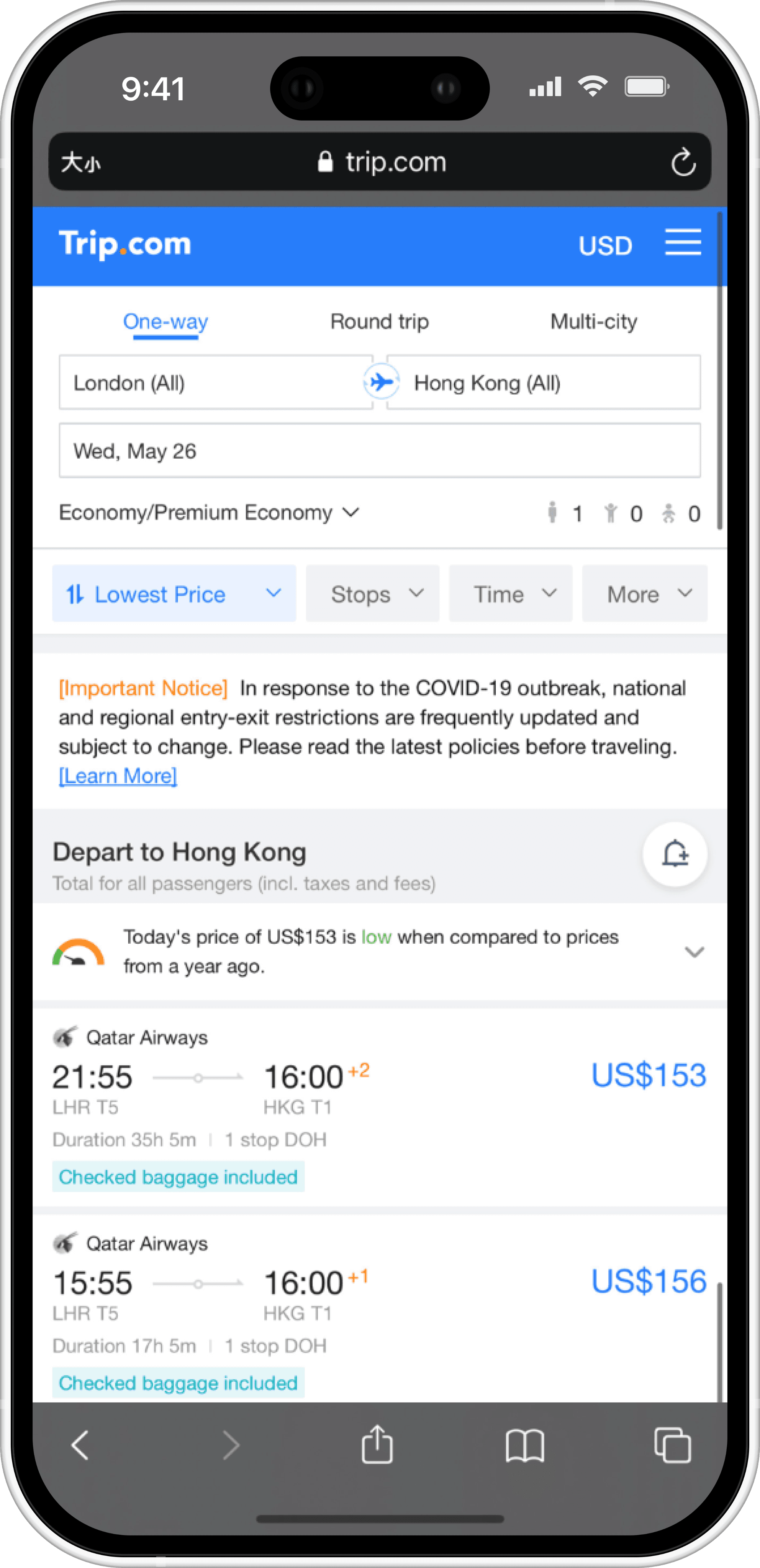
This is previous flight list page for one-way bookings. The page supports multiple trip types, currencies, and languages, while also accommodating fixed ad placements, PPC/SEO traffic, and operational banners.
Users are expected to compare flights, adjust search conditions (dates, cities), select outbound and return flights, and proceed to booking within a limited viewport. As a result, the list page becomes the primary decision-making surface in the entire booking flow.
This is previous flight list page for one-way bookings. The page supports multiple trip types, currencies, and languages, while also accommodating fixed ad placements, PPC/SEO traffic, and operational banners.
Users are expected to compare flights, adjust search conditions (dates, cities), select outbound and return flights, and proceed to booking within a limited viewport. As a result, the list page becomes the primary decision-making surface in the entire booking flow.
This is previous flight list page for one-way bookings. The page supports multiple trip types, currencies, and languages, while also accommodating fixed ad placements, PPC/SEO traffic, and operational banners.
Users are expected to compare flights, adjust search conditions (dates, cities), select outbound and return flights, and proceed to booking within a limited viewport. As a result, the list page becomes the primary decision-making surface in the entire booking flow.
Heat Map Analysis
Heat Map Analysis
Heat Map Analysis
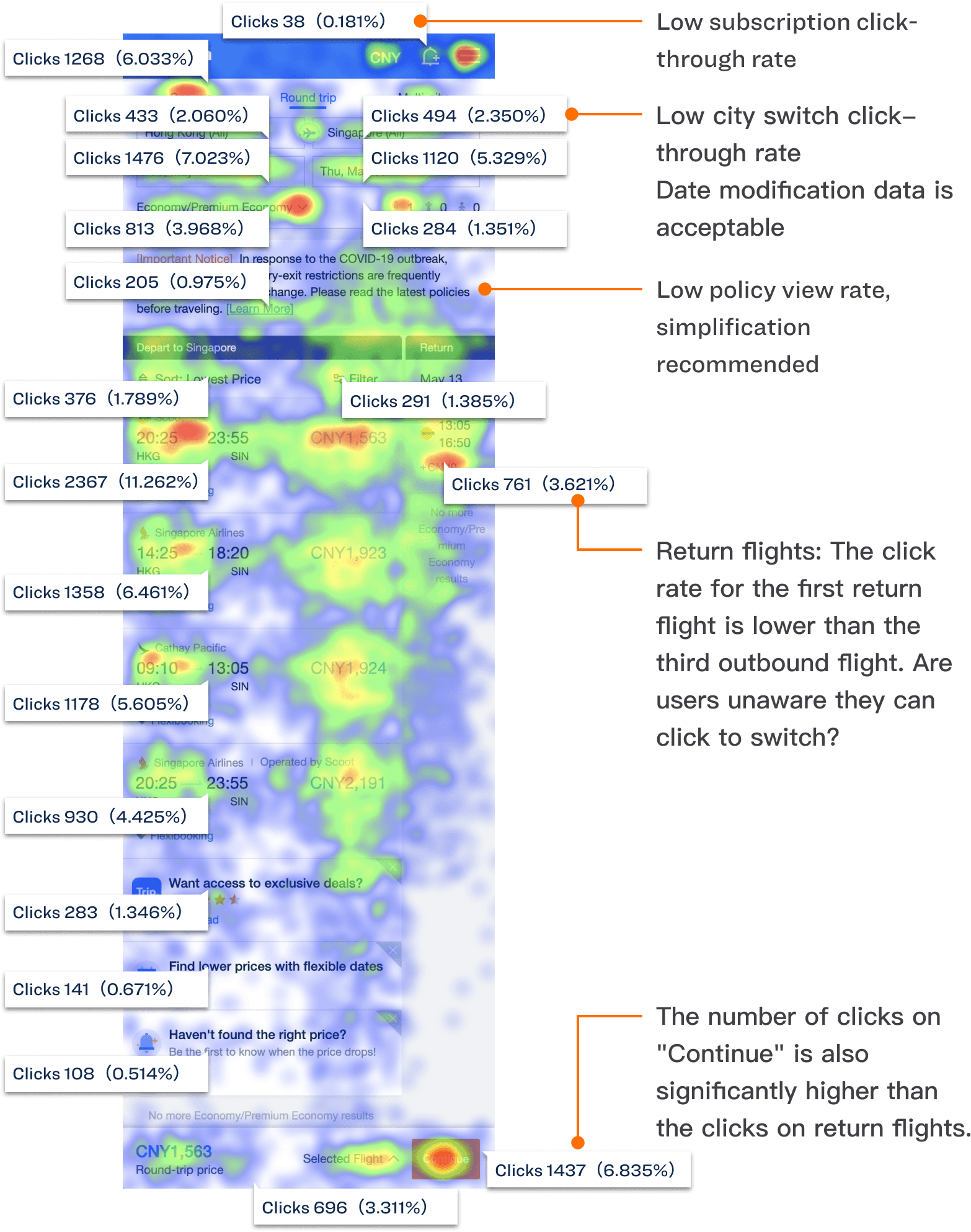
Low price subscription shows extremely low click-through. Despite being visually present near the top, users rarely interact with it, indicating unclear value perception or weak semantic priority.
City switch receives significantly fewer clicks than date modification. Users are willing to change dates to find cheaper flights, but struggle to discover or understand the city swap interaction.
Policy content has low engagement despite occupying prime screen space. Long-form policy text creates visual noise without delivering proportional user value.
Low price subscription shows extremely low click-through. Despite being visually present near the top, users rarely interact with it, indicating unclear value perception or weak semantic priority.
City switch receives significantly fewer clicks than date modification. Users are willing to change dates to find cheaper flights, but struggle to discover or understand the city swap interaction.
Policy content has low engagement despite occupying prime screen space. Long-form policy text creates visual noise without delivering proportional user value.
Low price subscription shows extremely low click-through. Despite being visually present near the top, users rarely interact with it, indicating unclear value perception or weak semantic priority.
City switch receives significantly fewer clicks than date modification. Users are willing to change dates to find cheaper flights, but struggle to discover or understand the city swap interaction.
Policy content has low engagement despite occupying prime screen space. Long-form policy text creates visual noise without delivering proportional user value.
Design Direction
Design Direction
Design Direction
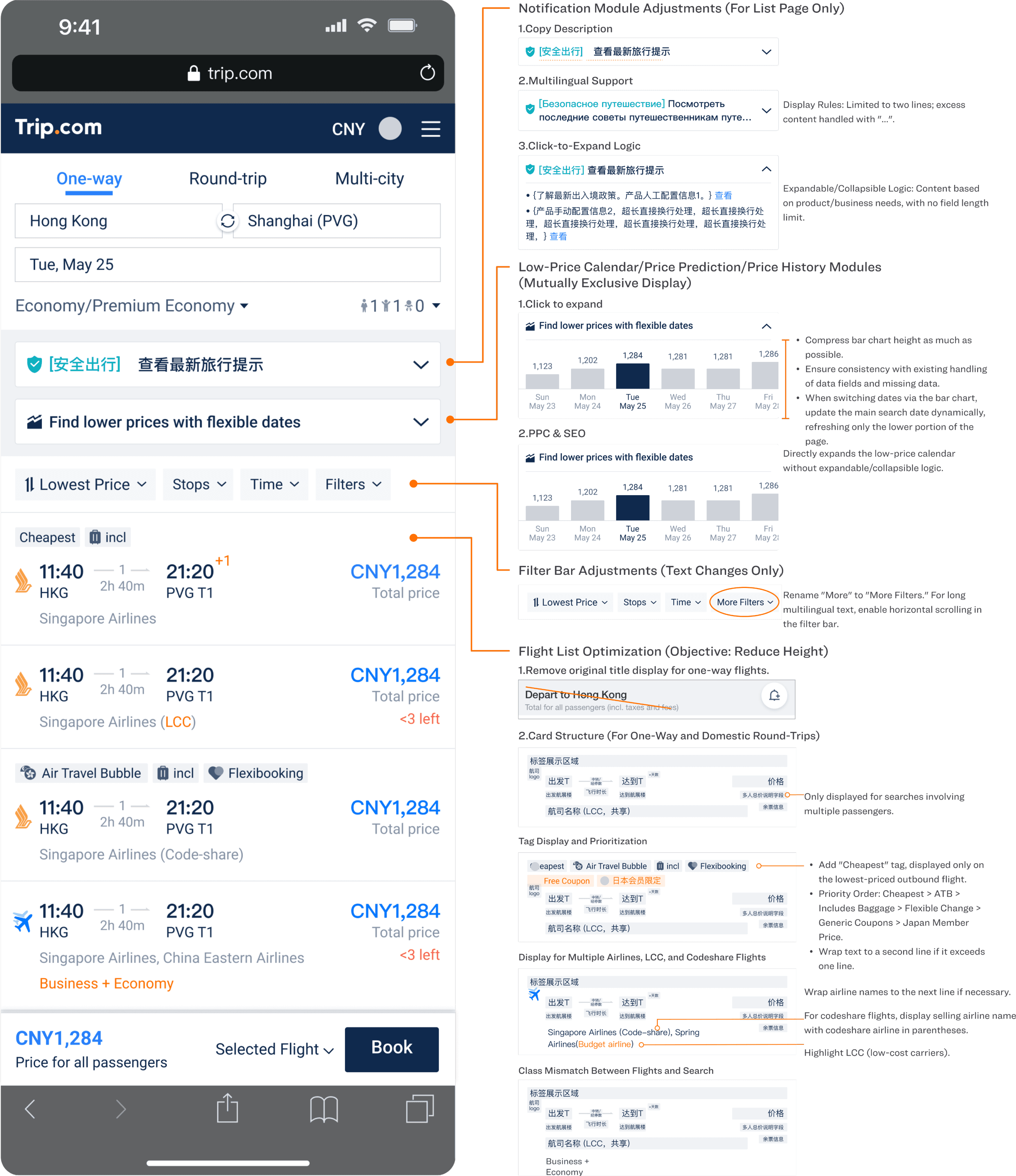
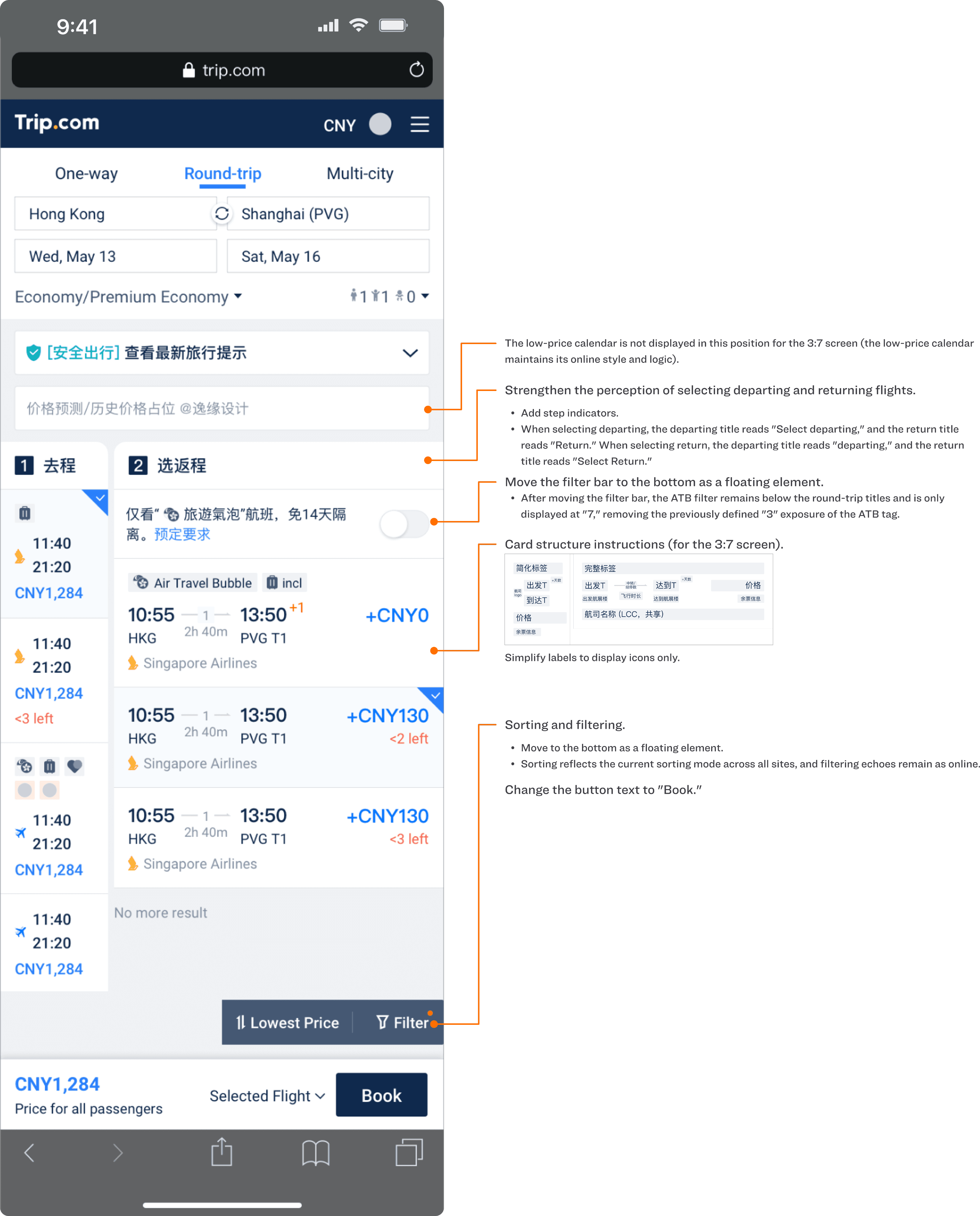
Restructure the flight list page’s information hierarchy and interaction semantics under fixed advertising, multilingual, and PPC/SEO constraints, so users can clearly perceive the current trip state (outbound vs. return), efficiently compare flight options, and confidently proceed to booking without unnecessary backtracking or cognitive load.
Restructure the flight list page’s information hierarchy and interaction semantics under fixed advertising, multilingual, and PPC/SEO constraints, so users can clearly perceive the current trip state (outbound vs. return), efficiently compare flight options, and confidently proceed to booking without unnecessary backtracking or cognitive load.
Restructure the flight list page’s information hierarchy and interaction semantics under fixed advertising, multilingual, and PPC/SEO constraints, so users can clearly perceive the current trip state (outbound vs. return), efficiently compare flight options, and confidently proceed to booking without unnecessary backtracking or cognitive load.
Departing list Page
Departing list Page
Departing list Page
Returning list Page
Returning list Page
Returning list Page
Featured cases
Featured cases
Featured cases
all projects
all projects
all projects
Contact Me
Ready to bring your vision to life? Let's connect and explore the possibilities together. Reach out today!
Work
About
Contact
2025 All rights reserved. Design by Shankun Zhou.
Contact Me
Ready to bring your vision to life? Let's connect and explore the possibilities together. Reach out today!
Work
About
Contact
2025 All rights reserved. Design by Shankun Zhou.
Contact Me
Ready to bring your vision to life? Let's connect and explore the possibilities together. Reach out today!
Work
About
Contact
2025 All rights reserved. Design by Shankun Zhou.